 Hyperagent
 How Airtable's Data Team Built an Agent That Saves 200 Hours a Week
Airtable's Data team deployed an AI agent on Hyperagent that fields analytical questions from across the company. What would take the data team an extra 200 hours a week to handle manually, is now handled by Airtable's Data Agent.

Airtable's Data team deployed an AI agent on Hyperagent that fields analytical questions from across the company - autonomously, in production, all day long. A finance lead types a question in Slack:
"Break down customer retention by sales segment and plan type since 2022."
In three minutes, they have the answer - right there in the Slack thread. The agent drew on Airtable's institutional knowledge, navigated a data catalog of 70,700+ entries, wrote SQL against the data warehouse, validated results against known benchmarks, and delivered finished analysis. When they follow up in the thread - "now show me this by geo" - the agent carries the full conversation forward.
The Airtable team asks questions in Slack. Hyperagent responds in directly thread. (We've used example data here)
Every one of these questions used to mean waiting in an analyst’s queue - or more often, not asking at all and making the decision without data. Now, teams across Airtable - leadership, product, GTM, finance - get accurate, validated answers in minutes. The agent fields what would take the data team an extra 200 hours a week to handle manually. And the volume keeps compounding, because the faster people get trusted answers, the more questions they ask.
Here's how they built it on Hyperagent - and what it took to get it right.
What Makes a Data Agent Worth Trusting
Earlier this month, Jason Cui and Jennifer Li of a16z wrote: "data and analytics agents are essentially useless without the right context." They can't tease apart vague questions, decipher business definitions, or reason across disparate data. "What was revenue last quarter?" means something different at every company - which table, which metric definition, which filters, which fiscal calendar. Without that context, an agent guesses. And guessing is worse than not answering at all, because people stop trusting it - especially when the people asking can't validate the SQL themselves.
So what does a data agent need to get answers right the first time, consistently, at scale? Here's how Airtable's agent approaches it. Before writing a single line of SQL, it walks through a mandatory discovery chain, the same process a senior analyst follows instinctively, and selectively loads the right context to answer the specific question. Let's trace a real question through the system.
Someone in finance asks: "What's the retention rate for enterprise accounts by tenure band?"
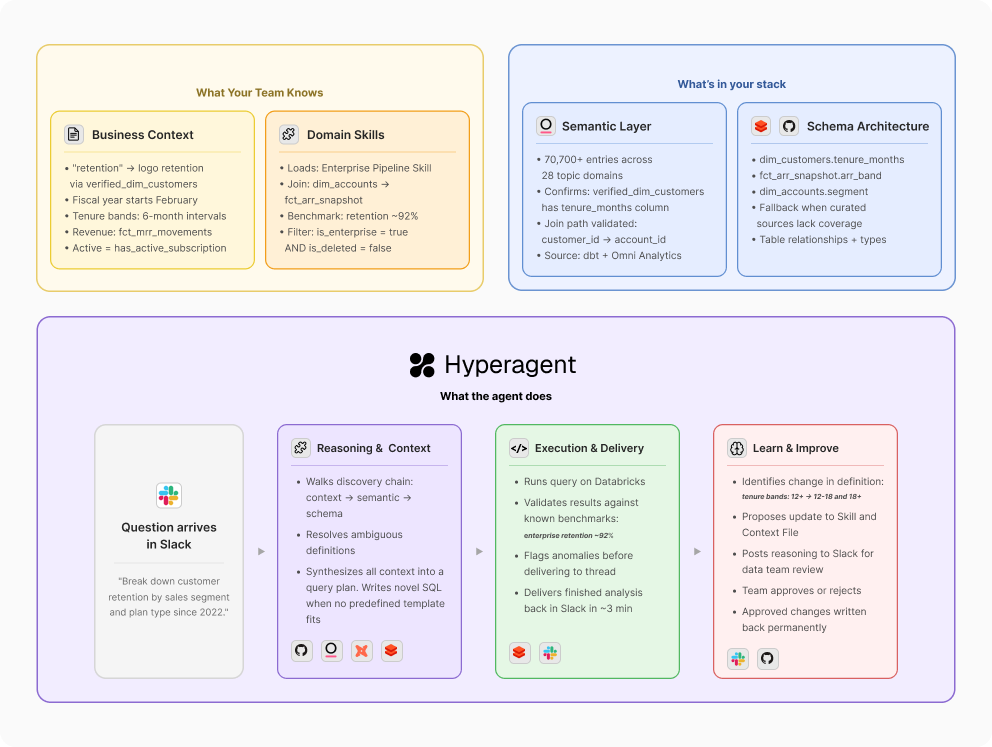
(A) A shared foundation that encodes how your company thinks about data. There's a layer of institutional knowledge that applies to any question an analyst would field - which revenue table is canonical, what 'pipeline' means, what fiscal calendar you run on. This goes beyond a schema or data dictionary - it's the institutional knowledge that currently lives in your analysts' heads.
At Airtable, this business context is codified as a foundational Skill - the agent's routing map that defines a prioritized sequence of context sources. This "skill waterfall" ensures the agent starts with the most curated information before moving to broader data sources. Its primary reference is a Business Context file maintained in GitHub - stored in the same repository as the code powering Airtable's entire data infrastructure, ensuring that both the agent's technical context and business context remain perfectly synced with the data team's source of truth. For this question, it's where the agent learns that "retention" for enterprise means logo retention calculated against the verified_dim_customers table, that tenure bands are defined in 6-month intervals, and that the fiscal year starts in February.
(B) Specialized knowledge that loads based on who's asking and what they need. The shared foundation gets you most of the way. But some data requires an extra layer of fidelity - finance metrics that go to the board, “tier 1” numbers the entire company sees, areas where a wrong answer has real consequences. Breaking these out into modular, domain-specific context gives the agent a way to double-check itself when the stakes are highest.
The question is about enterprise retention, so Airtable's agent pulls in the Enterprise Business skill - one of several domain modules containing validated SQL templates, join patterns, and known benchmarks specific to that area. Other questions would load different skills: AI growth reporting, self-serve business metrics, executive review formatting. Each lives as its own Skill in Hyperagent and loads dynamically based on what the question requires.
(C) Access to your semantic layer and data catalog. The agent shouldn't be exploring raw schemas by default. If your team has already organized data into dbt models, Looker explores, Omni Analytics topics, or any other semantic layer - that curation represents real work.
With the business logic and domain context resolved, Airtable's agent knows it needs verified_dim_customers joined against revenue data. It queries the data catalog - 70,700+ entries drawn from dbt models and Omni Analytics, organized across 28 topic domains - to confirm column availability and join paths. A single topic query replaces three to five individual table lookups.
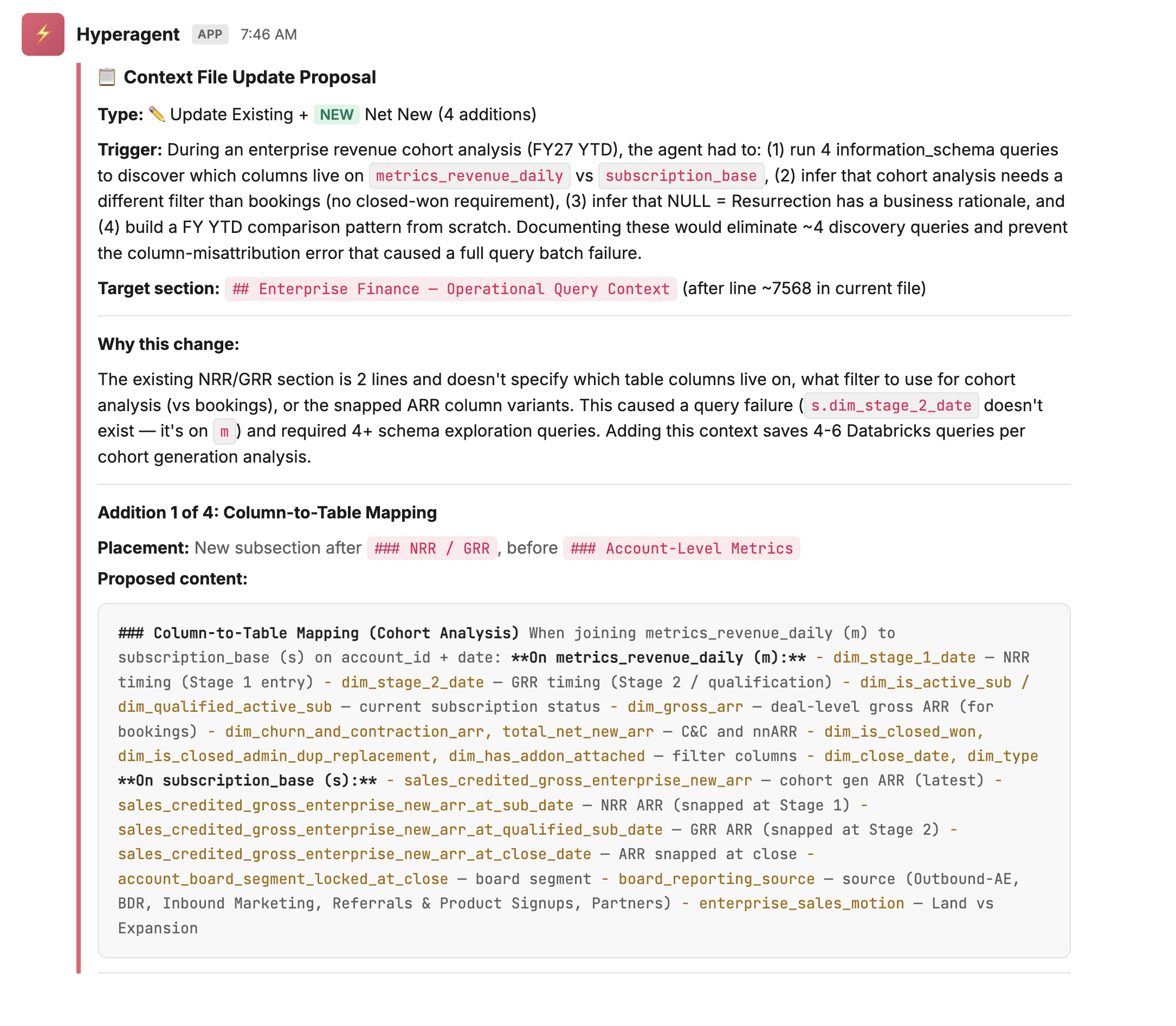
(D) The ability to learn and improve. A static context file gets stale. The data changes, new tables appear, business definitions evolve. A production-grade agent needs to identify what it doesn't know, propose updates to its own context, and have those updates reviewed by a human before they take effect.
Say the finance team recently changed how they define tenure bands - splitting the 12+ month cohort into 12-18 and 18+ to get more granular on long-term retention. The agent's context still has the old definition. The asker catches it in the Slack thread and provides the updated definition inline. Rather than silently incorporating it, the agent treats this as a proposed context update: it drafts the change, surfaces its reasoning, and posts both to a designated Slack channel for the data team to review. Nothing gets written back to the Business Context file until a team member approves. The source of truth stays authoritative precisely because humans remain in the loop before it changes.
Why Hyperagent
The Data team had already developed a highly customized, shared Claude Code setup that included deep knowledge of our production codebase, data pipelines, and documentation repositories. Concurrently, they were working with specific teams to experiment using standard Claude connected directly to the Databricks MCP server to support conversational data questions. The Data Team quickly realized that without the highly technical, personalized setup, the direct Databricks connections just lacked the context needed to deliver reliable answers consistently.
Furthermore, while Claude Code is incredibly capable in a terminal, there is no easy way to deploy it at scale without getting bogged down in building out hosting infrastructure, solving permission issues, and tackling governance. Managing governed loops for human approval or routing questions to different context configurations requires immense overhead. The true strength of Hyperagent was that it allowed them to take the lessons learned from their customized, individual developer-level tooling and abstract it into scalable, company-wide enterprise capabilities.
Build without needing additional engineers. Hyperagent gave the data team the ability to build sophisticated agent logic - discovery chains, multi-step reasoning, structured validation - without spinning up an engineering project. The team that understood the data could build the agent that used it.
Integrations that connected to their source of truth. Databricks for the warehouse, dbt and Omni Analytics for the semantic layer, Looker for dashboard context, Slack for deployment - either natively supported or buildable as Skills with stored credentials and API access. The connections pointed directly at the systems the team already trusted.
A context and learning layer built into the platform. Hyperagent gave the agent the ability to use business context structurally - Skills loaded dynamically based on the question, and the agent checked business context before touching data.
A governed loop for continuous improvement. When the agent learns something new, it proposes the change, posts the reasoning to a separate Slack channel, and waits for human approval before writing anything back. Every question is an opportunity to improve. When it discovers a table it didn't know about, a column convention it hadn't seen, or a business rule that should be documented - it surfaces the finding, a team member approves or rejects, and the approved correction becomes permanent.
Deployable where people actually work. The agent lives in Slack - the place where data questions were already being asked. It joins channels, responds in threads, and carries context across follow-up messages. The team configured it so different channels load different context: the self-serve channel defaults to self-serve metrics, the finance channel pulls from finance-specific skills.
The result is a compounding system. The data team can see what questions are being asked across the organization - and when a pattern emerges, they turn it into a new Skill. One-off analyses become repeatable, trusted commands. The questions themselves became the team's roadmap for what to build next. This is what a production data agent looks like - one that earns trust across an entire company because it gets the answers right.
Your data team's knowledge is too valuable to live in their heads. Put it to work in Hyperagent.
