Memories
What an agent knows about you and your work, kept as small standing records it can retrieve in future runs.
A memory is one small standing record of something an agent may need again: your role, how you like reports written, the color scale your team uses on renewal briefs, or the channel where updates land. Save the fact once, and future work can retrieve it instead of asking you to explain it again.
Tell it once
A memory turns stable context into something an agent can use again. Pinned and high-importance memories arrive up front; the rest are recalled when the work makes them relevant.
A memory loads by one of three paths
A thread does not start with every memory loaded. That would crowd out the work. Instead, memories arrive through three retrieval paths.
Pinned: always in context
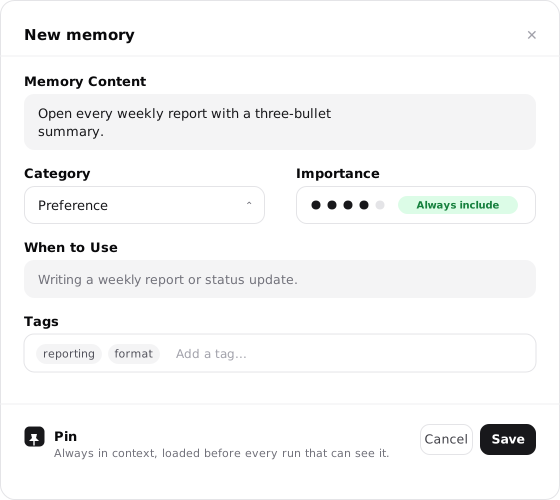
A pinned memory loads before every run that can see it, without ever being searched for. Reserve pins for the few facts every run genuinely needs.
Importance 4-5: loaded up front
High-importance memories load at the start of a run, ahead of recall, for every agent that can access them. The UI labels this Always include.
Everything else: recalled when relevant
The rest stay out of context until the agent's recall finds them relevant to the conversation, then brings them in on demand.
The choice is about timing. Put only the facts that shape nearly every run in the up-front paths; let topic-specific context wait for recall.
Up-front loading works within a budget
Pinned and importance 4-5 memories load before the run, but within a context window budget. If the set that qualifies is larger than the budget, the lowest-priority ones are left out. "Always include" is the UI label for the tier, not a guarantee that every such memory appears in every run regardless of how many there are.
How recall finds a memory
For everything below the up-front tiers, the agent searches its memories before it responds. That search reads three fields together: the memory's content, its When to use guidance, and its tags. A memory about Stripe can also surface on a request about billing or payments when related tags were expanded for it in the background. Specific terms carry more weight than generic ones, so precise content and tags are what make the right memory appear at the right moment.
You can also point the agent at a memory directly. Ask what it knows about your renewal process, or name the context you want used, and the agent searches its knowledge and brings the matching memory into the thread.
A memory is a few editable fields
Each memory is a short editable record with a handful of fields. Together they decide what the memory says, when it appears, and which agents can use it.
| Field | What it controls |
|---|---|
| Content | The fact, preference, correction, or constraint the agent should remember. |
| Category | The kind of memory it is, used for organizing and filtering. |
| Importance | A 1 to 5 rating. A 4 or 5 moves the memory into the up-front tier so it loads before the run; 1 to 3 leaves it to recall. |
| Tags | Search and organization signals. Tags feed recall, can be expanded with related terms, and make the Memories page easier to filter. |
| When to use | Guidance that helps the memory surface on the right requests. This text is read during recall alongside the content. |
| Pinned | Marks the memory as always in context, loaded before every run that can see it without being searched for. |
Importance is the field people misread most. Raising a memory to 4 or 5 does not make it more true or more trusted; it only changes when the memory loads, moving it from recall into the up-front tier. Rate a memory high when the agent should carry it before work begins, and leave it low when it only matters around a specific topic.
Audit autonomous knowledge with the Learned view
Personal and workspace agents can learn new memories autonomously as conversations progress. To inspect and govern what an agent has learned on its own, open the agent's page, select Knowledge, and open Memories.
Click the Learned filter segment at the top of the memory bank to isolate autonomous learnings from manually added memories. A learned counter pill displays the total count of discovered memories, allowing owners to verify provenance, refine accuracy, or archive outdated items.
The eight categories
A memory's category is one of eight kinds. They exist so you can organize and filter, not to change how a memory loads.
User fact
Who you are: your name, role, company, location, and other stable personal details.
Preference
How you like work delivered: tone, format, source style, level of detail, naming conventions, or units.
Project context
What you are building: tech stack, constraints, timelines, goals, and project-specific decisions.
Domain knowledge
Subject expertise the agent should understand: industry terms, technical concepts, market definitions, or regulatory context.
People
Colleagues, contacts, teams, customers, and relationships the agent should recognize when they come up.
Active work
Current projects, deals in flight, and other in-progress work that shapes how the agent should prioritize.
Tools and workflows
Systems you use, how they connect, process patterns, and operational conventions the agent should follow.
Organization
Company structure, team channels, operating rhythm, approval chains, and other institutional context.
Not everything should become a memory. Current deals, one-off numbers, temporary plans, and details that only matter inside one run usually belong in the thread, a table, a document, or the connected system where they came from.
Memories come from real runs
Most memories start in a real run. You correct a detail, state a preference, or explain a team rule, and that context gets saved for next time. There are three ways it reaches your library.
The agent suggests, you accept
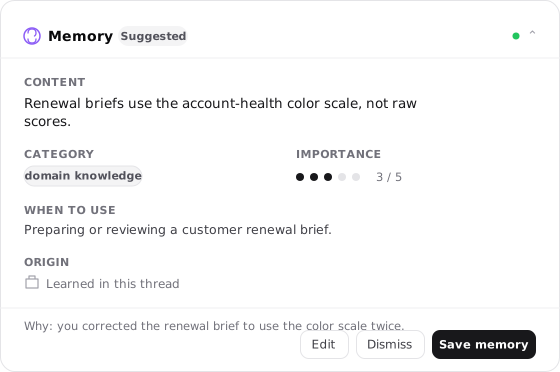
When the agent notices something worth keeping, it proposes a memory as a draft card in the thread or in a post-run review. You can save, edit, adjust importance, or dismiss it before it becomes standing context.
Saved without a prompt
If you allow it, an agent saves memories without showing a draft first. Use this for personal agents you trust to learn from the conversation, and keep it off for shared agents.
You write it yourself
Create a memory directly with the New memory button when you want to front-load context before the first conversation.
Every memory records where it came from, shown on its detail view. The Source line reads Agent suggested when an agent proposed it, which covers both auto-saved memories and drafts someone later confirmed; User created when a person wrote it; or Manual entry when there is no recorded origin. In a shared workspace, a Saved by [name] line attributes it to the teammate who added it, and an Origin thread link jumps back to the conversation the memory was learned in.
The Memories surface
The Memories page at /memories is where every saved memory lives. It gives you a searchable, filterable list to review context, group by category, and clean up duplicates.
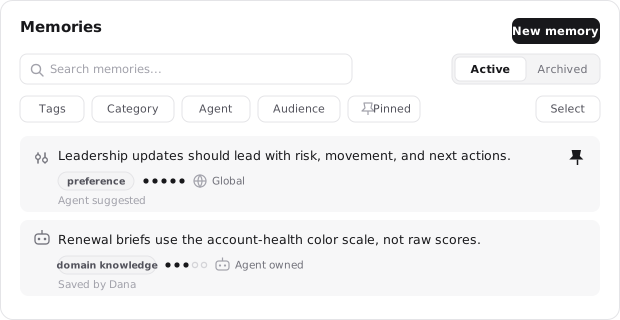
The filter bar narrows the list several ways at once:
- Tags filters to memories carrying a chosen tag.
- Category filters by one or more of the eight kinds.
- Agent filters to memories tied to a specific agent.
- Audience filters by reach: Global, Linked to an agent, or Not visible to any agent.
- Pinned shows only pinned memories.
- Archived switches the whole list to archived memories, separate from the active view.
Each row carries per-memory actions on hover: Pin or unpin, Promote to move an agent-owned memory into your library, and an actions menu for Archive or Delete. To work in bulk, choose Select, click memories to gather them, and shift-click to grab a range. The selection bar can then archive, merge, pin, or link the whole set to an agent at once.
Every memory has one owner
Every memory has one owner, and that location helps determine which agents can use it. The Visibility row on the memory detail identifies where it lives.
Your memories
Personal memories that your agents may use according to their knowledge settings. Use them for your role, writing preferences, company context, and facts that should not belong to one specialist alone.
This agent's memories
Memories that belong to one named agent. They deepen that role's context without adding the same fact to your other agents.
Workspace memories
Shared context that workspace-owned agents can use according to the workspace's access and knowledge settings.
This location explains the most common "where did it go" moment. Your personal /memories view and an agent's own Knowledge view are different surfaces. A memory saved to This agent's memories stays with that role rather than appearing as one of Your memories. Filter by Agent or open the agent to find it, and use Promote when the fact should move into Your memories. For the full read and save controls, see Knowledge and learning.
A memory is edited, archived, and restored
A memory stays useful only while it stays accurate, so it is built to be edited, set aside, and restored.
Change it, with a version to fall back on
Editing a memory's content, category, importance, tags, or when-to-use saves the previous state to version history. You can review what changed and restore an earlier version. Ownership moves like Promote leave no version trail.
Set it aside without losing it
Archiving takes a memory out of recall and out of context while keeping the record. Its status reads Archived - not recalled until you restore it. Archiving is reversible, so lean on it freely.
Remove it for good, from archived
Permanent deletion happens only from the archived state. Archive a memory first, then delete it once you are sure it is gone for good.
Tending your memories
A smaller set of current, well-maintained memories serves the agent better than a large stale one. Three habits keep the set healthy:
- Merge near-duplicates so one fact has one home instead of several drifting copies.
- Archive liberally. It is reversible, so there is no cost to setting aside anything you are unsure about.
- Reserve pins for the handful of facts every run truly needs. A pin spends part of the up-front budget on every run, so a short pinned set is a strong one.
Memory, skill, or Thread Context Document
Memories work alongside skills and the Thread Context Document, but each answers a different question.
| Concept | What it holds | Scope | Example |
|---|---|---|---|
| Memory | A fact the agent should carry into future work | Your memories, one agent, or a shared workspace | "Leadership updates should start with risk, movement, and next actions." |
| Skill | A reusable method for doing a piece of work | Agents that can access or discover it | "How to review a customer escalation." |
| Thread Context Document | Facts, corrections, and plan details for one conversation | One thread only | "In this run, use the corrected $5.5B valuation." |
A memory is not a process document. If the agent should remember that updates go to #exec-updates, that is a memory. If it should learn the full process for writing the weekly update, that is a skill. If it should hold a number you corrected ten minutes ago in this conversation, that belongs in the Thread Context Document.