Threads
A thread is one piece of work kept together: the conversation, the agent's workspace, and everything it produced. Threads are isolated by default and connected on purpose.
A thread is one piece of work: the conversation, the agent's workspace, and everything it produced, kept together. Ask an agent to turn interview notes into a launch brief, and the thread holds what you asked, what the agent did, what changed after your feedback, and the finished brief.
One piece of work, start to finish, in one place
Everything about a job stays together: the request, the files, the tools that ran, the corrections you made, and the finished output. Nothing to reassemble later and nothing to hunt for.
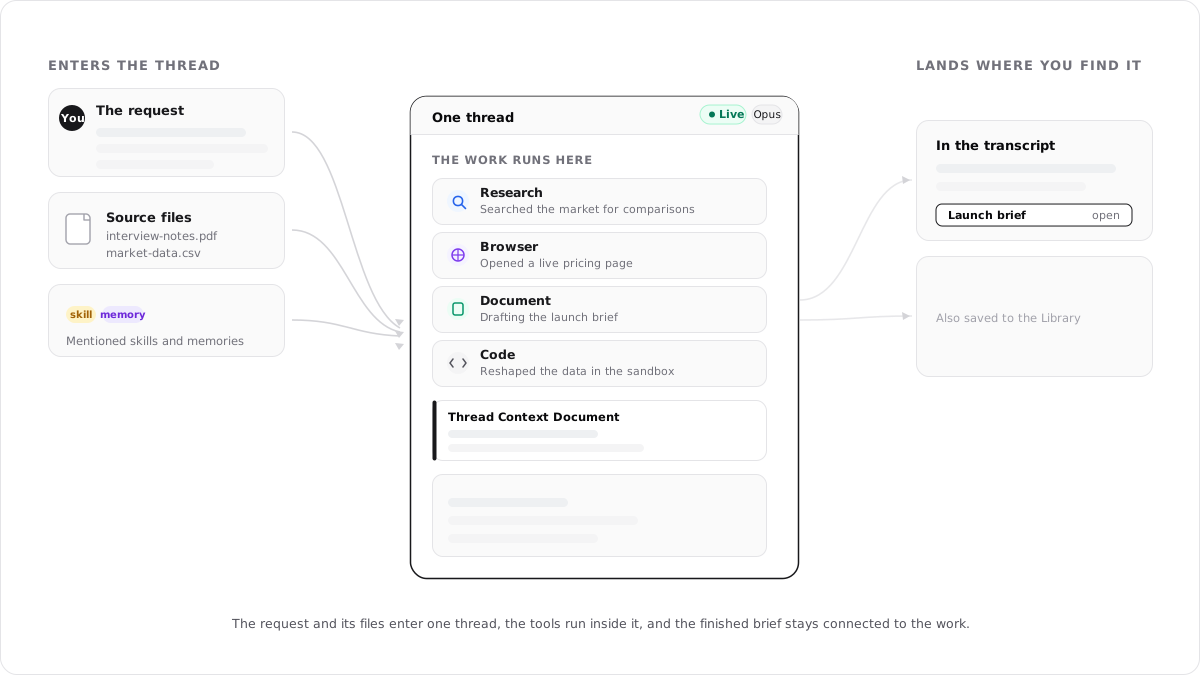
A thread holds one piece of work, front to back
You start a thread by asking for something, in the composer or from an existing conversation. An invocation starts one the same way for its agent: a schedule firing at 7 AM, a Slack mention, an inbound email. Whoever starts it, the work gets the same container.
Inside it live the conversation you can read, the private workspace where code and files run, the Thread Context Document holding the agent's facts and plan, and the finished outputs. Open an output and it fills the canvas beside the conversation, the same pane where you can watch the agent's browser live or browse its workspace files.
Name, activity, model, and settings
The name identifies the work. The star beside it keeps the thread at the top of your sidebar, the Live pill shows the agent is actively working, and the model chip shows the model and live usage.
The … menu at the far right opens Configuration, Learning, and Usage for this conversation.
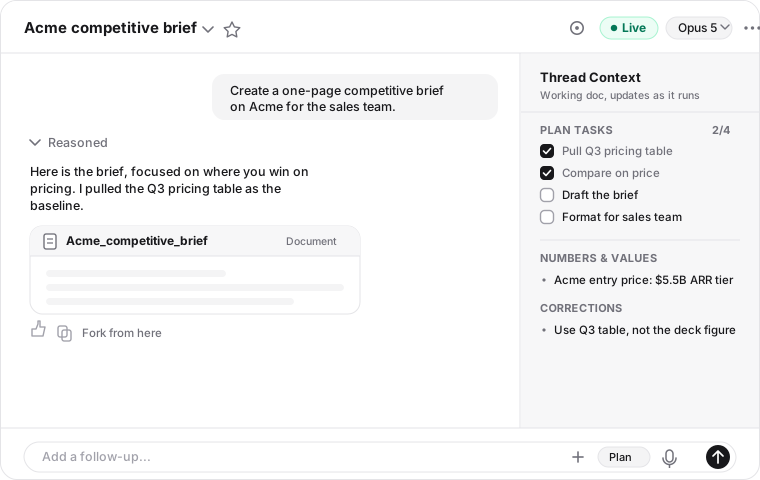
The complete visible record
Messages, tool activity, approvals, and outputs appear in order. Expand a Reasoned row to inspect the agent's visible work on that step.
Under each agent reply is a row of actions: thumbs up and down, copy, and Fork from here. Open an output card and it fills the canvas beside the conversation.
The facts and plan for this work
The Thread Context Document updates as the agent records corrections, decisions, and other facts it needs to keep exact. Plan Tasks show longer work moving toward completion.
Read the full behavior in Thread Context Document.
Where you add direction and context
Send a follow-up, or use + to attach files, skills, memories, and assets to this request. The mode control switches between Execute and Plan, and the model control can change this thread without changing a named agent's default.
What surrounds that view is just as much part of the thread: a private workspace with Python and Node.js where the agent executes code, the tools it can call, and the settings that bound it. What's in a thread covers the full working environment.
A thread keeps working after you leave
Once the agent is working, the thread lives on the server rather than in your browser tab. Close the laptop, switch devices, lose your connection: the agent runs by itself until the work is done, pausing only when it needs your input, like an approval or a question only you can answer. To call it off early, click Stop in the composer while it's running. Work already finished stays in the transcript. Run, stop, and fork a thread covers the details.
When the work changes, start a new thread
Everything the agent carries in a conversation competes for the model's context window, the finite space it can actually pay attention to. A long thread fills that window with its own history, so an old conversation steered somewhere new spends attention on work that no longer matters, and eventually starts compacting older messages into summaries to make room. A fresh thread starts with the whole window available for the new work.
Threads are isolated by default, connected on purpose
One thread's conversation never leaks into another. Each piece of work starts clean, which is what keeps an agent's threads predictable: no stray context from last week steering this week's work. When work should cross threads, you say so, and there are real mechanisms for it:
Let the agent find past work
Turn on Thread Search and the agent can look through your earlier conversations for the decision or detail it needs, without you locating the thread yourself.
Branch from this one
Under any agent reply, click Fork from here. It copies the conversation up to that message into a new thread, so you can try a different direction with a running start.
| Part of the work | Where it remains |
|---|---|
| Conversation and tool history | In this thread. Another thread does not inherit the transcript. |
| Thread Context Document | In this thread, including across compaction. It does not become cross-thread memory. |
| Finished outputs | In the transcript and Library. Their own scope determines which future threads can use them. |
| Saved memories | Available to future work according to what that agent can reach, set in Knowledge access. |
| Saved skills | Reusable by agents that can discover or access the method. |
| Named-agent configuration | Carried by that agent into new threads; it does not belong to one conversation. |
Start general, or start with a named agent
Start with the generalist
Use a generalist thread when you are exploring an unfamiliar task or do not need a standing role. Its browser login persistence belongs to this thread. If the work becomes repeatable, Save as agent turns it into an editable named agent.
Start with a named agent
An agent-bound thread begins with that agent's identity, instructions, tools, integrations, and knowledge. Browser persistence belongs to the agent and can support its other threads.
A thread keeps the agent it started with
There's no way to switch the bound agent mid-conversation. When the work belongs with a different agent, fork or start fresh. You can still change the bound agent's tools, integrations, and attached knowledge, and those apply from the next turn.
Go deeper
What's in a thread
What the agent and you can each do, what the thread can reach, what it produces, and its limits.
Thread settings
The Configuration tab section by section, run limits, the Usage meter, and the Learning tab.
How context gets into a thread
What arrives at the start, what surfaces each turn, and what the agent fetches on demand.
Thread Context Document
The agent's facts, corrections, decisions, and live plan for one piece of work.
Run, stop, and fork a thread
Background work, Stop, automatic naming, compaction, and forking.
FAQs
Knowledge access
What an agent can reach and where its new knowledge is saved: read scope, attachment and discovery, save destination, knowledge profiles, and what changes in a workspace.
What's in a thread
How a thread brings context, tools, connected apps, controls, and finished outputs together so an agent can complete a piece of work.