Put it where you work
Move the agent to Slack, a schedule, or your inbox, so the work starts without you.
So far, every run started with you opening a thread. The last step is making the work start where it actually shows up: a teammate's question in Slack, a Monday morning, an email landing in an inbox.
Pick the surface where the work already arrives
Don't wire up every channel on day one. Ask where this job comes from today, and put the agent exactly there. One surface, done well, changes your week.
The three most people start with
A schedule
The job is calendar-shaped: "every Monday at 7, the report should exist." The agent runs before you're online and the result is waiting. Schedules →
Slack
The team asks for this work in a channel. Deploy the agent there and they mention it like a coworker; answers land in the same conversation. Slack →
The work arrives as messages: forwarded contracts, requests, reports to digest. Give the agent an address and forwarding becomes delegating. Email →
There are more doorways when you need them: webhooks from your systems, your coding agent over MCP, Telegram, even other agents handing off work. Every surface, compared →
What one looks like running
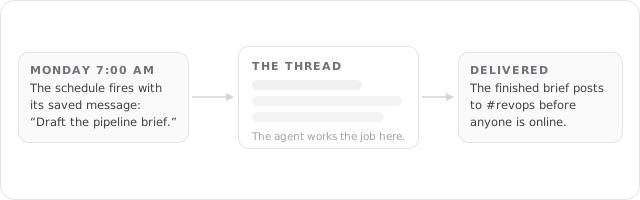
Whatever the surface, the shape is the same: the trigger starts a run, the agent brings its instructions and knowledge, the work happens in a thread you can open, and the result goes where you pointed it.
Automate on the agent's Invocations tab
Open your agent and go to its Invocations tab. Each surface is a card: add a schedule with its message and delivery, connect a Slack channel, or turn on an email address. Every invocation is configured, trusted, and paused on its own.
Two habits keep automation safe:
- Shape the job in threads first. Automate once the output is right more often than not, not before.
- Start with less trust. Scheduled runs default to read-only in your connected apps; widen it after you've watched a few runs succeed.
FAQs
That's the loop: work in threads, promote the job to an agent, teach it what you're tired of repeating, and put it where the work arrives. From here, the Platform docs go deep on any piece you want to master.