Tools
Built-in capabilities agents use to research, operate sites, compute, and create finished work.
Tools let an agent do the work, not only describe it
Agents can search, browse, run code, and create finished outputs with built-in capabilities. Configure the standing set on an agent, then adjust one thread when a particular job needs something different.
Choose tools by the job
Research
Search the web, produce cited research, build web datasets, and retrieve context from earlier threads.
Browser
Drive a live browser to navigate sites, fill forms, work behind logins, and hand control to you when a person needs to take over.
Code and files
Run code and command-line tools, manipulate files, and keep working state available across turns in the thread.
Webpages and slides
Publish reports, dashboards, presentations, and experimental interactive apps as shareable outputs.
Media generation
Generate or edit images, video, audio, transcripts, avatar clips, and maps.
Tools combine inside one run. A market brief might use Search for sources, Browser for a site that needs interaction, code to analyze the findings, and Webpages to publish the result.
Set the standing tools and thread exceptions
Configure the agent
Use the agent's Tools tab to set the capabilities every run starts with, wherever the work begins. Presets select all, none, or a smart default before you tune individual tools.
Adjust the thread
Open Settings → Capabilities from the composer to change tools for one conversation. Matching the agent's setting again removes the override.
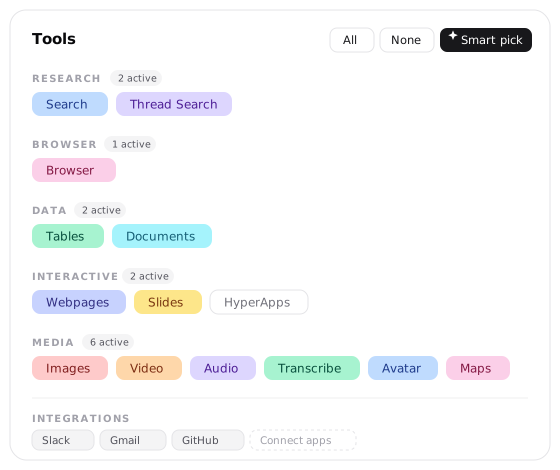
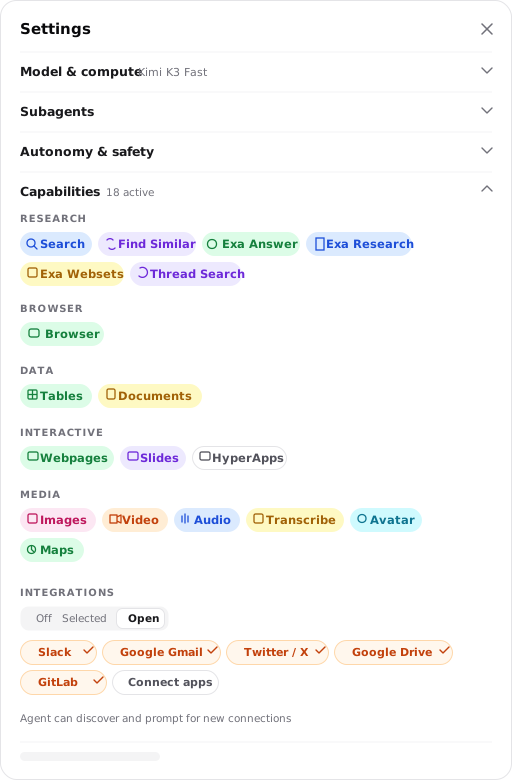
Nearly every built-in tool is available by default. Code execution is always available. The Documents setting controls access to the document library; reading and updating the current run's own working notes remain available when it is off. Script starts off because it is a separate stateless execution environment, while normal code execution is already available in the thread. HyperApps starts off because it is early alpha. Configuration is mainly for narrowing a focused agent or enabling one of those exceptions.
Tools and integrations are different
A tool is a built-in capability Hyperagent provides, such as Search, Browser, Images, or code execution. An integration is access to one of your connected accounts, such as Slack, GitHub, Gmail, or a CRM.
Connecting an integration and allowing an agent to use it are separate steps. Browse and manage connected services under Integrations.
In a thread's Capabilities settings, the integration scope can be Off, Selected, or Open. That scope controls which connected accounts the current conversation may use; it does not connect or disconnect the accounts themselves.
Tool reference
The reference below follows the groups shown in the product. Keep the commonly needed tools on, then remove capabilities a narrowly scoped agent should not use.
| Tool | Default | What it does |
|---|---|---|
| Search | On | Searches and reads the web through the selected Standard or Exa provider. |
| Thread Search | On | Searches earlier conversations for context and decisions. |
| Find Similar | On in Exa | Finds pages similar in meaning to a supplied URL. |
| Exa Research | On in Exa | Produces deep multi-source research with citations. |
| Exa Websets | On in Exa | Builds a structured, verified dataset from the web. |
See Research.
| Tool | Default | What it does |
|---|---|---|
| Browser | On | Navigates a live browser, interacts with pages, and captures evidence. |
Stay logged in can preserve one thread's authenticated session. Named agents can instead use Persistent sessions. See Browser.
| Tool | Default | What it does |
|---|---|---|
| Documents | On | Creates and maintains structured writing with version history. |
| Tables | On | Creates, updates, and queries records with typed columns. |
Turning Documents off limits library access without disabling reads and updates to the current run's own working notes. Global tables across threads is on by default and lets an agent read tables marked global. See Documents and tables for sharing, scope, and lifecycle.
| Tool | Default | What it does |
|---|---|---|
| Webpages | On | Publishes styled, versioned webpages. |
| Slides | On | Creates versioned presentations with navigation. |
| HyperApps | Off | Builds experimental interactive apps with persistent state. |
See Webpages and slides.
| Tool | Default | What it does |
|---|---|---|
| Images | On | Generates and edits images. |
| Video | On | Generates short clips with native audio, image-to-video, and clip extension. |
| Audio | On | Produces speech and multi-speaker dialogue. |
| Transcribe | On | Transcribes supported audio with speaker diarization, timestamps, and emotion. |
| Avatar | On | Generates a HeyGen presenter video from a script. |
| Maps | On | Geocodes locations, finds places, calculates routes, and creates map outputs. |
See Media generation.
| Capability | Default | What it does |
|---|---|---|
| Code execution | Always on | Runs code and command-line tools with files that persist across turns. |
| Script | Off | Runs Python or JavaScript in a separate stateless environment. |
See Code and files.
Image search for finding existing web images is also available when configured for the account. It is separate from the Images tool, which generates new images.