Rubrics and evaluations
Define what good looks like, score real work against it.
In Hyperagent, a rubric writes your standards for good work down as criteria a model can score, so the next output gets a number instead of another conversation, and you can watch that number move.
Rubrics turn taste into a number you can move
Write the standard down once, then score any output against it in a couple of clicks. Quality stops being something you re-argue each time and becomes a trend line you can point at.
The judge that does the scoring
Nobody wants to grade their agent's work by hand every week, and the agent can't be trusted to grade itself. So a second model does it: the judge.
The judge is handed two things and nothing else, the conversation and your rubric. It doesn't see the agent's reasoning about how it did, or its earlier scores, or which model produced the work. It reads the output the way a reviewer would and scores each criterion on its own.
That separation is what makes the number worth having:
- It's consistent. The same standard is applied the same way at 9am and at midnight, on run one and run fifty.
- It's independent. An agent can't talk its way to a good score, because the thing scoring it never hears the argument.
- It explains itself. Every criterion comes back with the reasoning behind its number, so you can tell whether you agree.
You choose which model sits in that seat each time you run an evaluation.
What's in a rubric
A rubric is a handful of criteria. Each is one thing you'd check if you were reviewing the work yourself, and carries a name, a weight, and a scoring guide.
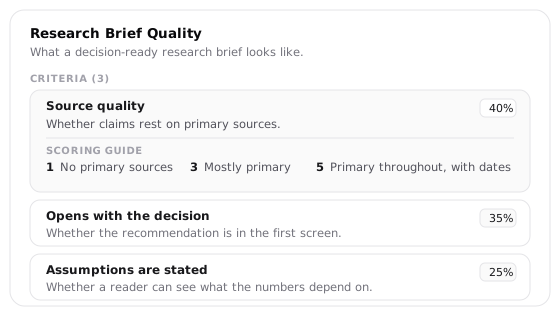
Good criteria are specific enough that two people would score the same output the same way. "Whether claims rest on primary sources" is checkable; "well researched" is not. Three to seven of them is the useful range, few enough that each weight means something.
- Weights say what matters most. A research brief might put source quality above structure. They're relative, so you don't have to make them add up: anything that doesn't sum to one is normalized when you save.
- Scoring guides make the number repeatable. "1 = no primary sources, 3 = mostly primary, 5 = primary throughout with dates" holds two runs to the same bar. Without a guide, the judge invents its own, and the score drifts.
- Write criteria you could defend to a colleague. "Clear organization and logical flow" can be argued about honestly. "Good" cannot.
How a rubric makes the agent better
A score on its own changes nothing. The value is what a run of scores lets you see.
- One evaluation tells you how this output did, criterion by criterion, with the judge's reasoning.
- A dozen evaluations show which criterion is consistently weak, which is improving, and which one you keep disagreeing with.
- That pattern names the fix. A criterion that scores low run after run points at a missing skill or a vague instruction. A criterion you keep overruling points at the rubric.
From there the agent proposes the fix itself, as a skill, a memory, or a change to its instructions, and you accept or dismiss it like any other suggestion. The rubric is what turns "it feels off lately" into a specific thing to change.
Write your first rubric
There's no blank form to fill in. You open the evaluation dialog, ask for a new rubric, and the agent drafts the criteria with you.
Open Run Evaluation
Open a thread with real work in it. Under the agent's response, click Eval.
Choose "+ Create New Rubric..."
It's the first option in the Evaluation Rubric dropdown. Choosing it closes the dialog and starts rubric building in the conversation.
Answer the agent's questions
It works through one criterion at a time: what to check, how much it matters against the others, and what a 1 and a 5 look like. Answer in your own words. It tells you how far along the draft is as you go.
Save when it's ready
Once there's enough to score against, the agent checks the draft for gaps, then posts it as a card. Edit anything, then save. It lands in your rubric library ready to run.
Three other ways in:
- From feedback on real output. In the composer, open the Execute menu, choose Give feedback, and answer the interview. When it offers what to do with your answer, reply 3 for Create eval rubric and your complaints come back as criteria.
- From the thread's Rubrics tab. With nothing pinned yet, it offers Build rubric interactively, which starts the same guided build.
- Wait for a proposal. After substantial work the agent may draft one on its own, or suggest pinning one you already have. Those wait on the Rubrics page and in the thread's Rubrics tab.
Score an output
An evaluation applies a rubric to real work. The judge reads the whole conversation, not just the last message, so it can tell whether the output answered what was actually asked.
Open the thread you want scored and click Eval in the actions beneath the agent's response. If the rubric is already pinned to the thread, its Eval button in the Rubrics side panel does the same thing.
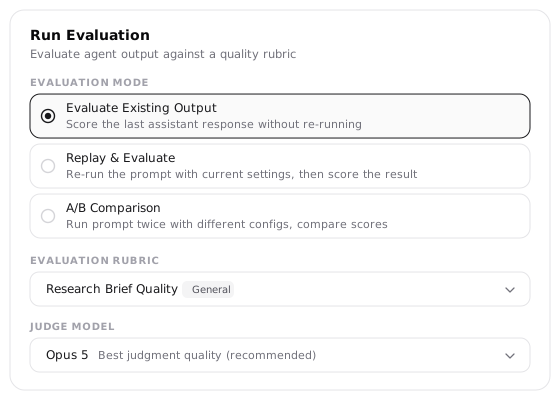
The mode decides what gets scored:
- Evaluate Existing Output scores the response already in the thread. Nothing re-runs, so it's the fast one, and the right default.
- Replay & Evaluate runs your prompt again in a hidden thread and scores that. Use it after changing the agent's setup, to see whether the change helped.
Judge Model picks who does the scoring. Opus 5 is the default and the one to keep when the answer matters; Sonnet and the Gemini Flash models are there when you're scoring in volume and want it cheaper. Same as thread uses whatever model ran the work. The choice applies to this run only.
Every evaluation is a separate call that sees only the conversation and the rubric, never the agent's own reasoning about how it did. That's what keeps a score from being the agent grading itself.
Read the result
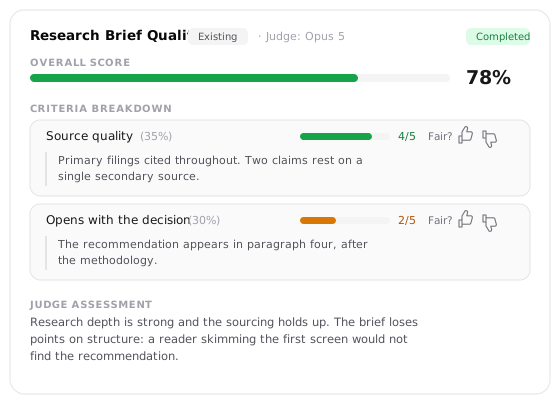
Overall Score is the weighted total. Criteria Breakdown is where the value is: each criterion shows its score out of five, its weight, and the judge's reasoning for the number it gave. A 78% made of one excellent criterion and one failing one is a different problem from a flat 78% across the board.
Judge Assessment closes with the judge's read of the output as a whole.
Tell it when a score is wrong
Each criterion carries a Fair? prompt with a thumbs up and thumbs down. Marking a score unfair asks you to pick a reason, and those answers are what later separate "the agent is weak here" from "this criterion is measuring the wrong thing."
Rate the ones you disagree with as you go. A history of unrated scores can tell you a criterion is low, but not why.
Turn scores into fixes
One score is about one run. The point of collecting them is the pattern, which answers a question you can't answer from a single number: is the agent falling short, or is the ruler bent?
Open the rubric from the Rubrics page and the whole picture is on one screen.
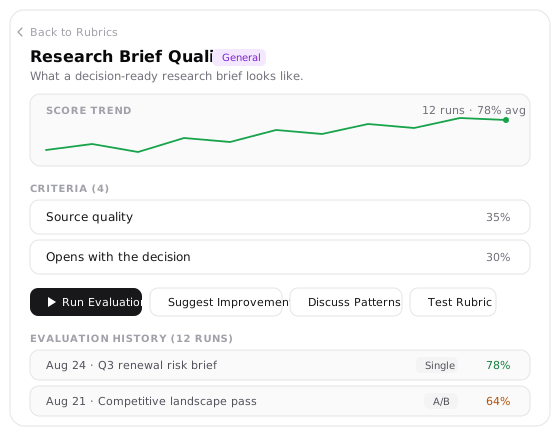
Suggest Improvements reads the history, including which scores you marked unfair, and proposes something concrete. What it finds falls into a few shapes:
The rubric needs calibration
You keep marking one criterion's scores unfair. It's measuring the wrong thing, and the fix is to edit the criterion or its scoring guide.
The agent has a real weak spot
A criterion scores low run after run and you agree the scores are fair. Now a new skill, a sharper memory, or a revised instruction is worth trying.
Something has regressed
Scores on a criterion are trending down. Recent changes to the agent are the first place to look.
Each suggestion arrives as a card you accept or dismiss, the same way you handle everything else in the Learning queue.
Calibrate before you chase a weakness. A low score only means something once you trust the criterion, which is the whole reason the thumbs matter. Suggest Improvements needs three or four runs before patterns are worth reading; below that it works from the most recent evaluation alone.
Two more ways to work the history:
Discuss Patterns
Opens a new thread with the per-criterion averages and your agreement rates already attached, and asks the agent to work out whether the gap is capability or calibration. Available once you have two runs.
Test Rubric
Opens a fresh thread with this rubric pinned and a starting prompt, so you can watch the criteria land on new work before trusting them.