Manage Learnings
Review and approve new learnings your agent proposes.
Your agent files a proposal whenever it picks something up. Every one waits for you, and nothing changes what the agent knows until you accept it.
Nothing sticks until you say so
Proposals collect out of the way until you have five minutes for them. Accept what's right, clear the rest in a couple of clicks, and the agent knows exactly what you approved.
Where you'll see them
Proposals collect quietly rather than interrupting the work, which means you need to know where they went. They show up in three places, each suited to a different moment.
Catch them alongside everything else waiting
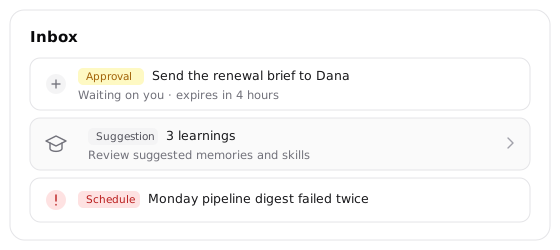
The Inbox is the single list of things that need you: approvals, failing schedules, and one row for pending learnings. It won't let you accept from there, deliberately, since a lesson deserves reading in context. Clicking through opens the Learning page.
Review a lesson while the run is fresh
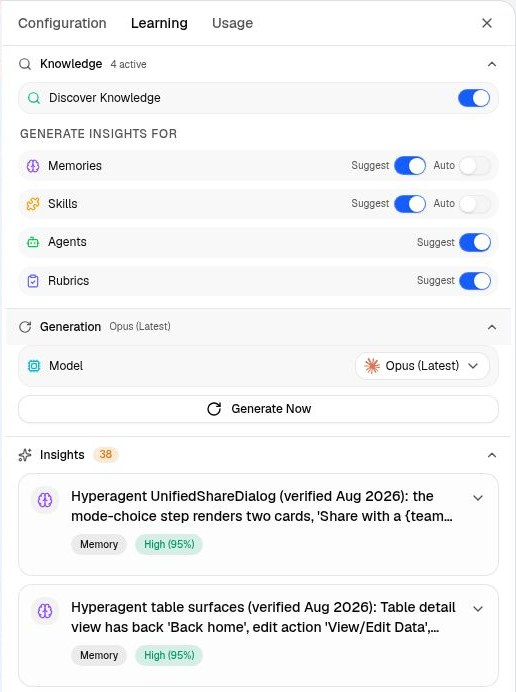
The Learning tab in the thread's side panel carries a count of what this conversation proposed. This is the best place to judge a proposal, because the work that produced it is right there. Open Insights and act on each card in place. Memories offer Accept and Dismiss; skills offer Quick or Interactive instead of a plain Accept.
Clear a backlog across every thread
The Learning page gathers proposals from all your threads, grouped by the run that produced them. Filter by agent, or click a type to see every suggestion of that kind across threads at once, which is how near-duplicate ideas become obvious.
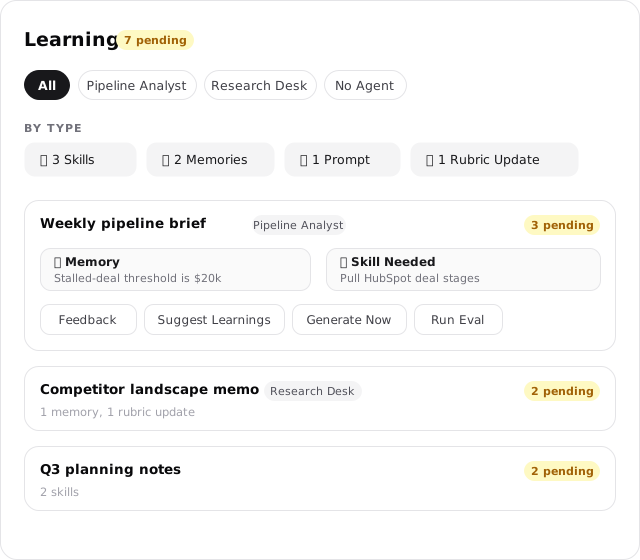
Rubric proposals are the exception to all three. They wait on the Rubrics surfaces instead, because measuring quality is its own practice.
Edit the card before you save it
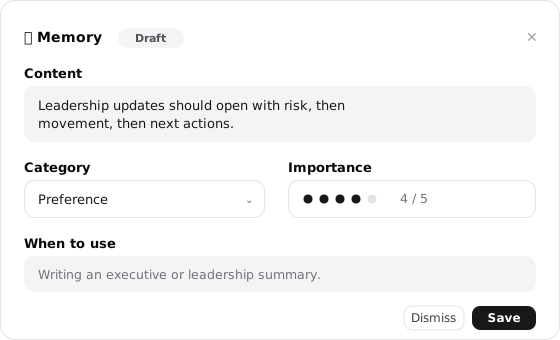
A draft card is the record itself, not a summary of it. Every field is editable, so what saves is what you approved rather than what the agent guessed.
What accepting does
| Kind | What accepting it does | Where it lands |
|---|---|---|
| Memory | Saves the memory, or refines the existing one it updates | Your memories, this agent's memories, or the workspace's shared memories, according to Knowledge access |
| Skill | Quick researches and builds the skill on its own; Interactive opens a guided skill-building conversation | Your skills library |
| Prompt | Adds the refinement below your existing instructions | The agent's brief, or the thread's own instructions when no agent is attached |
| Agent configuration | Applies the proposed change to the agent | The agent's configuration |
A prompt suggestion can never erase what you wrote. It's appended below your instructions, and you see the full updated brief immediately.
Clear a backlog quickly
Three controls clear proposals in bulk, so a busy week stays easy to work through:
- On the Learning page, expand a thread and click Select above its suggestions to turn on checkboxes. Pick your rows, shift-click for a range, then Dismiss.
- Filter to one agent and Clear N suggestions appears at the top of its panel, clearing everything pending for that agent across every thread. It asks first, and it leaves anything you already accepted alone.
- Click a type badge to switch to the grouped view. Where the same idea arrived from several threads, that group carries Dismiss All Variations, which retires the whole cluster at once.
Dismissing is final
A dismissed proposal won't come back, and that's what makes the queue safe to clear fast. Nothing you dismiss will nag you twice, so you can be decisive. If a dismissed idea turns out to be good, run Suggest learnings on a thread where it applies and the agent proposes it fresh.
Manage what you've kept
Accepting is half the job. A tidy library keeps the agent sharp, because fewer and fresher memories mean the right one surfaces at the right moment. Three habits keep it that way.
Archive rather than delete
Archiving takes something out of the agent's recall and keeps the record, so you can retire anything you're unsure about and get it back later.
- Open the item's row menu, or its detail page, and choose Archive. Memories, skills, agents, rubrics, and threads all work this way
- Restore returns an archived item to recall
- On the Memories page, select several rows and use Archive in the bar that appears at the bottom
- Deleting is the deliberate second step, available once something is archived
You can also archive without leaving the conversation. When an agent saves a memory on its own, the chip it posts in the chat carries an archive button, so a lesson you disagree with can be retired the moment you read it.
Merge duplicates so one fact has one home
- On the Memories page, select two or more rows and choose Merge from the bar at the bottom. You pick which memory survives and edit the combined content; the rest are archived
- For a broader sweep, open the Memories page's header menu and choose Dedupe memories. It scans the library at a similarity threshold you set and walks you through each group
- The agent guards this too, holding back an auto-save that looks close to something you already have and offering it as a card instead
Keep a thinking-out-loud thread out of it
Some conversations are scratch space. Open the thread's menu, from the sidebar or the thread header, and choose Exclude from knowledge. The agent then won't search or read that thread from anywhere else. It's reversible, and it's offered on threads that aren't bound to an agent.