Knowledge access
What an agent can reach and where its new knowledge is saved: read scope, attachment and discovery, save destination, knowledge profiles, and what changes in a workspace.
Every agent starts a run with context, and after it finishes its work, it can save what it learned to use later. Define how an agent should use and save context on the agent's Knowledge tab, and every run inherits it.
Knowledge access decides what an agent brings in and what it takes away
Set the boundary once and every run inherits it. The agent reads only the memories, skills, and files you allow, and any new learning is saved where you chose, not wherever it happens to land.
The three kinds of knowledge
Memories
Facts and preferences it carries between runs: a threshold you set, how you like a report opened, who owns a process.
Skills
Methods worth repeating: how to pull the weekly report, how your team decides an escalation is urgent.
Context files
Documents and files it should reference directly, like a playbook, a spec, or a brand guide.
Each kind has its own depth in the knowledge docs. What follows is the boundary itself: which of them a particular agent may use, and where its own additions go.
How an agent remembers
Two things happen around every run. Before it starts, the agent gathers what it is allowed to know. After it ends, whatever it picked up is saved.
- Access governs exposure: an agent answering questions in a public Slack channel should not be able to reach a preference you told a private assistant.
- Learning governs accumulation: an agent handling a hundred support conversations a week should not turn all of that chatter into memories cluttering everything else you own.
The two are independent, which is more useful than it sounds. An agent can read everything you have saved while keeping everything it learns to itself, so it benefits from your context without adding to it.
What an agent can reach
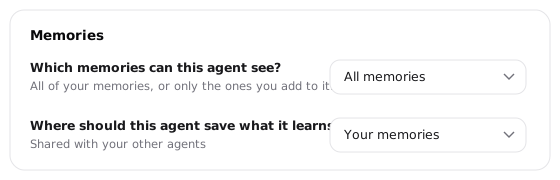
Scope decides what information is reachable. Which memories can this agent see sets the outer limit: All memories hands it everything in your workspace, while Only curated memories narrows it to what you linked to this agent by hand. Within that limit, knowledge arrives four ways, and each kind of knowledge uses them a little differently.
Manage how an agent uses memories
When configuring an agent, you can choose which memories an agent can reference:
All memories
Everything saved in your workspace, including anything you save later. Best for a private coworker that should understand your standing context without being briefed twice.
Only curated memories
Just the memories you link to this agent, and nothing else. Best for any agent other people talk to, where it should know exactly what you gave it and no more.
Curating memories
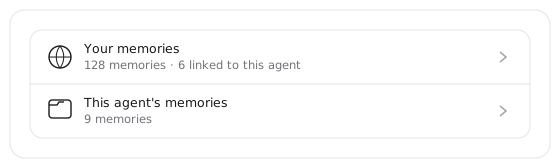
The agent draws on two banks: your workspace memories, and the agent's own memories, which belong to it alone. You can choose to let the agent pull from all those memories, or link specific ones that it should see. A linked memory is retrieved when the work calls for it; pin one instead and it loads into every run whether or not the run has anything to do with it.
You can also point at a memory directly: type @ in the composer to name one, and the agent loads it for that request.
When to pin a memory
A pinned memory costs room in every single conversation the agent ever has. Save pins for the handful of things the role genuinely cannot operate without, like a quality standard it must apply every time or a policy it must never violate. If you find yourself pinning a fifth memory, what you probably want is a context file.
Manage which skills your agent can use
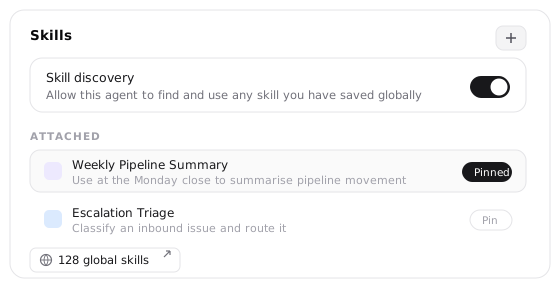
Depending on what your agent does, you may want it to discover every skill available, or only to draw from a certain set. You control this with skill discovery.
-
On, the agent can reach any skill you have saved globally. It works from summaries: a pinned skill puts its name and description in the prompt every run, so the agent always weighs whether this is the moment for it, and the full instructions load only when it decides to use them.
-
Off, the agent works from the attached kit alone, and starts every run holding those skills in full. That suits a narrow role you want behaving predictably, and works against you once the kit is large enough to crowd the conversation.
Workspace agents
A personal agent searches all skills available to you. A workspace agent searches the skills its workspace owns or has been given, and never a teammate's private library.
Give an agent documents to work from
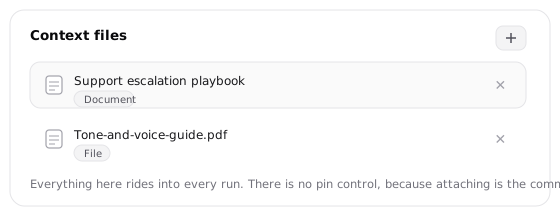
Context files are the documents and files the agent should be able to reach directly, like a playbook, a spec, or a brand guide. Attach them in the Context files section.
Attaching a file does not push its contents into every conversation. Every run, the agent sees what is attached, each file by name and description, and it opens one to read in full when the work calls for it. A long playbook costs nothing until the moment it is relevant, and you never have to tell the agent to go and read it.
Loading a document every run
If something must be considered on every single run, put the instruction in the agent's instructions rather than hoping it notices. And when what you need every run is small, a threshold or a policy line, a pinned memory holds the content directly with no file to open.
Let an agent read its own past work
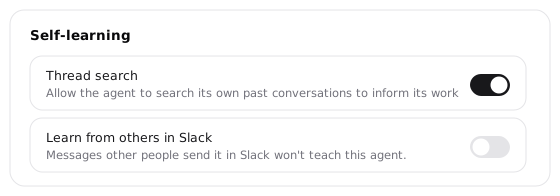
Thread search lets an agent look back through its own past conversations, picking up work it started last week, or recalling what it already tried before trying it again.
Turn it on when an agent's job spans conversations. Leave it off when each run should stand alone.
Where an agent saves knowledge
When an agent learns something it should remember, it can save it to use in the future. Where it lands depends on two things: the type of knowledge, and who owns the agent.
Memories
An agent can save a memory to two places, and this is the one destination you set yourself.
- Its own memories belong to that agent alone. No other agent can see them, which suits a specialist whose lessons would be noise everywhere else.
- Workspace memories are available according to each agent's knowledge settings: personal context for a personal agent, shared workspace context for a workspace-owned one.
Skills
Skills always belong to a workspace the agent operates in. If the agent is in your personal workspace, skills are saved there. If you're using a workspace-owned agent, skills are saved to that workspace.
A skill headed for a shared workspace is never saved without you. Its instructions, scripts, and any credentials it carries affect every member, so that confirmation is required no matter how much you have let the agent learn on its own.
Documents
A document an agent writes during a run belongs to that run's thread, and so to whoever started it. The exception is a workspace agent producing something meant to be broadly available: that becomes a workspace-library document its members can read.
For the whole picture, see what's private and what's shared.
Choose a knowledge profile for your agent
A knowledge profile sets scope, destination, and learning behavior together. So when configuring an agent, you can pick a posture that matches the agent.
Synced self-learning
Reads all your memories and skills, and saves what it learns back to yours. You and the agent share one body of knowledge, so anything it picks up helps your other agents. The right default for an agent you use yourself.
Curated
Reads only what you explicitly added, and learns nothing on its own. The locked-down stance, and what Hyperagent applies for you the first time an agent joins a Slack channel.
Standalone self-learning
Reads only what you added, but saves what it learns to its own memories. It grows with use while staying self-contained, so teammates who invoke it make it smarter without touching anything of yours.
Custom
The same decisions, made one at a time. Change any single control under a named profile and you land here automatically, which is worth knowing so it doesn't surprise you.
Curated is the safe default for a new Slack agent
When you connect an agent's first Slack channel and its knowledge was never configured, Hyperagent switches it to Curated so channel traffic can't teach it or read your wider set of memories. You'll see a notice saying only selected memories are shared with the agent. Widen it later, once you've watched how the channel actually uses it.
Custom settings
Under Self-learning, a master switch decides whether the agent may learn at all, and a row for each kind of change sets how far you trust it: propose nothing, propose and wait for you, or save on its own.
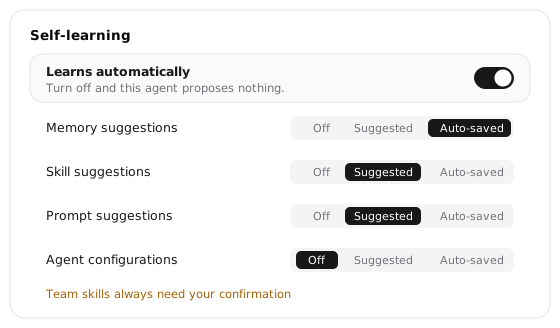
Manage learning behavior covers what each level means, who else can teach the agent, and which changes wait for review however much you trust it.
How your agent works with workspace knowledge
A workspace holds related agents, skills, and memories. An agent can save memories with its own role or to the workspace library. The shared destination broadens their audience without bringing in a member's personal context.
A workspace-owned agent works from the workspace's knowledge rather than any individual's. Nothing personal comes in: the agent reads the workspace's memories and its own, never the personal memories of whoever happens to start the run. This allows you to use a shared agent without wondering whose context is leaking into it. What it learns is saved according to its destination: with the agent, or to the workspace library. Library memories become available to other agents according to their knowledge settings.
Learn more about workspace knowledge in Workspaces.
Why the agent doesn't remember something
When an agent seems to have forgotten a fact, a memory has almost never been lost. Something is sitting on the wrong side of one of the two boundaries, and there are three usual culprits.
-
You taught it to a different agent. If an agent saves its learning to its own memories, the fact lives there and no other agent can see it. To share an agent-owned memory, link it to the other agent, or teach that agent directly.
-
It was saved somewhere this agent doesn't read. A memory in an agent's own memories will not appear in your personal memories, and the reverse holds too if your agent only reads its own. To fix this: change the save destination so future learning lands where you want it, then recreate the stray memory in the right place.
-
It exists but was never linked. A curated agent reads only what you linked to it, so a memory can be sitting in plain sight and still be invisible to that agent. Link it, or widen the scope to all memories if the narrow boundary is not earning its keep.