Activity
The agent's own thread history: every run it has done, live and interactive alike, with search and filters, each row opening the thread behind it.
When an agent runs on its own, on a schedule, in Slack, from a webhook, you need somewhere to see what it has been doing. Activity is that place: the agent's own history of runs, one row per thread, each opening the conversation behind it. It is where you watch a working agent rather than configure it.
Activity is the agent's run history, in one list
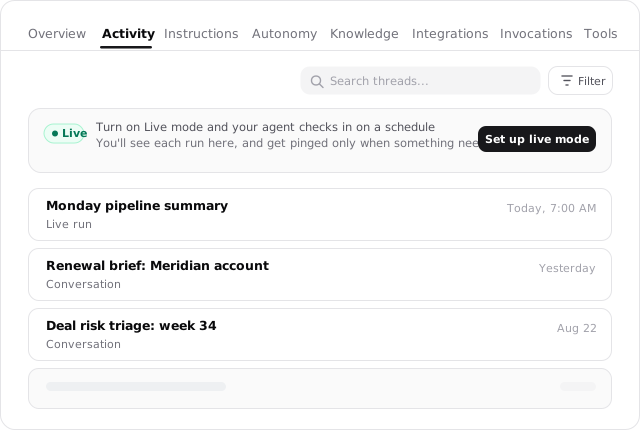
Every run an agent does becomes a thread, and the Activity tab lists them all, live runs and conversations together, so you can open any one and see exactly what happened.
Activity
The complete run history for one named agent. Open any row to inspect its thread, tools, approvals, files, and output.
Command Center
The fleet-wide view across every agent you operate: active work, decisions, cost, and quality trends.
Open the agent's history
Activity is a tab on the agent's own page, alongside Overview, Instructions, Autonomy, Knowledge, Integrations, Invocations, and Tools. Open an agent and select Activity, or go straight to it at /agents/:id?page=activity. It is scoped to that one agent: this is the agent's history. The fleet-wide view across every agent you operate is the Command Center.
What each row is
Every row is one thread, which is one run or conversation the agent handled, and it links straight to that thread at /thread/:id. A background run started by a schedule, Live Mode, or a webhook lands in the same list as a conversation you had by hand, so the whole of what the agent has done sits in one timeline. Opening a row is how you audit a run: the thread holds the complete record of what the agent read, did, and produced.
Search threads
The Search threads... input narrows the list to matching runs, so you can find one conversation among a long history.
Filter threads
The Filter threads control scopes which of the agent's threads are listed; on a shared agent, that includes narrowing to your own runs versus everyone's.
Turn on Live Mode from here
When an agent isn't on a schedule yet, Activity is also where you start one. A Live card at the top of the list offers Set up Live Mode: turn it on and the agent checks in on a schedule, with each run landing in this list and a notification only when something needs you.
Live runs and your conversations share one history
Once Live Mode is on, its scheduled runs appear in Activity right beside the threads you started, so the tab is the single record of the agent working, whether you kicked it off or the schedule did. See Live Mode.
Where to look for cost
Activity answers "what has this agent done," not "what has it spent." Cost lives on the agent's Overview, switchable between total, per run, and per thread, and the Usage tab inside any single thread breaks down that one run.