Thread settings
Every dial for one conversation in one place: the model and how hard it thinks, subagents, execution mode and turn timeout, tools, appearance, the run's cost, and what it proposes to keep.
Thread settings are where you make one conversation behave the way this piece of work needs, without touching the agent everywhere else. They open from the settings control in the thread header, in three tabs: Configuration for what the run can do, Usage for what it has cost, and Learning for what it proposes to keep.
Every dial here overrides the agent, for this thread only
A named agent sets the standing default; a thread setting layers on top of it for this conversation. Leave a dial untouched and it inherits the agent's value; change it and the thread's choice wins, everywhere else left alone.
How every setting here resolves
One rule governs the whole Configuration tab, so it is worth learning once. Each control has an agent default and an optional thread override. When the thread override is unset, the run inherits the agent's value; when you set it, the thread value wins for this conversation. The exception is anything that latches at the thread's first run, like the runtime, which is fixed for the life of the thread once set.
Two settings inherit slightly differently and are worth knowing:
- The turn timeout can be set at three levels, agent, thread, and per turn from the composer, and the most specific one wins.
- The system prompt is snapshotted into the thread when it starts, so later edits to the agent don't rewrite a running thread. When the agent has moved on, the panel shows Prompt is out of date; Update agent config pulls the latest prompt into this thread, and Reset to agent returns an overridden thread to the agent's current values.
The Configuration tab
The Configuration tab is a single scrolling panel of collapsible sections. Here is the whole panel; each section is documented in full below.
The model and how hard it works
The model for this thread, Fast inference, Reasoning effort, and the runtime it runs on.
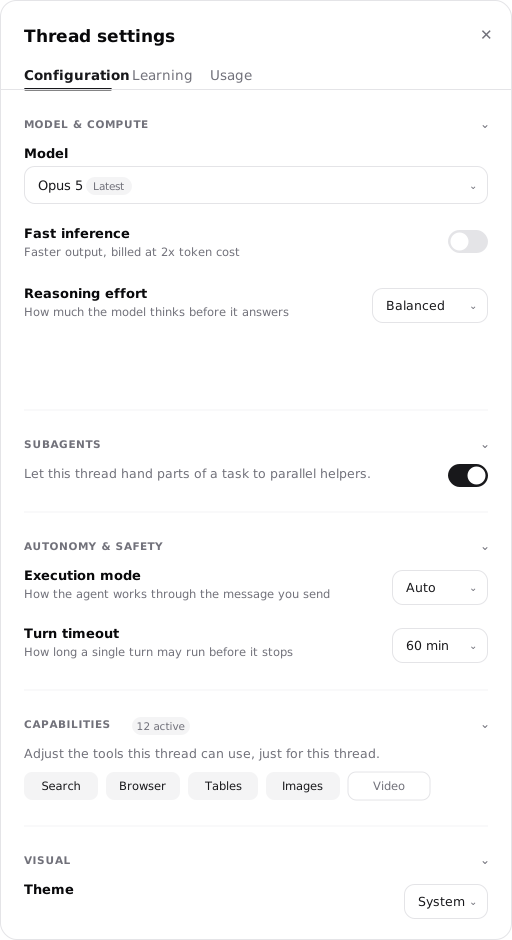
Temporary workers for parallel work
Whether this thread can dispatch short-lived subagents, and which model they use.
How freely the run acts, and how long
Execution mode for whether the agent pauses for approval, and the turn timeout.
The tools this thread can use
The active tools for this thread, layered over the agent's baseline.
How the thread looks
Appearance for this thread, which changes presentation only, not behavior.
Model & compute
Four controls decide which model runs and how hard it works.
-
Default model picks the model for this thread. The picker offers the models compatible with the thread's runtime (see below).
-
Fast inference trades cost for speed: Faster output, billed at 2x token cost. Turn it on when latency matters more than token spend.
-
Reasoning effort sets how much the model thinks before it answers. Higher effort means deeper reasoning and more tokens. Not every model exposes the full ladder, and some fixed-reasoning models show no picker at all.
Level What it's for Low Fast responses Medium Balanced High Deep reasoning Extra high Deeper reasoning Max Maximum capacity -
Runtime is the execution environment that serves the model. Default lets Hyperagent choose the runtime that matches the selected model. The runtime latches when the thread's first run starts, and after that the model picker offers only compatible models. Start a new thread when the work needs a model on a different runtime. See how the runtime is selected.
Subagents
Subagents controls whether this thread can dispatch short-lived subagents to work in parallel. These are temporary workers inside the run, not named agents reached through an invocation, and Subagent model sets which model they use. Their cost is attributed in the Usage tab. Delegating to named specialist agents is a separate capability, covered in Agent delegation.
Autonomy & safety
Two controls decide how freely the run acts, and for how long.
Execution mode decides whether the agent pauses before sensitive actions. It is the same choice as the composer's Plan/Execute menu, so setting it in either place moves the other.
| Mode | Behavior |
|---|---|
| Auto | Agent runs everything end-to-end without stopping. |
| Ask first | Agent pauses for approval before sensitive actions like sending messages or modifying external systems. |
One consequence is worth knowing: a run with no one watching cannot pause for approval, so Ask first collapses to Auto on background runs (a schedule, a webhook, a one-way email). Keep a person in the loop through a channel, or a thread you're watching, when approval matters. See Invocations for which runs are attended.
Turn timeout caps how long a single turn may run before it stops. Max duration before the agent is stopped. The presets and the three levels it can be set at are in Limits that bound a run.
Capabilities
Tools lists the tools this thread can use. On an agent-bound thread this layers over the agent's Tools baseline: turning a tool off here leaves it off for this conversation without changing the agent everywhere else. For what each tool does and the full list with defaults, see Tools.
Visual
Visual settings change how the thread is presented to you, such as its appearance, and nothing about what the agent does.
Limits that bound a run
A run isn't open-ended. Three limits control how long a turn can work, when older context is summarized, and how much a message can carry.
Turn timeout caps how long a single turn may run before it stops. The default is 60 minutes, and you can pick from preset spans:
| Preset | Good for |
|---|---|
| 10 min | Quick tasks |
| 30 min | Standard tasks |
| 60 min | Long research tasks |
| 90 min | Extended tasks |
| 4 hours | Ambitious builds |
You can set the turn timeout on the agent, on the thread, or per turn from the composer, and the most specific choice wins.
Auto-compact threshold decides when a long thread starts summarizing older messages to free room in the context window. It defaults to Default, which compacts once the window is nearly full, and you can move it earlier or later:
| Preset | Effect |
|---|---|
| Default | Compact when the context window is nearly full |
| 50% | Compact early |
| 60% | Compact early |
| 70% | Balanced |
| 80% | Keep more context |
| 90% | Keep more context |
You can also compact on demand with Compact context now, whose tooltip reads Summarize the conversation so far to free up context. For what compaction does to a run, and how the Thread Context Document survives it, see Run, stop, and fork a thread.
A single message can carry up to 20 files, up to 100 MB in total. A file that's too large is refused with a note that it must be smaller and a suggestion to split it, compress it, or share a link instead.
See what a run has cost
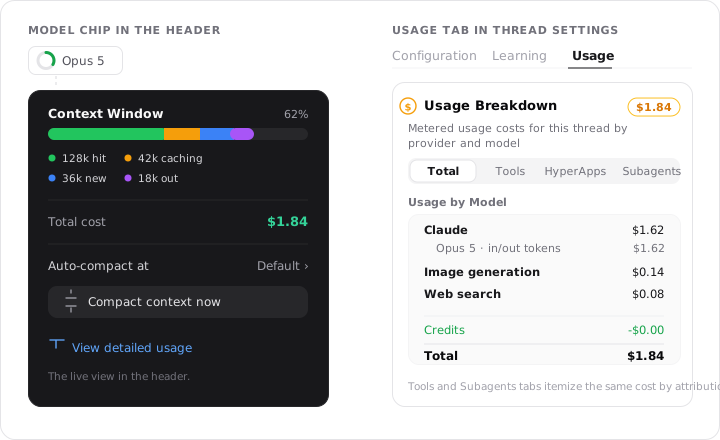
A run costs something, and the thread shows you what. The Usage tab reports this thread's own consumption: the total cost, a line-item breakdown of where it went, cost attributed per tool, and the cost of any subagents the run spun up. The model chip in the thread header carries a lighter, live view: its popover shows the running session cost and a context gauge, with View detailed usage as the link through to the full accounting.
Review what a run proposes to keep
A finished run can propose a memory, skill, prompt improvement, or agent-configuration change. The Learning tab shows the suggestions from this conversation, where you can inspect what would change before saving, applying, or dismissing it.
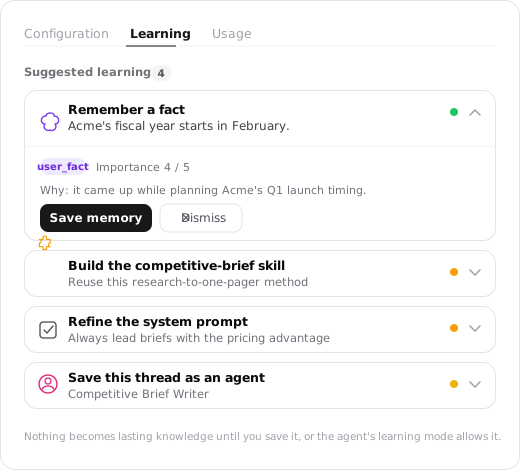
Nothing suggested becomes lasting knowledge until its learning level allows it. See Suggestions and auto-learning for how proposals are raised and reviewed everywhere.
FAQs
What's in a thread
How a thread brings context, tools, connected apps, controls, and finished outputs together so an agent can complete a piece of work.
How context gets into a thread
What the agent starts a run with, what surfaces as the conversation moves, and what it fetches on demand: memories, skills, files, tool results, and integration data.