How context gets into a thread
What the agent starts a run with, what surfaces as the conversation moves, and what it fetches on demand: memories, skills, files, tool results, and integration data.
You've given the agent plenty: instructions, memories, skills, files, tools, connected apps. A thread doesn't start with all of it. The model's context window is finite, and an agent that packed everything it owns into every run would leave no room for the work itself. Instead, context arrives three ways, and knowing them answers most "why didn't it use that?" questions.
The agent packs light and knows where everything is
A run starts with the essentials, gets shown what's relevant as the conversation moves, and fetches the rest the moment the work calls for it.
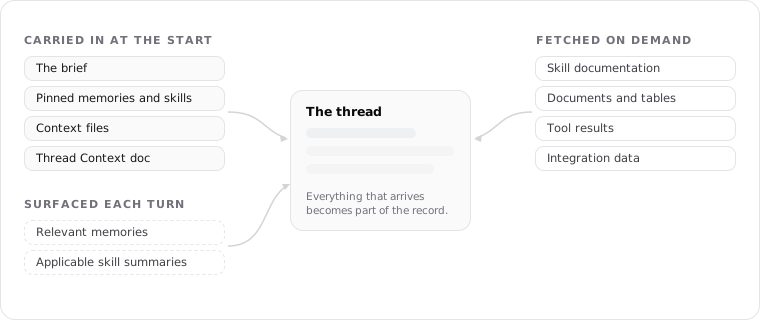
Carried in from the start
Some things are in the thread before the first word, because every run needs them:
- The brief. The agent's instructions, snapshotted into the thread when it's created.
- Pinned memories. A pinned memory loads in full on every run that can see it, before anything is searched for.
- Always include memories. Memories rated importance 4 or 5 also load up front, but within a fixed context budget. If more of them qualify than the budget holds, the lowest-priority ones are left out, so "Always include" is a strong bias, not a guarantee that every one appears every time.
- Pinned skills. A pinned skill puts its name and description into the system prompt on every run, so the agent weighs it each time it plans. It reads the full instructions only if it decides to use the skill.
- Context files. Documents and files attached to the agent are listed by name and ID on every run, so the agent always knows they exist, but their full content is not loaded up front. The agent opens one with a tool call when the work calls for it. Attaching makes a file available and visible, not resident in every run.
- The thread's own notebook. The Thread Context Document, so a continuing thread picks up its working memory.
Pins are the part of this tier that costs real room, because a pinned memory rides along in full on every single run. That is why pinning is a budget you spend, not a default you reach for; the listings for skills and files are cheap by comparison, since they carry only a name until the agent opens them.
Surfaced as the conversation moves
Each turn, Hyperagent matches what's being discussed against the agent's knowledge and surfaces what's relevant: memories that bear on the topic, and skill summaries that look applicable. It surfaces them by their name, description, and when-to-use text, so the agent sees enough to know an item exists and what it's for, then pulls the full content only if it decides to use it.
You can see what surfaced. Knowledge hints on a response name the memories and skills that informed it, and the tool results below show the context the agent fetched to answer, so what shaped a run stays visible rather than hidden.
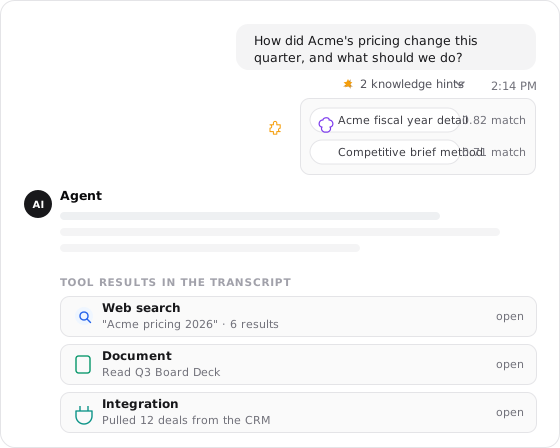
Fetched when the work calls for it
The rest arrives because the agent decides it needs it, mid-run:
- Knowledge it searches. The agent searches its skill and memory library, gets summaries back, and loads full documentation only for what it chooses. Knowledge and learning covers this in depth, including the discovery setting that widens or narrows the search.
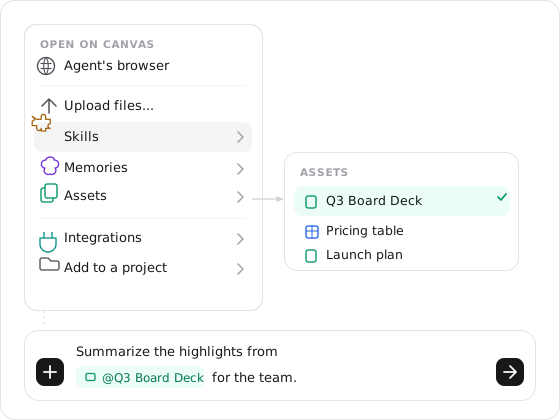
- Documents and tables it opens. A document is read when the work references it; a table is opened when the agent needs the rows. @mentioning one in your message is a direct instruction to go get it.
- Tool results. A web search, a browser session, a code run: the tool executes and its result lands in the transcript, where it's context from then on. A large result doesn't have to: the agent can save it as a file in the thread's workspace and read just the parts it needs, so a big export sits on disk without occupying the context window.
- Integration data. Connecting an app loads nothing by itself. It gives the agent tools it can call, and data enters the thread only when a call happens: reading a Slack channel, pulling CRM records, opening a sheet. What arrived is visible in the thread's record.
Once fetched, it stays: everything that enters a thread becomes part of its record, which is what lets a later turn build on an earlier tool call without repeating it.
@mention is how you point the agent at something now
Type @ in the composer to name a specific document, table, skill, memory, or past thread, and the agent loads that item for this request instead of waiting to discover it. A mention is a direct instruction: use this, now.
How the agent decides what to load
It reads the same signals you would. When the work mentions an invoice process, the agent searches for skills about invoices; when a question touches a customer, it looks for memories about that customer; when your message @mentions a table, it opens that table. It navigates by names, descriptions, and when-to-use notes, which makes those fields the highest-leverage writing in your knowledge base:
Pin what's constant
The few facts and methods every single run needs. Pinning everything crowds out the work; pinning nothing makes the agent rediscover its own job.
Label what's findable
Write memory content, skill descriptions, and table descriptions like signposts. Specific beats broad: the search that loads them matches meaning.
Mention what's urgent
When you already know what the agent should read, @mention the table or name the document. A direct pointer beats waiting for discovery.
Related
Knowledge and learning
Control which memories, skills, and files an agent can reach, and where new learning is saved.
Learning
How a run turns into new memories, skills, and instructions the next run can use.
How agents load skills
The loading paths in depth, and the discovery setting that widens or narrows the search.
FAQs
Thread settings
Every dial for one conversation in one place: the model and how hard it thinks, subagents, execution mode and turn timeout, tools, appearance, the run's cost, and what it proposes to keep.
Thread Context Document
The agent's working memory for a run: the facts, corrections, decisions, and plan it keeps in a document you can read while it works.