Thread Context Document
The agent's working memory for a run: the facts, corrections, decisions, and plan it keeps in a document you can read while it works.
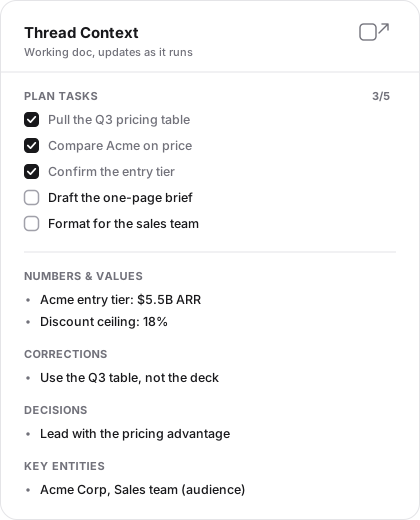
You're watching the agent work, and off to the side a panel is quietly filling in. A checklist ticks itself off as steps complete. A short list of facts grows: a number you gave it, a correction you made, a decision it settled on. That panel is the Thread Context Document, the agent's working memory for this run, kept where you can read it as it happens.
The agent's notes, kept where you can read them
As the agent works, it writes down the facts and the plan it needs to hold onto. That notebook lives in the thread, updates in real time, and is yours to read whenever you want to know what the agent is holding.
Every thread has one, and the agent maintains it
Every thread produces one Thread Context Document. It belongs to that thread alone, and the agent maintains it as the run unfolds.
| Section | What the agent records |
|---|---|
| Plan Tasks | The steps in longer work, checked off as they finish. |
| Numbers & Values | Figures that need to remain exact. |
| Corrections | Facts or assumptions you changed during the run. |
| Constraints | Rules, limits, and requirements the work must follow. |
| Key Entities | The people, companies, products, or other subjects in play. |
| Decisions | Choices the run has committed to and should not reopen casually. |
| Notes | Other working context worth preserving for this thread. |
The document updates while the agent runs. A newly recorded fact appears in the panel, and Plan Tasks advance as steps finish, so you can see the agent's current understanding without reconstructing it from the transcript.
It survives compaction
When a conversation grows long, Hyperagent compacts older messages into a summary so the agent can keep working within the model's context window. A summary preserves the direction of the conversation, but it can smooth over an exact number or correction.
The Thread Context Document is stored separately from that message history. After compaction, the agent can read the document again and recover the exact facts, constraints, decisions, and plan it recorded. See Run, stop, and fork a thread for when compaction happens and when a fresh thread is the better choice.
Where you see it
The Thread Context Document surfaces in the thread's Activity panel. A chip summarizes the current state at a glance, showing how many plan tasks are done and how many facts the agent has recorded. Open it and you get the full document: the plan checklist and every fact section, rendered in a panel you can dock beside the conversation or float over it.
The panel streams live during a run. As the agent completes a task or records a fact, you see the checklist advance and the sections grow without refreshing anything.
Thread Context Document or memory
Thread Context Document: this run
Holds the facts, corrections, constraints, decisions, and plan that keep one thread coherent. It survives compaction but doesn't carry into another thread.
Memory: future work
Preserves a fact or preference that should be available beyond this conversation. Future threads can retrieve it according to the agent's knowledge settings.
A corrected number that only matters to this run belongs in the Thread Context Document. A reporting preference worth applying next time belongs in a memory.
Read it, and correct it in chat
Check what the agent is carrying
Read the document mid-run instead of reconstructing the agent's understanding from the transcript. Its facts and decisions make a wrong assumption easier to catch before it shapes the output.
Change it through the conversation
Tell the agent what the right value is in chat. It updates the document, and the corrected fact survives the rest of the run with the other recorded context.
FAQs
How context gets into a thread
What the agent starts a run with, what surfaces as the conversation moves, and what it fetches on demand: memories, skills, files, tool results, and integration data.
Run, stop, and fork a thread
A run is the agent working through your request. It keeps going after you leave, ends when the work is done or when you stop it, and can be forked from any point without losing the original.