What's in a thread
How a thread brings context, tools, connected apps, controls, and finished outputs together so an agent can complete a piece of work.
Ask an agent to turn customer notes into a renewal brief. It reads the files you attach, recalls the account context it already knows, checks the CRM, researches anything missing, analyzes the numbers, and drafts the finished document. You review the work, correct a date, and approve an action without leaving the conversation.
A thread is where the whole job comes together
It gives the agent the context to understand the work, the capabilities to act, and a place to return the finished output. It gives you the controls to guide, approve, and inspect that work as it happens.
Get context
Bring in the request, files, agent instructions, saved knowledge, and live data the work needs.
Take action
Research, browse, use connected apps, run code, and create with Hyperagent's built-in tools.
Produce outputs
Return documents, tables, webpages, slides, media, apps, and files with the record of how they were made.
Get the right context into the work
The thread starts with the request and gathers more context as the work develops. Some context arrives immediately; other material surfaces or gets fetched only when it becomes relevant.
Your request and attachments
Messages, uploaded files, and anything you @mention enter directly from the composer.
Agent instructions and knowledge boundary
A named agent brings the role and instructions that frame the job, plus the boundary that determines which saved knowledge it can retrieve.
This thread's working context
The conversation and Thread Context Document keep the current facts, corrections, decisions, and plan connected to this job.
Information fetched during the run
Search results, integration records, browser activity, documents, tables, and tool output join the thread when the agent retrieves them.
Access does not mean everything is loaded
The agent can reach more than it carries in the model's context window. See How context gets into a thread for what arrives up front, what surfaces when relevant, and what is fetched on demand.
Take action with tools and connected apps
Once the agent understands the job, it can act through built-in tools and the integrations available to the thread. Code execution is one part of that capability set, alongside research, browser work, connected apps, and creation tools.
Research and browse
Search the web, search past threads, and control a live browser on sites that require navigation or an authenticated session.
Work in connected apps
Read and act in services such as Slack, a CRM, or a spreadsheet through the integrations, credentials, and permissions available to the run.
Analyze and automate with code
Use Python, Node.js, and standard command-line tools in a private run environment. Files written there persist across turns in this thread.
Create in the format the job needs
Build Documents, Tables, Slides, Webpages, HyperApps, Images, Video, Audio, Avatar clips, Transcriptions, Maps, and files.
See what each tool does in depth
For every built-in capability, when to use it, and how tools differ from integrations, see Tools and integrations.
Stay in control while the agent works
A thread remains interactive while the run is active. You can add information, handle protected actions, change direction, or adjust this conversation without changing the agent everywhere else.
Bring the right material into the thread
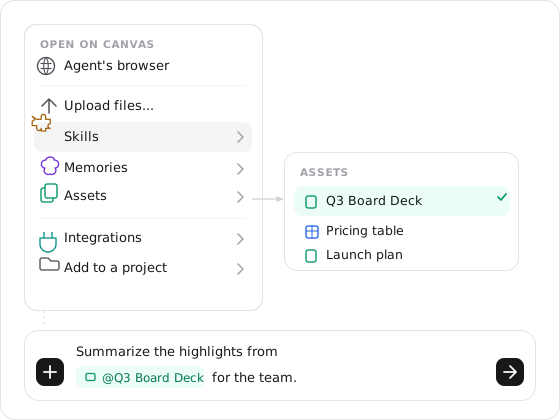
Upload files, @mention a document, table, skill, or memory, and point the agent at exactly what it should read. You can also highlight text in a reply or output and reference that passage in your next message. See how context gets into a thread.
Change direction without waiting for the turn to finish
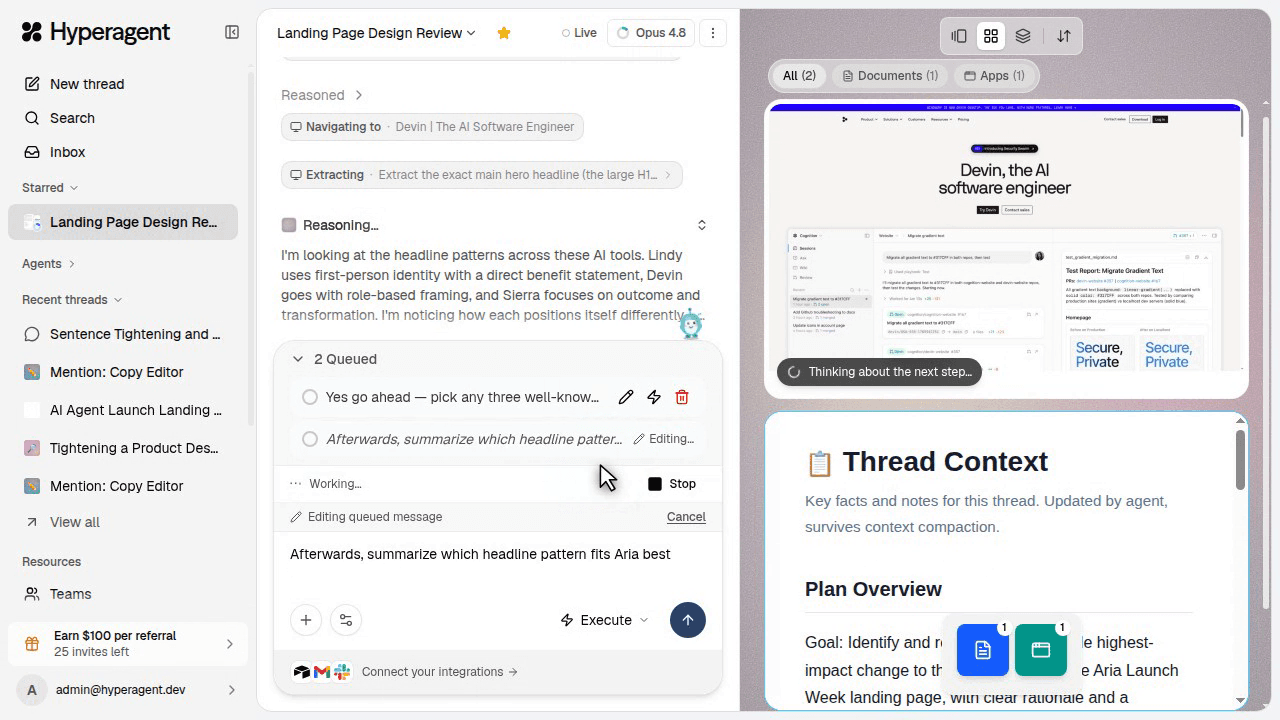
Send another message while the agent is working. Leave it in the queue, edit it before it sends, or steer it into the active turn when it should change what the agent is doing now.
Keep protected actions in your hands
Protected actions pause for your approval. A live browser session can also be handed to you for a login or anything you would rather do yourself. Built-in search and browser tools can reach the web as part of their job; code asks before reaching a new domain.
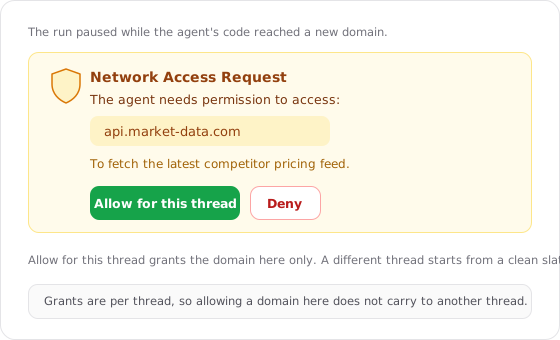
A network grant applies only to this thread. Later requests to the same domain can continue without asking again; another thread starts with its own grants.
End the run or branch from a decision point
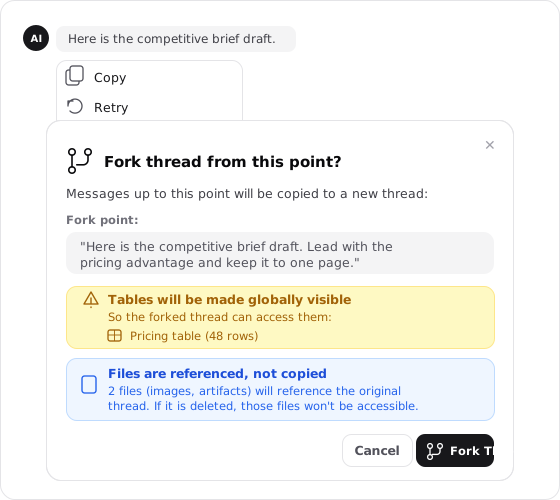
Correct the agent mid-run, Stop an active turn, or Fork from here on any message to try a different direction. See run, stop, and fork.
Tune this conversation without changing the agent
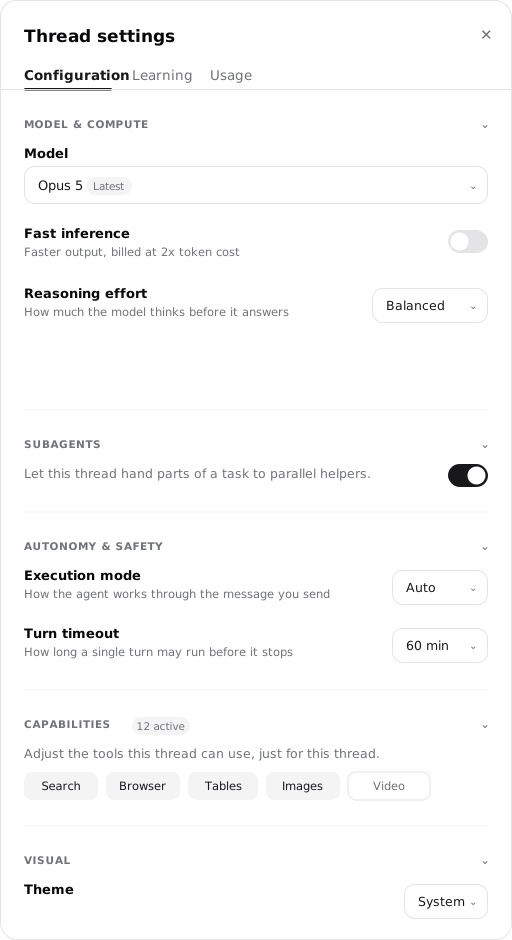
Change the model, tools, or timeout for this conversation without touching the agent's defaults, from Thread settings.
Keep the output and the record behind it
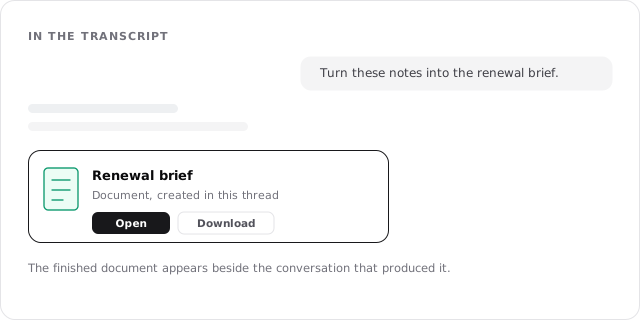
The result does not disappear into the last message. The finished work, the visible history of the run, and the context needed to continue all remain attached to the thread.
Finished outputs
Documents, tables, webpages, slides, images, media, apps, and saved files appear as cards in the transcript and entries in the Library.
The run's visible record
Messages, tool activity, approvals, corrections, and output cards remain in order so you can inspect how the result was reached.
Continuity for this job
Working files persist across turns, and the Thread Context Document keeps the facts and plan the agent needs to continue this thread.
A run can also propose what should carry forward
A finished run may suggest a memory, skill, prompt improvement, or configuration change. A suggestion is not lasting knowledge until its learning mode allows it to be saved or you approve it. See Suggestions and auto-learning.
Know the boundaries of a run
A turn stops at its timeout
60 minutes by default, adjustable from 10 minutes to 4 hours on the agent, the thread, or per turn from the composer. The most specific choice wins.
Active context is finite
By default a long thread compacts older messages when the context window is nearly full; you can move the threshold as low as 50% or compact on demand.
A message carries up to 20 files
100 MB in total. A larger source set needs to be split, compressed, or shared by link.
The runtime stays fixed
The runtime latches on the thread's first run; after that the model picker offers only compatible models for this conversation.
The controls for all four live in Thread settings, with the full preset tables. Changes there apply to this conversation without changing the named agent's standing defaults.
Go deeper
How context gets into a thread
What arrives at the start, what surfaces when relevant, and what the agent fetches on demand.
Thread settings
Model, runtime, tools, timeout, compaction, Usage, and Learning for one conversation.
Run, stop, and fork
Leave work running, stop an active turn, or branch from a decision point.
FAQs
Threads
A thread is one piece of work kept together: the conversation, the agent's workspace, and everything it produced. Threads are isolated by default and connected on purpose.
Thread settings
Every dial for one conversation in one place: the model and how hard it thinks, subagents, execution mode and turn timeout, tools, appearance, the run's cost, and what it proposes to keep.