Run, stop, and fork a thread
A run is the agent working through your request. It keeps going after you leave, ends when the work is done or when you stop it, and can be forked from any point without losing the original.
A run is the agent working through your request, from the moment you send it until it stops. It happens inside the thread, where you can watch each step, leave and come back, or end it yourself.
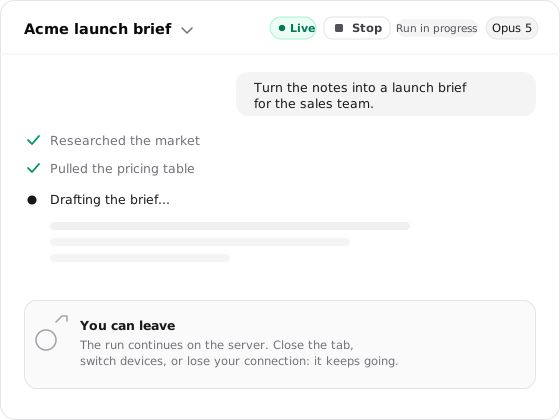
A run keeps going after you leave
Once the agent is working, the run lives on the server, not in your browser tab. Closing the tab, navigating away, switching devices, or losing your connection does not stop it. The agent works on its own until the request is done, and when you return the thread reconnects to the current state and fills in what you missed. A finished run opens on its result; an active one resumes streaming from where it is now.
A run ends when the work is done, or when you stop it
Most runs end on their own, when the agent finishes the request. The rest end for a reason you can see in the thread.
| How it ends | What happens |
|---|---|
| Finished | The agent completed the request and the result stays in the thread. |
| Waiting on you | An approval request or a clarifying question pauses the run until you respond, then it continues. |
| Timed out or failed | The run hits its turn timeout or an unrecoverable error; the messages, files, and tool results so far remain. |
| Stopped | You chose Stop. Work ends immediately and everything produced so far stays in the thread. |
Stop sits beside the live processing indicator while the agent is working. Reach for it when the direction is wrong, a source needs correcting, or the rest of the work is no longer worth running. For a run that paused or ended unexpectedly, see Troubleshoot a stuck run.
A thread names itself
You never have to title a thread; it names itself from the work, so a month of them stays recognizable. The name lands in two passes: a quick title near the start of a run so the thread is identifiable right away, then a fuller name, summary, and tags once the run finishes successfully. Rename it yourself anytime from the caret beside its name, and that title is authoritative, so automatic naming won't overwrite it. Between self-naming and your own titles, threads stay findable months later, whether you scan the list or search from Cmd+K.
A long run compacts to stay within the context window
A run can go on for a long time, but the model's context window is finite. At the thread's auto-compact threshold, Hyperagent summarizes older messages to free room for more work, and you can trigger it yourself with Compact context now.
Compaction doesn't end the run or erase the transcript you read. It changes only what the model carries forward directly: the older conversation becomes a summary, while the separate Thread Context Document preserves the exact numbers, corrections, constraints, decisions, and plan the agent recorded. Compaction keeps one run going, but it isn't a reason to keep every thread going forever: when the work has genuinely changed, a fresh thread starts with the whole window available.
Fork to branch a run without losing it
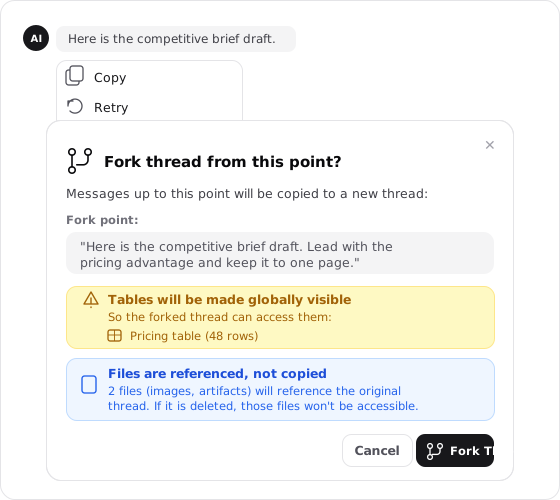
Sometimes a run is going well and you want to try a different direction without spending the one you have. Fork from here branches it. Hover any message in the transcript, choose Fork from here, and Hyperagent opens a new thread that copies the conversation up to that point, so the fork begins with the same history the original had at that message. From there the two are independent: push the fork somewhere new while the original stays exactly as it was.
A fork carries some state by copy and some by reference:
| Part | What the fork receives |
|---|---|
| Messages | The conversation through the selected message. Later messages stay only in the original. |
| Thread settings | The model, learning, and visual choices from the original. |
| Skills | Links to the skills the original thread was using. |
| Files | References to the original files rather than new copies. Deleting a referenced file affects the fork. |
| Tables | The same shared tables, so both threads can read and write the data. |
Fork when you want a running start from where this thread already is; start a new thread when the next piece of work doesn't need any of this thread's history.
FAQs
Thread Context Document
The agent's working memory for a run: the facts, corrections, decisions, and plan it keeps in a document you can read while it works.
Rooms
A room is a shared conversation where teammates and agents work together. Create one, bring in the right people and agents, and decide how each agent takes part.