Documents and tables
Reference material an agent reads and maintains: documents for writing that grows, tables for records with typed columns, shared across threads.
Some knowledge is too alive to be a memory. The strategy doc that grows a section every week. The pipeline table that looks different every day. A memory is a settled fact; this material keeps moving, and it needs somewhere to live between runs. Documents and tables are that somewhere: the reference material an agent reads from, edits in place, and carries from one thread to the next.
Documents and tables are the material your agent works from
A memory is one fact the agent recalls. A document or table is a body of material the agent reads and keeps current: structured, versioned, and available across every thread that should see it.
A document is named sections, edited one at a time
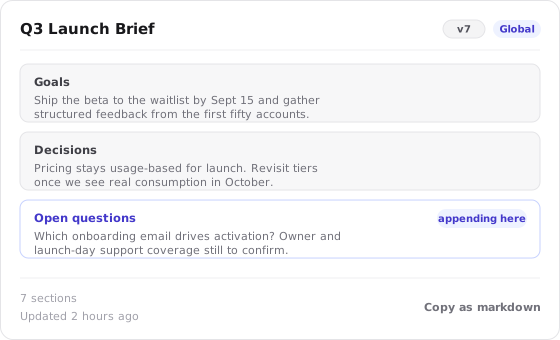
A document is not one block of text. It is a set of named sections, each holding Markdown, and the agent works on them one at a time. That structure is what lets an agent update a document without rewriting it.
When an agent maintains a document, it can:
- Append to a section, adding this week's findings to the Research section without touching anything else.
- Replace a section, swapping stale content for current content in place.
- Insert a new section where the document has grown a new concern.
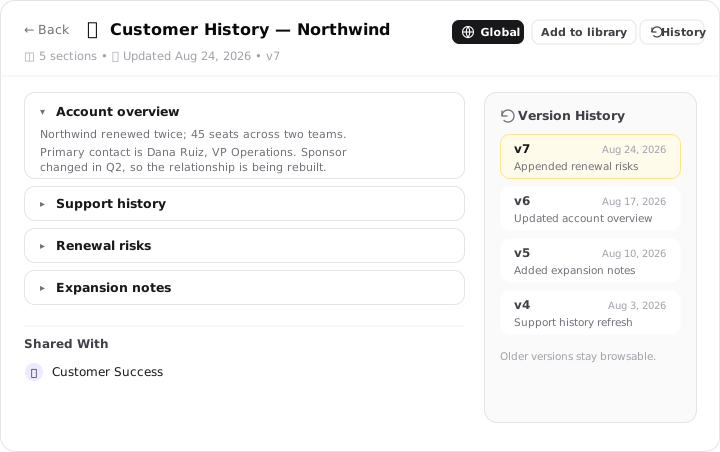
Because each edit targets a section rather than the whole file, the surrounding sections stay exactly as they were, and every change is recorded. A document keeps full version history: each update is a snapshot you can read back or roll the document to, so a report an agent has maintained for months still carries the record of how it got here.
Document scopes
A document is visible to as much or as little as you decide. You choose that reach with its scope:
One conversation
The document belongs to the thread it was made in and travels no further. Use it for material that only this piece of work needs.
Every thread in the project
Shared across all the threads in a project, so a brief written once is present wherever that project's work happens.
All of your threads
Available to every thread, for material an agent should always be able to reach: a brand guide, operating principles, a customer brief.
Documents you create this way live on the Documents page and in the Library alongside everything else your agents produce, searchable across threads.
The Thread Context Document uses the same machinery
Every thread quietly gets its own document, created automatically to hold that conversation's working state. It runs on the exact same sections-and-history machinery, but it is a working note for one thread, so it stays out of the Library rather than joining your reference material. See Thread Context.
A table is typed columns and rows
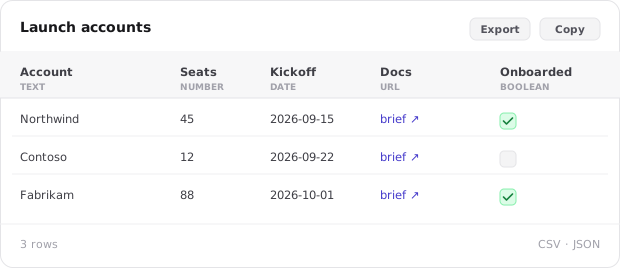
A table is structured records: columns you define and rows the agent fills. Each column has a type, and the type is what keeps the data clean enough to reuse.
| Column type | Holds |
|---|---|
| Text | Names, labels, free notes |
| Number | Counts, amounts, scores |
| Date | A calendar date |
| URL | A link to a source or record |
| Boolean | A true or false state, such as done or not |
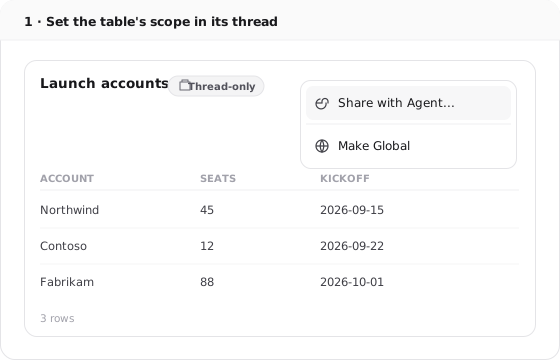
A table is born in the thread where the agent first builds it. From there you decide how far it reaches:
- Promote it to an agent, so that agent can reach the table in any of its threads.
- Make it global, so it is available broadly, the way a pricing table or a shared lead list should be. Whether an agent can actually see global tables is governed by that agent's global tables setting, so global reach and the agent's permission to use it are two separate switches.
To pull an existing table into a conversation, @mention it in the thread, the same way you would point a teammate at the right file. And when you need the data elsewhere, export it as CSV or JSON.
Tables do not keep version history
This is the one place tables and documents diverge. A document records every version and can be rolled back; a table holds only its current state. Before a change you might want to undo, export the table to CSV or JSON so you keep a copy of where it stood.
Bring existing material into a thread
A document or table does not fill the context window merely because the agent is allowed to reach it. The agent opens the material when the request calls for it, or you can point to it directly with an @mention. The resulting read or update appears in the thread's tool activity, so the source and change remain connected to the run.
Scope and direct mention solve different problems. Scope makes the material eligible for a thread or agent to use; an @mention tells the agent that this specific request should use it now. See How context gets into a thread for how retrieved material enters the run.
Documents hold writing, tables hold records
You don't have to decide between a document and a table; ask for what you need and the agent picks the shape the material wants. The distinction is worth knowing so you can read what it made, and steer it when you have a preference:
Document
A brief, a plan, a research write-up, a set of operating principles. Anything you'd read top to bottom, that gains sections as the work goes on.
Table
A lead list, an account tracker, a comparison, a dataset. Anything with rows the agent fills in, sorts, and queries.
Ask for "a tracker of these accounts" and you'll get a table; ask for "a brief on this account" and you'll get a document. Name the shape yourself ("keep this as a table") when you want to override the call.
The other two kinds of knowledge live elsewhere, and it is worth being clear about the line. A settled fact the agent should be able to recall in future work is a memory, not a line in a document. A method the agent should follow every time is a skill, not instructions buried in a document. Documents and tables are for the reference material in between: the things the agent reads, updates, and cites.
A list you keep restating in chat wants to be a table
If you find yourself pasting the same set of records into the conversation run after run, or the agent keeps rebuilding the same list from scratch, that list is asking to be a table. Save it once with typed columns and the agent reads it directly instead of reconstructing it every time.