Models and compute
Choose from a wide model catalog and match reasoning, speed, and cost to the size of the job.
An agent's work can range from a quick rewrite to a complex investigation. Choose a balance of quality, speed, and cost that suits the task.
Get the right balance of quality, speed, and cost
Give demanding work more reasoning power and keep routine tasks quick and affordable. Let Hyperagent choose a model, or pick one yourself.
Focus on the task, let Hyperagent choose the model
Describe what you need done. With Auto, Hyperagent handles model selection for each message. Choose a profile to guide its selection toward quality, balance, or lower cost. Your profile stays selected as the work changes; Hyperagent can switch to another compatible model or keep the current one.
One conversation, different kinds of work
Ask for a spreadsheet cleanup, then investigate an unexpected trend in the same conversation. Hyperagent handles model selection for each request, so you can keep going without choosing another model yourself.
Read the video transcriptChoose an Auto profile
Choose what matters most for your work:
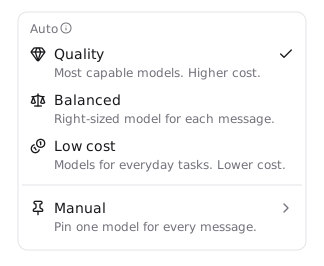
- Quality favors the most capable models for demanding work, with higher cost as the tradeoff.
- Balanced aims to match the model to each message for everyday research, drafting, and tool use.
- Low cost prioritizes lower-cost models for everyday tasks.
Available models depend on the plan funding the work and the options shown in the conversation’s model picker. Where Workspace billing is enabled, that is the workspace organization’s plan rather than your personal plan.
Models in each Auto profile
Expand the comparison to see the models Auto can choose in each profile. The tables show the current version of each model.
Model pools checked October 20, 2026. Selection depends on your plan, connected subscriptions, conversation context, and model availability. Auto chooses among eligible candidates for each task.
Scroll tables horizontally to compare all columns.
Family versions and additional fallback choices
Latest families follow Hyperagent's maintained version order. The current version shown above is the first eligible family member; an earlier available version can serve instead. The Anthropic frontier family currently starts with Fable 5.1, followed by Fable 5 and Opus 5.5.
Separate fallback and connected-subscription choices can also serve a profile. A compatible choice covered by your connected subscription can take precedence over the normal candidate pool.
- Quality: Kimi K3 can serve through compatible fallback routes.
- Balanced: GPT-6 Astra, GPT-5.6 Terra, Kimi K3, and GLM 5.3 Flash can serve through compatible subscription or fallback routes.
- Low cost: GPT-5.6 Terra can serve through compatible subscription or fallback routes.
How Auto manages cache reuse and speed
Auto reuses context when a switch would add unnecessary work. A follow-up can keep the previous model under the same profile while its context is considered warm and the model remains eligible. Auto avoids lateral switches and weighs the savings from a cheaper model against the cost of rebuilding context. It can move up when the work clearly calls for more capability or is high stakes.
For routing, Claude context is treated as warm for 5 minutes after the previous agent reply and OpenAI context for 30 minutes. These windows guide model selection; they do not confirm a provider cache hit. A subagent reply or a stopped or failed turn does not refresh them.
Auto uses Standard inference speed. Choosing a model automatically and choosing Fast or Ultrafast are separate decisions. To use an offered premium speed, select a compatible model in Manual, then adjust Reasoning & speed. Your saved speed preference can apply again when you return to a compatible manually selected model.
Select the model of your choice
If you need a specific model for an evaluation or a repeatable workflow, choose Manual and select one from the supported model catalog.
You can select a numbered model or a maintained family alias. A numbered model keeps that version selected. A Latest family alias follows the model serving that family as Hyperagent updates it. Neither guarantees identical outputs or permanent availability.
Set a default or change one conversation
An agent's model setting supplies its usual choice for new work. Set that choice on the agent when it should apply across the role. In a conversation, use the model menu or Model & compute to change the thread's choice without changing the agent's default elsewhere.
A thread without a named agent starts from your Agent defaults. Changing a default does not rewrite an existing conversation's choice. Schedules and webhooks also offer a Default selection to inherit the agent's standing model.
Choose a speed for one conversation to override the agent's default. Leave it inherited to follow the agent's setting.
Model & compute controls
Choose a setting to see what it changes and where to find it. Knowledge access is configured separately.
Set the model for the work ahead
Open the agent's Model settings to choose its default for new work. Use Auto to let Hyperagent handle model selection, or Manual when you want to use a particular model. The catalog compares the available model families and their supported controls.
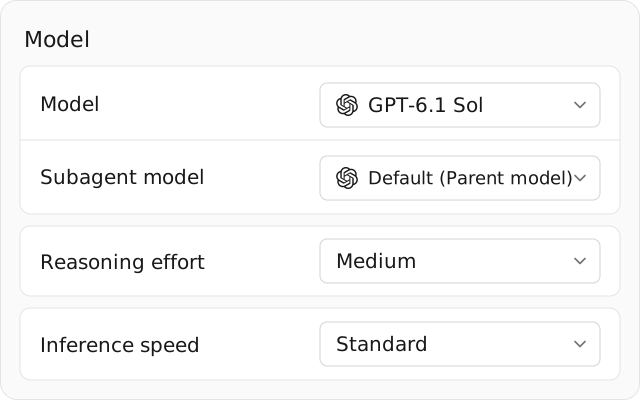
To make a different choice for one conversation, open Model & compute in that thread. This changes the thread's selection without changing the agent's default for other work. The reasoning and speed controls you see depend on the selected model and the plan funding the work.
Adjust thinking effort and response speed separately
Open Model & compute inside a conversation to adjust the controls your selected model supports. These settings affect different parts of the work:
- Reasoning effort sets how much effort the model puts into thinking through a request. Higher effort can help with demanding analysis, but can take longer and use more tokens without guaranteeing a better answer. Max uses that model's enabled reasoning ceiling.
- Inference speed changes how the model's output is served. Choosing a faster speed does not increase reasoning effort. Fast and Ultrafast require eligibility; review the disclosure before selecting them.
Choose a speed for this conversation to override the agent's default, or leave it inherited to follow the agent's setting. The catalog lists each model's supported effort and speed options.
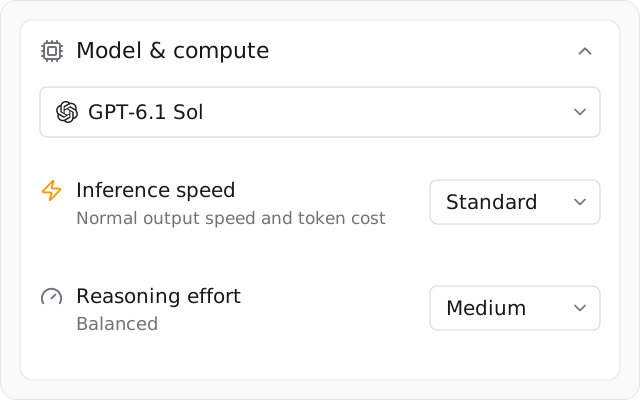
Auto uses Standard speed
Switching from Manual to Auto uses Standard speed. A Fast or Ultrafast preference from your manually selected model does not carry over.
Choose the model for parallel legwork
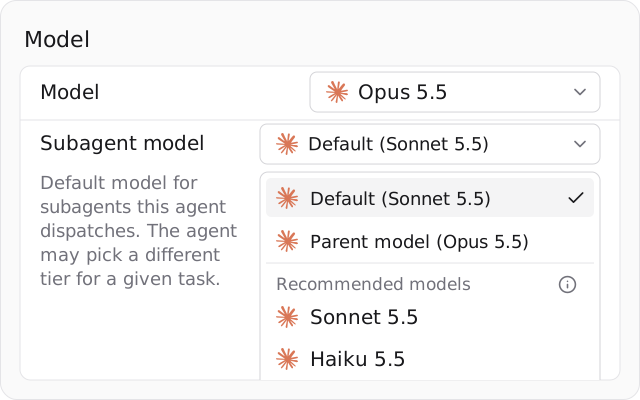
Subagents are short-lived workers that help the parent agent with parallel tasks. The Subagent model setting lets their model differ from the one handling the main conversation.
Choose Parent model when workers should use the same model as the parent, or select an offered worker model suited to the task. For example, routine information gathering may need less capability than the final analysis. Check the model shown beside Default to see what it currently uses; it is not always the parent model.
Use the subagent picker to see supported choices. The main model catalog is a comparison reference, not a list of every model available to subagents.
Set a budget and time allowance for each turn
Open the agent's Limits settings to control how much one response or scheduled task can use. These limits apply to individual turns, not the lifetime of a conversation.
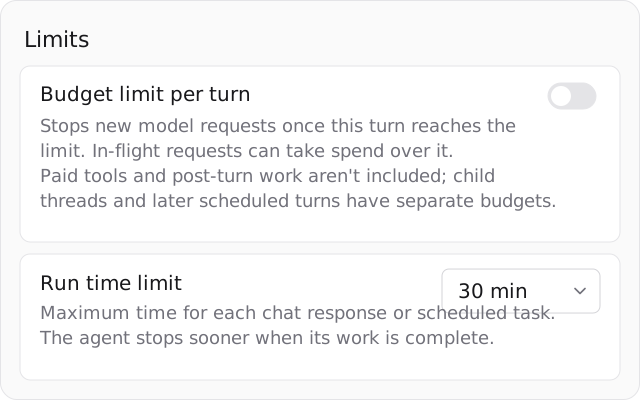
- Budget limit per turn stops new model requests once the turn reaches the limit. Requests already in progress can take spending above it. Paid tools and post-turn work are not included; child threads and later scheduled turns have separate budgets.
- Run time limit sets how long a response or scheduled task can run. Allow more time for sustained research or coding, and less for routine checks. The agent can finish sooner, and later turns can continue the conversation.
Use the Context tab here for the separate setting that controls when older conversation context is summarized.
Make room for longer conversations
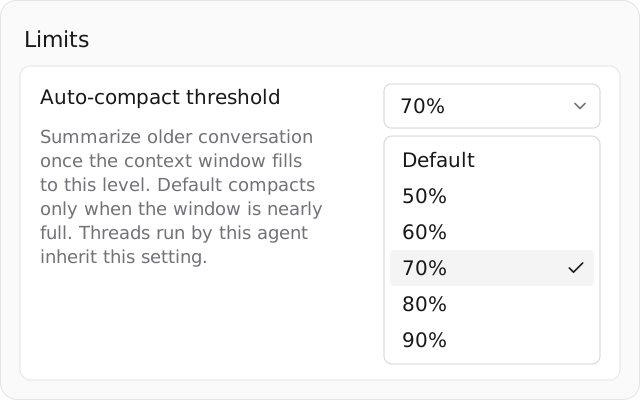
As a conversation grows, Auto-compact threshold controls when Hyperagent summarizes older active context to leave room for more work. Find it under the agent's Limits settings; threads run by that agent inherit the setting.
Choose a lower percentage to compact sooner, or a higher percentage to keep more of the original conversation active before compaction. Default waits until the context window is nearly full. Compaction does not delete the transcript.
For a one-time compaction, choose Compact context now in the model menu or enter /compact. The Thread Context Document keeps the facts, corrections, decisions, and plan tasks recorded for the current job.
Supported model catalog
Compare models here when you want to choose one yourself in Manual. These models run an agent or conversation; media generation tools use separate model choices.
Scroll tables horizontally to compare all columns.
Claude
| Best fit | Context | |||
|---|---|---|---|---|
| Opus 5.5 | Flagship frontier reasoning for complex agentic analysis and technical synthesis | 1M | ||
| Fable 5.1 | Sustained multi-turn workflows and long planning | 1M | ||
| Fable 5 | Highest-capability work when quality matters more than cost | 1M | ||
| Opus 5 | Complex agents, difficult reasoning, and careful final output | 1M | ||
| Opus 4.8 | Earlier flagship for complex work; supports Fast inference | 1M | ||
| Opus 4.7 | Earlier Opus model for complex work | 1M | ||
| Opus 4.6 | Earlier Opus model for complex work | 1M | ||
| Sonnet 5 | Balanced everyday agents at lower cost than Opus | 1M | ||
| Sonnet 4.6 | Earlier balanced Sonnet model for everyday work | 1M | ||
| Haiku 5.5 | Routine text and image-input tasks on compatible workflows | 1M | ||
| Haiku 4.5 | Quick, simple tasks and high-volume lightweight work | 200K |
OpenAI
You can use supported OpenAI models with an existing ChatGPT subscription. Connect your ChatGPT subscription to get started. Available models depend on your plan.
| Best fit | Context | |||
|---|---|---|---|---|
| GPT-6.1 Sol | Near-Astra coding and agentic reasoning at lower cost; powers Sol (Latest) | 950K | ||
| GPT-6 Astra | OpenAI's frontier reasoning model for complex agentic analysis | 950K | ||
| GPT-6 Sol | Workhorse coding and agentic reasoning of prior flagships | 950K | ||
| GPT-6 Luna | Fast, lightweight GPT-6 model for high-volume automated workflows | 950K | ||
| GPT 5.6 Sol | Deep reasoning model with image support | 950K | ||
| GPT 5.6 Terra | Balanced OpenAI option for everyday agents | 950K | ||
| GPT 5.6 Luna | Fast, low-cost OpenAI option | 950K | ||
| GPT 5.5 | Earlier OpenAI flagship | 950K |
Gemini
| Best fit | Context | |||
|---|---|---|---|---|
| 4 Argon | Coding and analysis with text and image inputs | 930K | ||
| 3.8 Flash | High-throughput, fast Google model with 1M context | 1M | ||
| 3.6 Flash | Fast structured execution, monitoring, research loops, and coding | 1M | ||
| 3.5 Flash | Earlier fast Google model for everyday work | 1M |
Meta
| Best fit | Context | |||
|---|---|---|---|---|
| Muse Wonder 1.0 | Coding and multi-step agent work with text and image inputs | 920K | ||
| Muse Spark 1.3 | Meta's open-weights model for high-throughput coding and agentic work | 920K | ||
| Muse Spark 1.1 | Creative agent work | 1M |
Grok
| Best fit | Context | |||
|---|---|---|---|---|
| 4.7 | xAI's frontier model for coding and agents with 128K max output | 370K | ||
| 4.6 | Longer research and analysis ending in decision-ready briefs | 500K | ||
| 4.5 | Conversational agent work | 500K |
Open and specialist models
| Best fit | Context | |||
|---|---|---|---|---|
| Large 4 | Text and image-input tasks on compatible workflows with fixed reasoning | 390K | ||
FAQs
Activity
The agent's own thread history: every run it has done, live and interactive alike, with search and filters, each row opening the thread behind it.
Knowledge access
What an agent can reach and where its new knowledge is saved: read scope, attachment and discovery, save destination, knowledge profiles, and what changes in a workspace.