Other agents
Let one named agent hand specialist work to another, with controls on who can call it and what each agent can do.
You have a support agent that fields customer questions all day, and some of those questions belong with the product specialist down the hall. Instead of answering outside its depth, the support agent hands that question to the specialist, gets an answer back, and finishes the reply.
Other agents is the invocation that lets one named agent start work for another. The caller writes the brief. The specialist runs in its own thread with its own instructions, model, tools, skills, and knowledge, then returns the result.
Your agents can work as a team
Delegation lets a capable generalist bring in a specialist for the part of a job that specialist does best. It takes consent on both sides: the caller has to be allowed to delegate, and the specialist has to be willing to be called.
How delegation works
The caller invokes another agent by name. The agent it calls runs in its own brand-new thread with a fresh context window, does the work with its own prompt, model, tools, skills, and knowledge, then returns a short result. Nothing of the caller's conversation crosses over except the brief the caller writes for the handoff.
The caller invokes an agent by name
During a run, the parent agent calls an allowed specialist by name and sends a brief: the goal, the inputs, and what a finished result looks like.
The specialist runs in its own thread
Hyperagent opens a new thread on the specialist with a clean context window. It carries the specialist's own configuration, not the parent's history.
A card returns to the parent thread
The parent's transcript shows a card with the specialist's summary, a status pill, and a link into the specialist's thread so you can read the full run.
The specialist returns within a depth limit
Delegation is one level deep by default. Eligible named-agent roots can enable nested delegation for one additional level. Self-delegation follows the same depth limit.
The parent's runner pays for the delegated run, and the specialist's budget is clamped to the parent's cap. A delegation can never spend more than the run that started it.
The result card in the parent thread
When a delegated run finishes, the parent thread shows a card for it. The card carries the specialist's name, a summary line of what came back, a status pill, and a View thread link that opens the specialist's own thread.
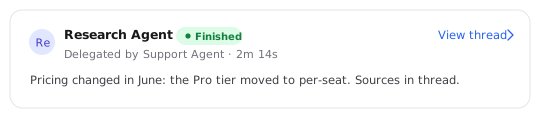
Running
The specialist is still working. The card shows elapsed time while the run is in flight.
Finished
The run completed and the summary and View thread link are ready to read.
Failed
The run started but could not complete. Open the thread to see what went wrong.
Unavailable
The specialist could not be reached to run, so no work happened.
Consent on both sides
Delegation to another agent requires consent on both sides. The caller has to be allowed to delegate, and the agent being called has to permit other agents to invoke it. Neither side alone is enough.
The Autonomy tab enables delegation
On the caller's Autonomy tab, the Agent delegation section turns delegation on and holds the allowlist of agents this one may invoke. A workspace mode instead includes your other agents automatically.
The Invocations tab controls who may call it
On the specialist's Invocations tab, the Other agents row controls who is allowed to invoke it as a sub-agent. Its chat, schedules, and channels are unaffected.
Choose how the agent acts in conversation
Auto runs everything end-to-end. Ask first pauses for approval before sensitive actions. This setting applies while you're in the conversation.
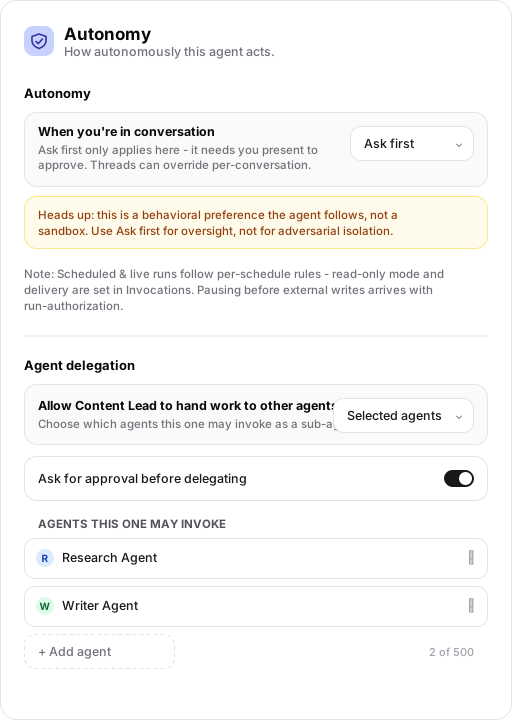
Turn delegation on and pick the audience
Choose Do not delegate, a workspace mode that includes your agents automatically, or Selected agents with an explicit allowlist.
The Ask for approval before delegating toggle decides whether a handoff to another agent waits for your OK. Permitted self-delegation does not need a separate delegation approval.
Name the agents this one may invoke
In Selected agents mode, add each specialist this agent is allowed to call.
Each named agent must also permit callers on its own Invocations tab, or the invocation is refused.
Execution modes: Auto and Ask first
Every agent acts in one of two modes while you are in conversation with it. The mode is set on the Autonomy tab and a thread can override it per-conversation.
Auto
Agent runs everything end-to-end without stopping.
Ask first
Agent pauses for approval before sensitive actions.
Ask first is oversight, not isolation
Heads up: this is a behavioral preference the agent follows, not a sandbox. Use Ask first for oversight, not for adversarial isolation.
Ask first when nobody is watching
Ask first works by pausing for a person to approve. That means it only applies where someone is present to answer. When a run happens on its own, on a surface with no approval to give, there is nobody to unblock the pause. On those surfaces the run either refuses or folds to Auto rather than hanging, so an unattended run never stalls waiting for an approval that can't arrive.
The approval card
When the caller is set to ask for approval before delegating to another agent, a card appears in the parent thread. The specialist runs only after you approve that handoff. Permitted self-delegation is the exception described below.
Self-delegation skips only the handoff approval
When self-delegation is permitted, an agent can start a fresh instance of itself without a separate delegation approval. The child inherits the calling run's action-approval posture, including Ask first. Tool permissions, write restrictions, and delegation depth limits still apply. This is not permission to act without approval or to create an unlimited chain.
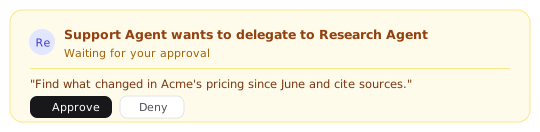
Approve or Deny the delegation
The card shows the specialist's name and the prompt the caller wants to send, with Approve and Deny controls.
The specialist starts running
The card switches to the specialist running, with a View thread link into its work.
No agent was invoked
The card reads Denied - Research Agent was not invoked. and nothing runs.
If a pending delegation is interrupted before it finishes, the card asks you to run it again rather than leaving the request half-started.
Subagents are not delegation
Both can divide work, but they solve different problems.
Delegation calls another agent
The specialist has its own identity, instructions, tools, knowledge, and thread. Use delegation when the work belongs to a durable role you want to configure, trust, and inspect independently.
Subagents add parallel hands
A run may dispatch anonymous workers inside the same thread for short-lived legwork. They have no settings page and disappear when the work ends. The thread's Subagents setting chooses only their model.
Trace a delegated run
A delegated run lives in the specialist's own Activity, the same place all of that agent's threads appear. Each row opens the thread where the work happened. From the parent side, the result card's View thread link takes you straight into that thread, and the run carries provenance back to the parent thread that started it. Each result card links one handoff. If nested delegation is enabled, follow the next card to inspect the additional level.
Trust and tool access
A delegated run is treated as external content for learning purposes. The brief the caller sends arrives in the same trust class as content that came from outside, kept separate from what you yourself wrote, so a specialist doesn't learn from a caller's prompt as if a person had typed it.
A specialist uses its own configured tools. Delegation does not lend it a capability it lacks, and inherited action-approval requirements and write restrictions still apply. If a specialist can't send email on its own, it can't send email just because another agent asked it to.