Live Mode
Keep an agent on a checklist so it watches for changes on its own and only pings you when something needs attention.
You have something that needs watching: a pipeline before the forecast call, an account before renewal week, a launch through the day. Live Mode gives that watch to an agent. It checks on an interval and alerts you only when something needs attention.
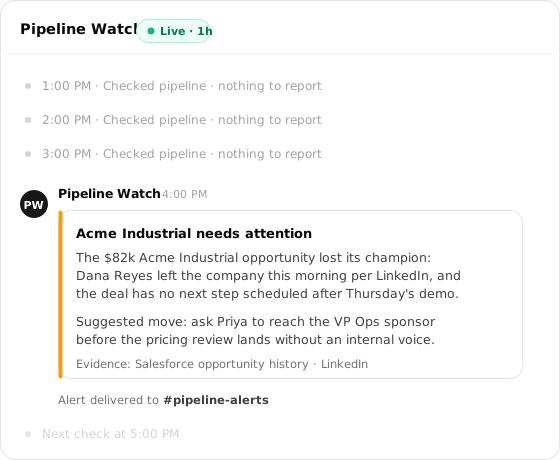
Live Mode turns your agent into a monitor
It checks on an interval, stays silent while everything is fine, and pings you the moment something needs attention.
How Live Mode works
Check. On your cadence, the agent works through the checklist you wrote. Give it a clear alert condition: "Alert when a deal over $50k loses its champion or has no next step" gives the agent a threshold. "Make sure everything is fine" doesn't.
Compare. Every check runs in the same thread, so the agent can compare the latest state with earlier findings. If yesterday's check flagged an enterprise deal with no next step, today's can see whether that risk was resolved.
Alert. An all-clear stays in Run History as nothing to report. A finding goes to your selected channel. If the watch can't run three times in a row, Live Mode pauses it automatically.
Live Mode or a schedule
Live Mode and schedules run on the same machinery, but they handle different jobs.
| Live Mode | Schedule | |
|---|---|---|
| Job | Watch changing work for a finding | Produce a recurring deliverable |
| Output | Alert only when something needs attention | Report on every run |
| Thread | Keep every check in one continuing thread | Start fresh or continue an existing thread |
| Timing | Run on an interval, with a 30-minute minimum | Run on a clock or recurrence, with a 5-minute minimum |
Use a schedule for work such as a Monday report that should arrive every Monday. Use Live Mode when "nothing changed" is a useful result and each check should compare against the ones before it. Choose the full schedule builder when you need a specific wall-clock time or weekly rule.
Set up Live Mode
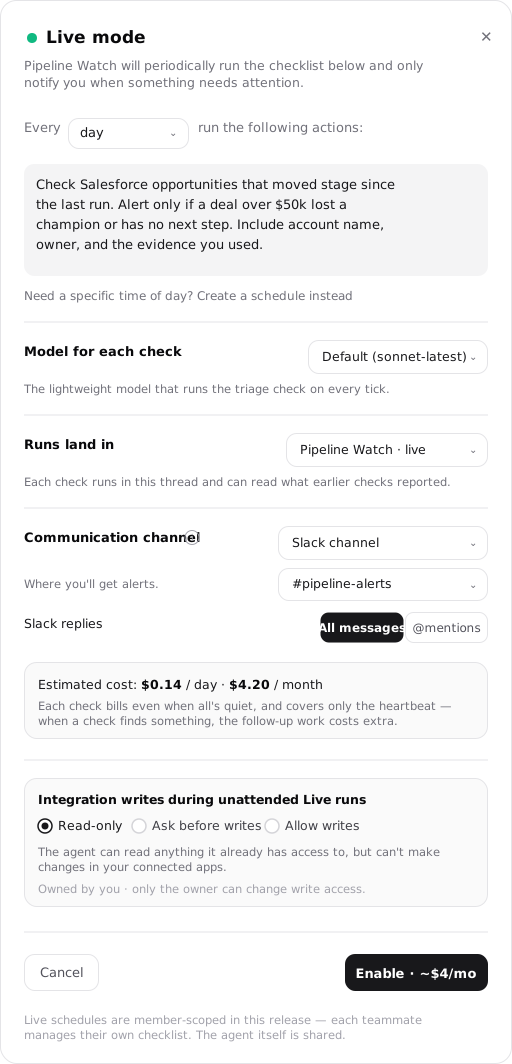
On the agent's Live Mode card, select Set up. Live Mode has its own control rather than using the schedule dialog. The setup covers seven decisions:
How often it checks, and what it checks
Choose 30 minutes, 1, 2, 4, 8, or 12 hours; once a day; or enter a custom number and unit. The 30-minute minimum still applies, and new watches default to daily because every check bills. The checklist tells the agent what to inspect, what changed, and when to alert. Leave it empty and the agent reviews its responsibilities using its default instructions.
A leaner model for the routine check
The heartbeat model runs the lightweight triage on every check, separate from the agent's main model for interactive and follow-up work. The default tracks the latest Sonnet. Many teams keep this routine model lean and reserve a stronger main model for the work a finding triggers.
One thread holds the whole watch
Choose the thread that will hold the watch. Every check runs there and can read earlier findings, which gives the watch continuity. The Live schedule belongs to the agent, so the same watch and thread back the agent wherever it appears.
Where alerts reach you
Thread only keeps the result in the run thread with no external copy. Slack channel, Slack DM, Telegram, and email also send the finding to that destination. For a Slack channel, choose a destination the connected reporting bot is permitted to write to. An explicit write grant can permit delivery when another agent handles inbound responses there. Selecting delivery does not grant new access. The thread always holds the run.
What the watch costs while it's quiet
The preview shows "Estimated cost: $X.XX / day · $X.XX / month" for one heartbeat call per check, including all-clears. Follow-up work after a finding uses the agent's main model and costs extra. The Enable button repeats the monthly figure as "Enable · ~$X/mo".
What it may change while you're away
Read-only is the default: the agent can read connected apps but can't change them. Ask before writes pauses at each attempted change and sends an approval request. Allow writes lets the agent send messages, edit files, and update records on its own. Only the schedule's owner can change this setting.
The cost rides on the button
The primary button reads "Enable · ~$X/mo" so the monthly estimate is the last thing you see before committing. It stays disabled while a Slack destination is unresolved or the chosen heartbeat model can't run on the bound thread.
Run and manage a Live watch
After setup, the Live pill in the thread header is the way back into the watch. A pulsing emerald dot means it is running normally; the pill shows when delivery or checks need attention.
| What you see | What it means |
|---|---|
| Set up Live Mode | No watch configured yet; the chip opens setup. |
| Live · Xh | Running normally, with the cadence shown (for example Live · 1h). |
| Live · check delivery | Running, but a recent alert couldn't be delivered. Check the identity and destination access. |
| Live · check failing | Checks are failing, but the watch hasn't paused yet. |
| Paused · check failed | Auto-paused after repeated failed checks. |
| Paused | You paused it by hand. |
Test it before relying on it. Select Check now to run an immediate check without advancing the interval, so the next scheduled check stays where it was. This confirms the checklist, channel, and delivery before you leave the watch unattended. A Checking now badge appears while the run is in flight, and the button stays disabled until it finishes.
When the watch can't run. A missing integration, failing tool, or unmet prerequisite counts as an error. After three consecutive errors, Live Mode pauses the watch rather than keep billing a broken check and repeatedly alerting you about the same failure.
Only errors count toward the streak. A successful check resets it, and a normal finding never counts as a failure. Resuming clears the streak and starts the watch again from its next check.
The watch follows the agent. The Live pill in any of the agent's threads opens the same watch. An agent can also have schedules, but it can have only one Live watch. Trying to set up another returns This agent already has a live schedule and opens the existing watch.
Integration writes while you're away
A Live watch runs without anyone at the keyboard, so it starts read-only. Most watches never need more; widen access after you have watched the narrower policy succeed.
Read-only
The agent reads anything it already has access to and changes nothing in connected apps.
Ask before writes
The agent pauses before each change and sends you an approval request. Nothing goes out unless you approve it.
Allow writes
The agent sends messages, edits files, and updates records without approval. Use this after the watch has earned that trust.
Only the teammate who created the watch can change its write policy, including on a shared workspace agent.