Webhooks
Trigger an agent with an HTTP POST: configure the prompt and thread, secure the endpoint, and understand the asynchronous response.
Some work should start the moment an event happens somewhere else: a pull request opens, a form is submitted, a CI job fails, or a CRM record changes. A webhook endpoint turns that event into an agent run. The system that saw the event sends an HTTP POST, and the agent starts with your instructions and the payload in hand.
Webhooks let another system start the work
POST a payload to the endpoint URL and the agent runs on it. A shared secret authenticates the caller, and Hyperagent acknowledges the request before the run finishes.
How webhooks work
Another system sends a POST
GitHub, your CRM, a form service, or your own backend sends the event body to a URL created for this agent.
The endpoint checks the caller
Authenticated endpoints require a shared secret in the request header. Public endpoints trade that protection for broader compatibility.
The prompt frames the payload
Your standing prompt tells the agent what to do. Hyperagent appends the raw request body and starts the run in the configured thread.
The request is acknowledged immediately
A successful call returns 202 Accepted with a run ID. The work continues
asynchronously and its result lands in the run's thread.
Create and call a webhook
On the agent's Invocations tab, open Webhook Endpoints. Each endpoint has its own URL, prompt, secret, and thread strategy, so one agent can support several event sources without mixing their configuration.
Create the endpoint
Add an optional name, write the prompt every event should follow, choose a thread strategy, and decide whether the caller must authenticate.
Save the secret
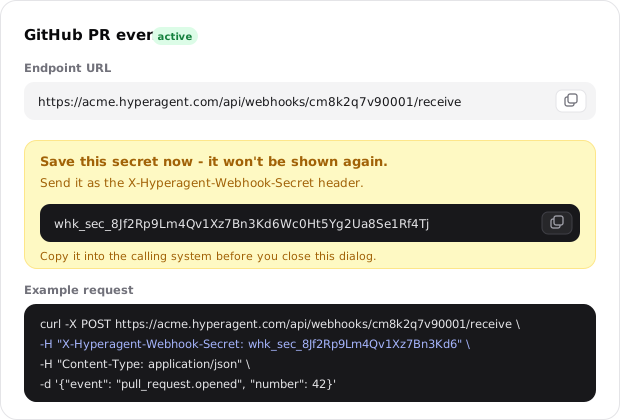
Authenticated endpoints reveal their secret once. Copy it into the calling system before closing the confirmation.
Copy the URL
The endpoint card shows the complete URL and a ready-to-run curl example.
Send a POST
Add the secret header when required, send a body no larger than 1 MB, and treat 202 Accepted as confirmation that the run was queued.
Webhook configuration options
A label for this event source
Optional. The name is visible only to your team and helps distinguish endpoints on the same agent—for example, GitHub PR events or New lead intake.
An agent can have as many endpoints as you need. Each keeps its own URL, secret, prompt, thread strategy, status, and invocation history.
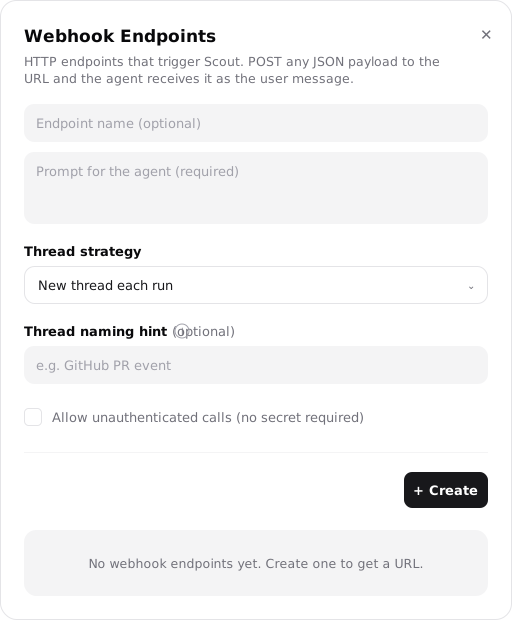
The standing instruction for every call
Required. The payload arrives as raw data; the prompt tells the agent what to do with it. The same instruction applies to every event this endpoint receives.
Example: Triage this GitHub webhook and comment on the PR if the change looks risky.
See how the prompt and raw payload are delivered to the agent.
Where each event becomes work
- New thread each run: Give every event a clean thread with no history from earlier events.
- Continue existing: Append every event to one thread that already belongs to this agent.
Compare both strategies and their naming behavior.
How new webhook threads are named
Optional. This field applies to new-thread mode. Tell the agent how to name each thread from the payload—for example, Name it after the PR number.
Leave it empty to use Webhook: {agentName}.
See when a fresh thread is the right choice.
Whether callers need the secret
Off by default. Leave it off to require the X-Hyperagent-Webhook-Secret header.
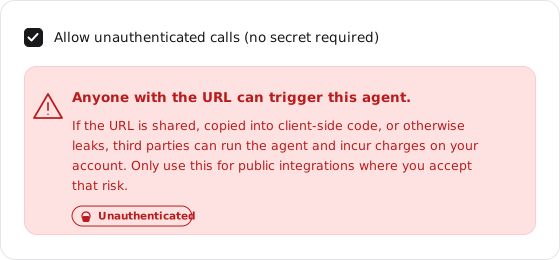
Turning it on lets anyone with the URL trigger the agent and incur charges. Hyperagent applies an earlier anonymous rate limit and lowers the run's trust so memories aren't auto-accepted, but the URL becomes the only access barrier.
Review the security tradeoffs before enabling it.
Detail and Edit dialogs and model overrides
Webhook endpoints feature unified Detail and Edit configuration dialogs matching the standard schedule layout. Under Advanced settings in the endpoint editor, an optional Model picker lets you assign dedicated models to individual webhook endpoints. High-frequency triage webhooks (like CI notifications or lead alerts) can run on fast, low-cost models without changing the agent's main conversational model.
Endpoint URL
Every endpoint accepts one method at one URL:
POST /api/webhooks/{endpointId}/receiveThe endpoint ID is a long random identifier created with the endpoint, which makes the URL impractical to guess. Only POST is accepted. The complete URL appears on the endpoint card with a copy button and curl example.
Secure the endpoint
Authenticated endpoints use a shared secret. The caller sends it in a header, and Hyperagent checks it before creating a run.
Send the secret
curl -X POST https://your-workspace.hyperagent.com/api/webhooks/{endpointId}/receive \
  -H "X-Hyperagent-Webhook-Secret: {secret}" \
  -H "Content-Type: application/json" \
  -d '{"event": "pull_request.opened", "number": 42}'
Hyperagent generates the secret from 32 random bytes when the endpoint is created. The UI shows it once with the warning Save this secret now—it won't be shown again and tells you to send it as X-Hyperagent-Webhook-Secret.
The server stores only a SHA-256 hash, never the original secret. For each call, it hashes the submitted header and uses a timing-safe comparison against the stored value so a caller can't learn the secret from response timing.
The secret is shown exactly once
Copy it into the calling system before closing the dialog. A lost secret can't be recovered; it must be rotated.
Webhook signature verification
In addition to bearer secret headers, webhooks support secret-based HMAC signature verification for third-party providers (such as Stripe, GitHub, and Shopify). Configure your provider's webhook signing secret in the endpoint settings, and Hyperagent verifies the inbound signature before triggering the agent run.
Rotate a secret
Select Rotate secret on the endpoint card to generate a new 32-byte secret. It is shown once, and the old secret stops working immediately. Only the endpoint owner can rotate it. Update the calling system as soon as you rotate.
Rotate when the secret may have leaked or on the schedule required by your security practice.
Understand the security boundary
A shared header secret
Hyperagent verifies that the submitted secret matches. It does not verify an HMAC signature of the request body.
No replay protection
A captured valid request can be sent again and will start another run. There are no timestamps or nonces in the authentication check.
No IP allowlist
Any host with the URL and secret can call the endpoint. Source-IP restrictions aren't part of this authentication model.
This model works when the caller can hold a secret in a header. If your integration requires signed bodies, replay protection, or source-IP restrictions, those checks need to happen before the request reaches this endpoint.
Unauthenticated endpoints
Enable Allow unauthenticated calls (no secret required) only when the caller can't send a custom header and you accept a public endpoint.
Anyone with the URL can run the agent
If the URL is shared, placed in client-side code, or otherwise leaked, third parties can trigger runs and incur charges on your account. Use this only for public integrations where that risk is acceptable.
Hyperagent adds two protections to unauthenticated endpoints:
- A separate pre-parse rate limit rejects excess anonymous calls before the body is read.
- Runs receive lower trust, which suppresses memory auto-accept. Memories proposed during those runs aren't saved automatically. Authenticated calls are treated as owner-facing and don't carry that restriction.
Only the owner can select Add a secret on the endpoint card. Doing so immediately returns the endpoint to header-based authentication.
Rate limits
Two independent sliding windows protect each endpoint. Both default to 60 calls per minute and are keyed to the endpoint, not the caller's IP:
- The invocation limit applies to authenticated and unauthenticated endpoints. It runs after the size check but before a run is created.
- The additional unauthenticated limit applies only when no secret is required. It runs before the body is read, making anonymous floods cheaper to reject.
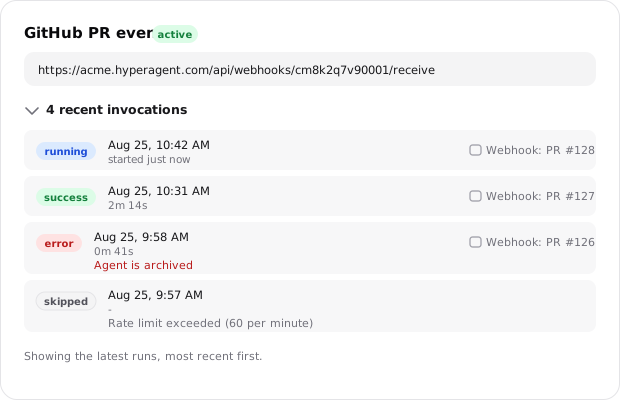
Crossing either window returns 429 with a Retry-After header. The first rejection in a window is also recorded as a skipped invocation in the endpoint's history.
Understand the request and response
Request body
The body can contain any data your caller sends, up to 1 MB. There is no required schema. Hyperagent appends the raw body to the configured prompt inside a boundary the agent can distinguish from your instructions:
{your configured prompt}

<webhook-payload>
{the raw request body}
</webhook-payload>
The request body isn't parsed or validated on the way in; it reaches the agent as text, exactly as sent. Any </webhook-payload> sequence inside the body is neutralized before delivery so incoming data can't close the wrapper and present itself as instructions.
Successful response
A successful request returns immediately with 202 Accepted:
{
  "runId": "clw3x8k2p0001abcd1234wxyz",
  "status": "accepted"
}
The response means the run has been queued, not completed. The run ID identifies it in Recent invocations; it isn't a public polling handle.
Status codes
Every non-202 response explains why the call didn't start a run:
| Code | Meaning |
|---|---|
202 | Accepted. The run is queued; the body contains runId and status: "accepted". |
401 | The secret header is missing on an endpoint that requires it. An unknown endpoint also returns this when no header was sent, so a wrong URL can't be distinguished from a real one. |
403 | The secret is present but wrong, or the endpoint's secret hasn't been generated yet. |
404 | No endpoint with that ID exists, returned when a header was sent. |
413 | The payload is larger than 1 MB. |
422 | The endpoint is paused, or the agent is archived or otherwise unavailable. |
429 | A rate limit was exceeded. The response includes Retry-After. |
503 | Webhook triggering is disabled for the deployment. |
Fire-and-forget delivery
There is no public endpoint for fetching the finished result. The run ID helps the owner find the run in Hyperagent, and the output lives in the run's thread—not in the HTTP response and not somewhere the caller can poll.
Need the response back? Use MCP
If the caller can act as an MCP client and needs the agent's response directly, use the agent's MCP server instead. Keep the webhook when an immediate acknowledgment is enough, and have the agent deliver the outcome another way: comment on the pull request, post to Slack, update your database, or call an API.
Choose a thread strategy
Every webhook run happens in a thread. The strategy decides whether events remain independent or build on the same history.
New thread each run
Each event gets a clean thread with the agent's instructions, skills, and memories but no history from previous events. Use it for independent work, such as triaging each pull request separately.
Continue existing
Every event is appended to one thread you choose, so the agent sees what earlier events left there. The target must already belong to this agent.
New threads are named Webhook: {agentName} by default. Add a Thread naming hint to derive a more useful title from the payload—for example, Name it after the PR number. Leave it empty to keep the default.
Operate and monitor an endpoint
Each endpoint keeps its own configuration and invocation history, so you can debug or pause one integration without affecting the agent's other event sources.
Review Recent invocations
Expand Recent invocations, shown with the current run count on the endpoint card, to see its latest runs, most recent first. This is the first place to look when the caller received 202 but no outcome appeared where expected.
| Field | What it tells you |
|---|---|
| Status | running, success, error, or skipped. |
| Started at | When the run began. |
| Completed at | When it finished, when available. |
| Duration | How long the run took. |
| Error message | Why it failed or was skipped, when a reason exists. |
| Thread | The thread where the run worked and where its complete output lives. |
A skipped invocation means Hyperagent declined to start the run, most often because of a rate limit or because the endpoint owner is no longer in the workspace. An error means the run started and then failed; its thread contains the full context.
Pause, resume, or delete
Pausing preserves the endpoint's URL, secret, configuration, and history while stopping new runs. Calls return 422 with Endpoint is paused. Resume the endpoint when you're ready to accept calls again.
Deleting an endpoint is immediate and permanent. The endpoint and its invocation records are removed, and the URL stops working. Deleting the agent removes all of its endpoints too.
Ownership on workspace agents
Every endpoint has one runtime owner, and its runs use that person's account and billing. All members of a shared agent can see its endpoints, but only the owner can change an endpoint's prompt, thread strategy, or secret.
Endpoints pause when their owner leaves
The next call is skipped with an owner-not-a-member note, and the endpoint
pauses automatically. Another member can activate it to take ownership.
Archiving the agent keeps its endpoints but makes calls return 422 until the
agent is available again.