Manage learning behavior
Decide how much your agent can change on its own: propose and wait for you, save without asking, or nothing at all.
Your agent picks things up as it works. You decide what happens next: it waits for your approval, saves on its own, or lets it go.
Trust is granted per kind of change, not all at once
Let an agent save small facts on its own while changes to its instructions still wait for you. Mixed setups are the normal ones, and no level moves unless you move it.
Set how much it learns
Open your agent and go to its Knowledge tab. The Self-learning section holds one row per kind of change, and each row takes a level.
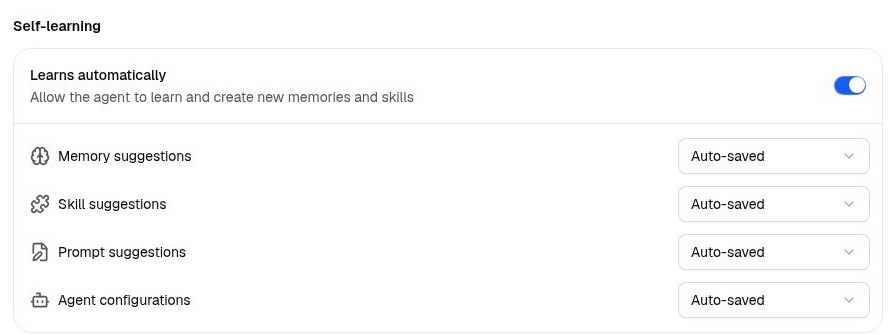
- Suggested proposes and waits. New agents start here.
- Auto-saved skips the approval step, so small, obvious lessons land on their own.
- Off keeps that type out of the agent's hands. You can still ask for one directly.
Raise a type to Auto-saved once the agent has proven itself there. Nothing changes the level but you.
Which level to use
- An agent you use yourself, every day. Memories on Auto-saved. It picks up your standing preferences as it works, and you keep reviewing the changes that reach further.
- An agent your workspace runs. Leave everything at Suggested. Check whether memories save with the agent or to the workspace library. Suggested learning gives a person a chance to review new guidance.
- An agent in a channel you don't control. Curated, the knowledge profile that turns learning off and narrows what it reads. Hyperagent applies it for you the first time an agent joins a Slack channel.
What it can change
Memory suggestions
A fact or preference worth keeping: a threshold you set, how you like a report opened.
Skill suggestions
A method worth repeating. On a workspace agent, the skill belongs to the workspace, so this one always waits for you.
Prompt suggestions
An addition to the agent's instructions, appended below what you wrote.
Agent configurations
The agent editing its own setup: instructions, tools, skills, model, schedules.
Agent configurations is the one row without a Suggested option. A configuration change happens while the agent works, so it arrives as a card in the conversation. Auto-saved tells it not to wait for your click.
Let a Slack channel teach it
By default only you teach your agent. On the same Knowledge tab, just below Thread search, turn on Learn from others in Slack and the channel's members do too.

Worth doing when you trust the room. Even then, nothing from a channel auto-saves, so no one's message becomes standing knowledge without your review.
What never saves without you
Three things stay in your hands whatever the levels say:
- Workspace skills and agent configurations. A skill on a workspace agent, or a configuration change saved into a shared workspace. A shared skill's instructions, scripts, and credentials affect every member at once.
- Anything from outside. Runs that arrive through Slack, email, or a webhook.
- Anything that widens the agent's reach. Keeping a browser session signed in, or letting a schedule write to your connected apps.
Everything held for review waits in one queue. See Manage suggestions.
Undo anything
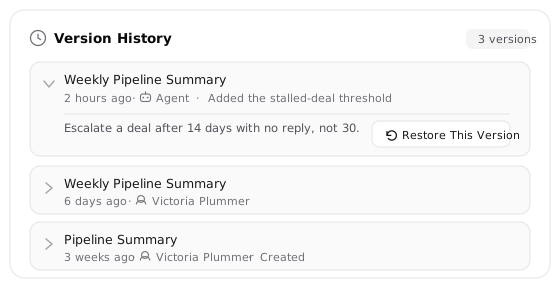
Open any memory or skill and Version History sits at the bottom of its detail page. Each entry says whether you or the agent made the change. Restoring is itself reversible: your current version is saved to the history first. Instructions are safer still, since the agent appends below what you wrote and never over it.