Give feedback to your agent
Teach the agent on purpose instead of waiting for it to notice.
During a thread, something fell short, or landed exactly right, and you want the agent to learn from it. You can respond directly, start a feedback interview, or ask the agent what from the conversation is worth keeping.
Say it once instead of correcting it every week
Tell the agent what was off and it turns your answer into a memory, a method, or a standard it gets scored against. The next run starts from the corrected version.
Four ways to teach your agent
Direct feedback in a thread
Tell the agent what missed the mark and what to change. Use it for immediate, one-off direction while the work is in front of you.
Give feedback
The agent interviews you about the output, then acts on your answer. Use it the moment something matters.
Suggest learnings
The agent reflects on the conversation and proposes what to remember. Use it after a session that went well.
Ask it to look for lessons
A background pass reads the thread and files what it finds for you to review later. Use it when you'd rather skim a list than have a conversation.
Give direct feedback in the thread
When the fix is clear, say it directly in the conversation. Point to what missed the mark, say what should stay, and describe the revision you want. The agent applies that direction to the current thread without starting an interview.
For example:
Keep the research, but rewrite the recommendation for the CFO. Lead with the cash impact, show the assumptions, and keep it to five bullets.Use direct feedback for quick iteration and one-off direction. The correction stays in the thread's working context, but it doesn't automatically become standing knowledge. If the lesson should carry into future runs, choose Give feedback. If the conversation revealed several patterns worth keeping, choose Suggest learnings.
Give feedback when the lesson should last
Direct feedback fixes this output. The interview turns the same correction into something every future run inherits.
Open the actions menu
In the composer, where you type, click the Execute button to open the menu. Under Actions, choose Give feedback.
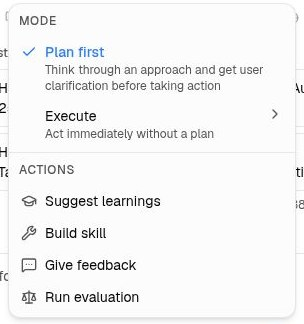
Answer its questions
The agent replies in the thread, opening broad and then probing whatever you raise. Expect it to ask:
- What you expected, and how close it came
- What specifically was missing
- What the ideal version looks like
- How much this dimension matters
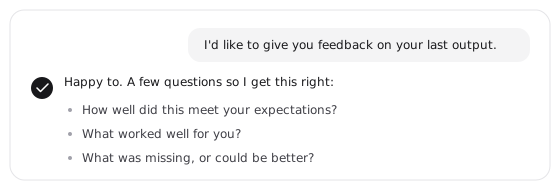
Confirm what it heard
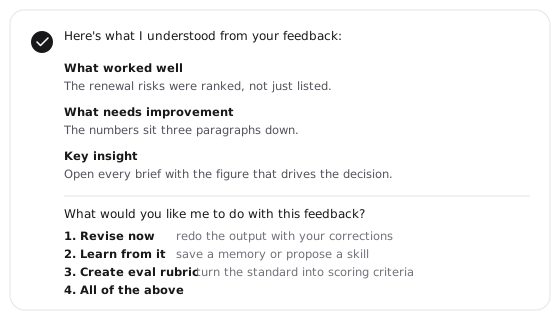
When it has enough, the agent posts a summary: what worked, what needs improvement, and the key insight it took away. Read it and correct anything it misheard, in the thread, before it acts on any of it.
Choose the outcome
In the same message, the agent offers four. Reply with the number you want, or several at once, like "1 and 3":
- Revise now redoes the output with your corrections
- Learn from it saves a memory or proposes a skill
- Create eval rubric turns your standard into scoring criteria
- All of the above runs them in order
A thumbs up or thumbs down on any message opens the same interview, already pointed at that message. Use it when your reaction is about one reply rather than the whole run.
Suggest learnings after a session that went well
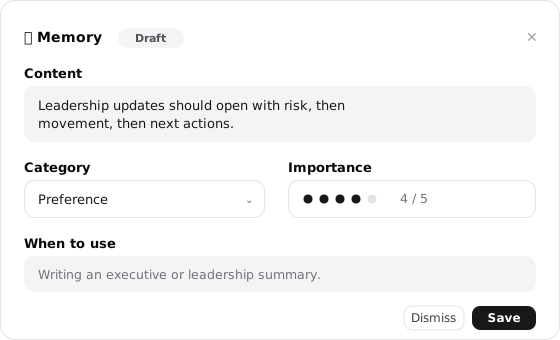
A run that goes right is worth keeping. Open the same Execute menu in the composer and choose Suggest learnings. The agent reads back over the conversation and posts what it should remember as draft cards in the chat, with its reasoning attached.
Every card is yours to shape before it saves:
- Rewrite the content in your own words
- Change a memory's category or importance
- Adjust when the agent should reach for it
- Press Save to persist it immediately, or Dismiss to let it go
Ask it to look for lessons on its own
Suggest learnings has the agent think out loud, in the thread, where you can push back on its reasoning. Sometimes you'd rather not have that conversation. You want the thread read, the lessons found, and a list you can work through later.
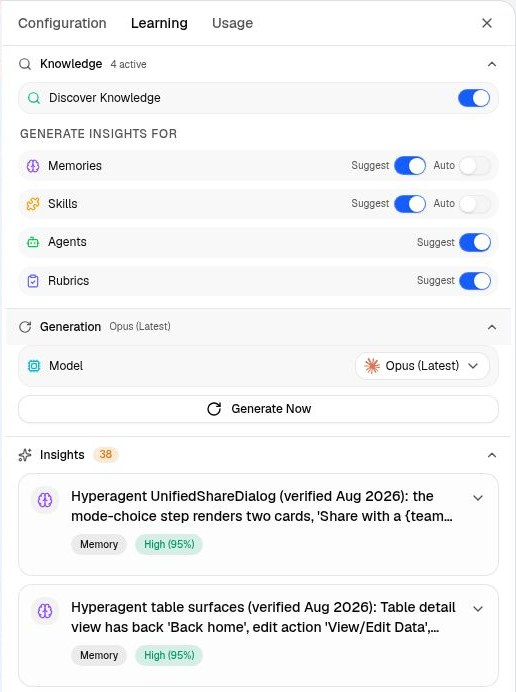
Open the thread's side panel and select the Learning tab, then expand Generation and click Generate Now. A separate pass reads the conversation while you carry on. What it finds appears under Insights in the same panel, and in your Learning queue, each proposal carrying Accept and Dismiss.
Choosing a model
Model in the same section decides which model reads the thread, and it applies to the pass you're about to run, nothing else. Pick a stronger one for a long or subtle conversation, a faster one when you just want the obvious lessons caught.
The choice doesn't carry: the next thread starts at Opus (Latest) again, and the suggestions that appear automatically after a turn always use Opus regardless of what you pick here.
This is the one path where the work happens away from you, so it suits a long thread you'd rather not reread, or any time clearing a queue later beats having the conversation now.
What makes a reaction stick
Whichever action you use, your feedback becomes one of the same kinds of knowledge everything else uses, so future runs find it:
- A correction of fact or preference becomes a memory, recalled whenever the topic comes back
- A better way of doing the job becomes a skill any of your agents can follow
- A standing expectation becomes a prompt refinement, appended below your instructions
- A quality bar becomes a rubric, so the standard is measured rather than argued