Code and files
Analyze data, update many files, work with websites and repositories, and produce finished outputs using a private computer.
Give an agent a folder of exports and ask for one clean dataset. Hand it a website and ask for a new page. Ask it to rename hundreds of files, convert a video, inspect a repository, or package a finished report. Every thread has a private computer capable of doing that work from beginning to end.
None of it requires you to be a coder. The same machinery a developer uses to test a codebase is what a marketer uses to merge twelve campaign exports into one clean sheet, standardize a folder of images, pull the tables out of a stack of PDFs, or turn a two-hour transcript into a formatted report. If you can describe the transformation, the agent writes and runs whatever gets it done, and what you see is the finished files.
Describe the result; the agent handles the technical work
You don't need to write code or specify commands. The agent can choose the right programs, run them, check the result, and return finished files you can open or download.
You also don't have to tell the agent to use the computer. Describe the whole task, however complex, and the agent decides when the work calls for it. For evaluating specific workflows, what follows covers what the machine comes with, what it can connect to, and where its boundaries sit.
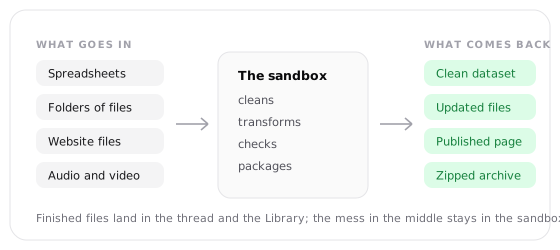
What the sandbox lets an agent do
Run real commands
Write and execute Python, Node.js, shell commands, and existing project scripts. Read the output, diagnose failures, change the approach, and run the work again.
Work with repositories
Clone public repositories, inspect history and diffs, edit files, run the project's checks, and prepare a verified change.
Install what the job needs
Add libraries and command-line packages when the built-in environment isn't enough. Installed dependencies remain available across later turns in the thread.
Process whole sets of files
Search directories, combine exports, convert formats, extract archives, resize or convert media, and create a clean output directory.
Return finished outputs
Package code, reports, datasets, images, audio, video, and archives as files you can open, download, or use in the next step of the work.
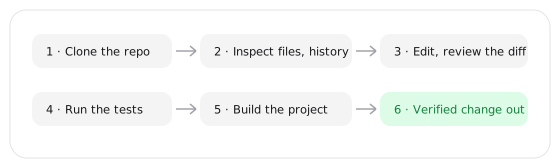
The agent can combine these operations in one job. It might clone a public repository, install its dependencies, change a component, run the test suite, build the project, and return the changed files and verification results.
The machine and its filesystem
Each thread receives its own sandbox. Files created in one turn remain available in later turns, so the agent can build on earlier work instead of recreating its state every time. Package installations persist with those files.
The sandbox may sleep after sitting idle. Waking it can make the first command on a later turn take a little longer, but its files and installed state remain intact.
The sandbox is private to the thread
Another thread doesn't inherit its files or installed packages. Return files as outputs when you need to download them, preserve them in the Library, or use them outside the source thread.
Files worth keeping appear as downloadable cards in the thread and in your Library. Temporary source files, caches, installed packages, and intermediate results can remain inside the sandbox while the agent works. Treat the sandbox as a workbench rather than an archive: anything you should be able to open, share, or recover on its own belongs in an artifact, document, or table, not only on the sandbox filesystem.
What comes installed
The base environment covers common software, data, repository, and media workflows.
| Category | Included |
|---|---|
| Operating system | Linux |
| Runtimes | Node.js 24 and Python 3 |
| Repository and web | git and curl |
| Package managers | npm and pip |
| Search and data | ripgrep (rg) and jq |
| Media | ffmpeg and ffprobe |
| PDFs | Poppler utilities (pdftotext, pdfinfo, pdftoppm) |
| Local rendering | Headless Chrome Stable channel |
| Fonts | Liberation and DejaVu families |
| Python libraries | requests, pandas, numpy, matplotlib, Pillow, beautifulsoup4, openpyxl Normally available |
| Archives | tar, gzip, zip, and xz |
Headless Chrome is the sandbox's own renderer: it opens files and local servers inside the sandbox to screenshot and check them, which the separate Browser tool cannot reach. A Normally available package is installed on a best-effort basis; when one is missing, the agent installs it and continues. Project-specific fonts still get downloaded or bundled per job.
When the task needs another library or CLI, the agent can install it and continue. Ask for a particular tool when the version or implementation matters; otherwise, the agent can choose what fits the job.
Common workflows
Inspect, change, and verify a codebase
The agent can clone a public repository, search it with rg, inspect Git
history, create or edit files, review the diff, and run the repository's own
validation commands.
Git is installed, but the sandbox does not arrive with your Git credentials. Public clones work directly. Authenticated repository access and pushes need an approved integration or credentialed skill.
Don't plan a workflow around SSH
The sandbox can't open an SSH connection or proxy one for another tool. Use HTTPS-based access through an approved integration or API instead.
Use the project's own toolchain
Install dependencies, run linters and tests, compile the project, inspect failures, and repeat until the requested work passes. The agent can preserve logs and build outputs when they are useful for review.
This works for more than application code. The same loop can validate a static site, execute a data pipeline, generate documentation, or run a repository's release scripts.
Transform the source material in place
Parse JSON with jq, search large directories with rg, write Python or
Node.js transformations, combine exports, normalize filenames, and produce
CSV, JSON, text, or other requested files.
Because the filesystem persists across turns, you can review an intermediate result and ask the agent to refine only the remaining problems.
Process outputs at the command line
Use ffmpeg to inspect, convert, trim, combine, or compress supported media.
Extract incoming archives, reorganize their contents, and return the result
as a new zip, tar, or gzip file.
Use a purpose-built command-line tool
A CLI can be more efficient than MCP when the work involves batching many operations, chaining commands, or processing results locally. The agent can install the tool it needs, run it directly in the sandbox, and combine it with files and other commands.
Convert between formats
Use pandoc for Markdown, HTML, Word, and other document
formats, or headless LibreOffice for batch conversion of Word,
PowerPoint, and Excel files.
Query and clean exports
Use duckdb to query CSV, JSON, and Parquet files with SQL,
or csvkit to inspect, filter, clean, and join CSVs.
Extract text or add OCR
Use pdftotext and pdfinfo to inspect PDFs, or
ocrmypdf to make scanned documents searchable.
Convert files in batches
Use magick to resize or convert images,
exiftool to inspect metadata, and ffmpeg for
audio and video.
Work with issues and pull requests
Use gh to inspect repositories, manage issues and pull
requests, and work with releases from the command line.
Copy and synchronize files
Use rclone to move files between supported cloud storage
services after configuring the required account access.
Installing a CLI does not grant account access
A service CLI still needs its normal credentials. Use Custom MCP when the capability, credentials, or governed access is provided through an MCP server instead.
Network access and service boundaries
Code can make outbound HTTP and HTTPS requests. When it reaches a domain that hasn't been approved for the thread, Hyperagent pauses the run and asks before sending the request.
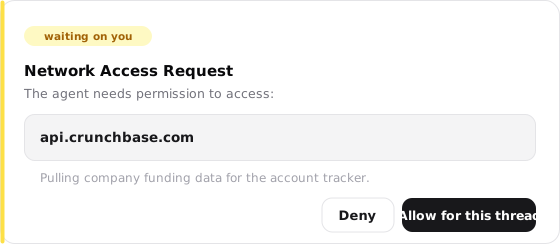
Allow for this thread applies only to that conversation. Another thread begins with its own approvals. Search and Browser use their own access paths; this approval covers requests made by code inside the sandbox.
What the sandbox can connect to
| Connection pattern | Support | What to use |
|---|---|---|
| Outbound HTTP or HTTPS API | Supported | Approve the domain for the thread, then call the API normally. |
| Managed database over HTTPS | Supported | Use the provider's HTTPS API or a native integration. |
| Local web server | Local only | Headless Chrome in the same sandbox can open it for tests; it cannot accept outside traffic. |
| SSH or an SSH proxy | Not supported | Use an HTTPS API, integration, or credentialed skill instead. |
| SMTP, FTP, or raw TCP | Not supported | Send email and move files through an integration or an HTTPS API. |
| Direct database wire protocol | Not supported | Use the database's HTTPS API or native integration instead of a direct PostgreSQL connection. |
| Public inbound traffic | Not supported | Publish with Webpages and slides, or return the built files as thread outputs. |
How the sandbox meets the rest of the platform
The sandbox is one of several environments a run touches, and the boundaries between them are deliberate. Each boundary links to its full story.
Two browsers, two jobs
The sandbox's headless Chrome reaches sandbox files and localhost; the watchable Browser tool reaches neither. To test work in the live browser, publish it first.
Actions come in, tokens don't
An enabled integration gives the run callable actions and their results. The stored OAuth token never enters the sandbox; nothing running here can read or forward it.
Scripts land here, secrets don't
Fetching a credentialed skill copies its scripts into the workspace. The credential stays separate: locked to one host it never enters the sandbox at all, and even script-readable values go only to the credentialed process while it runs.
On disk is not in mind
Files, packages, and repositories sit in the sandbox without occupying the model's context window; a file costs context only when the agent reads it. Big results can stay on disk and be read selectively.
Give durable results the right home
The sandbox is ideal for doing the work and producing files. When a result should remain easy to query or edit across other threads, save it in the structure designed for that job:
Use a table
Keep typed records the agent should query and update over time. Tables can be promoted to an agent or made global and can be exported as CSV or JSON.
Use a document
Keep section-based writing with version history and thread, project, or global scope.
See Documents and tables for their editing, scope, sharing, and version behavior.