Research
How an agent finds things out: web search with a Standard or Exa provider, cited research reports, lookalike discovery, verified datasets, and search across your own threads.
Before an agent acts, it finds things out: what the market looks like, what a page says, what you decided three weeks ago. Research is the group of tools that answer those questions, from a quick lookup to a report a team could circulate, without you gathering anything yourself.
Ask the question; the agent picks the method
You never choose a research tool by name. Ask for a fact and the agent searches; ask for a market picture and it reads many sources into one cited report; mention a past decision and it searches your own threads. Your part is deciding which methods it may reach for.
What research gets you
Answers from the open web
Search finds pages and reads them, so "what changed in their pricing this quarter" comes back with sources, not guesses.
Reports, not link piles
Exa Research reads many sources and synthesizes one structured, cited result. This is the tool behind a real competitive brief or market survey.
More like the one you have
Find Similar takes a URL you already trust and finds pages like it in meaning: competitive sets, lookalike sources, related reading.
Datasets, verified row by row
Exa Websets builds a structured dataset from the web, checking each entry against your criteria. Lead lists and research corpora that arrive in minutes, not instantly.
What you already decided
Thread Search reaches your own past conversations, so an agent picks up work it started weeks ago instead of asking you to repeat it.
Two providers, one decision
Web search runs on one of two providers, and the choice shapes what the agent can do:
- Standard is the built-in web search and page fetch. It handles straightforward lookups well and is the simplest default.
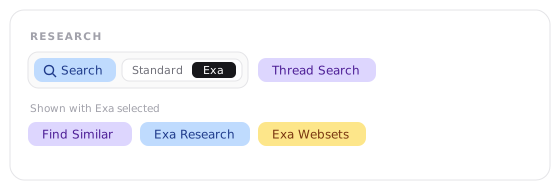
- Exa searches by meaning rather than keywords, which pays off when the query is a concept ("companies doing usage-based pricing for agents") rather than an exact phrase, and it returns cleanly parsed page content instead of raw HTML. Choosing Exa also makes three additional tools available: Find Similar, Exa Research, and Exa Websets.
That's the whole decision: Standard for simple lookup work, Exa when research is the job. In the toolbar, the provider lives on the Search chip itself, and the three Exa tools appear beneath it while Exa is selected.
Reading is part of searching
Finding a page is half the job; the agent also reads what it finds, and on Exa it gets back parsed content that's easier to work with when a page is dense or cluttered. Some pages resist reading: content that only renders in a real browser, or sits behind a filter or a login. For those the agent escalates to the Browser on its own. The dividing line is the one you'd use yourself: reading a public page is research; operating a site is browsing.
Your threads are a research source
Thread Search treats your own history as something the agent can look up: the call you made in another conversation, the analysis a thread produced last month, the context that would otherwise need re-explaining. It sits in the Research group and works on either provider.
One boundary is explicit: thread search works only on threads you own, a standalone web thread or a named agent's run over its own threads. It isn't available on shared-agent runs or externally triggered ones, like inbound email, webhooks, Slack, Telegram, channels, and @mentions, so a run started by an outside event can't read through your other conversations.
Finding images is research too
Searching the web for existing images, as references or seeds for image work, is always available when it's configured for your account, with no chip to switch on. It's separate from generating new images, which draws from a prompt rather than finding what already exists.