Workspaces, Hyperagent for iOS, GPT-6 Astra, and Claude Fable 5.1
Workspaces where your agents work for the whole company, native mobile approvals on iOS, frontier reasoning models, and saved website logins.
September 10, 2026
The biggest change this week is Workspaces. An agent is only useful to a team if the team can find it, run it, and trust the setup behind it. Workspaces gives shared work a proper home. Hyperagent for iOS keeps approvals moving when you leave your desk. New models and saved logins make agents easier to put to work without making them harder to manage.
Workspaces: your agents work for the whole company now
You could already share an agent. Workspaces changes where the shared work lives. Each Workspace has its own agents, threads, skills, memories, activity, and search. Switch into a Workspace and you are working in that context. Personal work stays in Personal.
Members can run the agents they need. Owners and Editors maintain the agents, skills, and approved context behind them. Your team gets the useful part without everyone editing the source. If you have been running an agent for other people, forwarding outputs, or keeping copies from drifting, this is the fix. Learn more in Teams and Workspaces.

Hyperagent for iOS is in the App Store
Hyperagent for iOS, version 1.0.1, is now available for iPhone and iPad on iOS 18.4 or later. Get a push notification when an agent finishes, needs input, or pauses before an external action. Open the alert to review the action, then approve or deny it from your phone.
The app also supports native voice dictation, artifact review, and Smart App Banners in mobile Safari. Open a Hyperagent link on your phone and you can move into the app instead of carrying on in a mobile browser.

GPT-6 Astra and Claude Fable 5.1 are ready for tougher jobs
GPT-6 Astra now powers Latest GPT and is available directly in the model picker. Pick it when the work needs deeper reasoning or a longer tool run. If you already use Latest GPT, there is nothing to change.
Claude Fable 5.1 is also available, with a 1M-token context window and four-times cheaper cache reads for sustained planning and substantial document work. Your agent’s instructions, tools, and memory stay put. Choose the model that suits the job instead of rebuilding the job around the model.
Learn more in Models.
Saved website logins keep browser work moving
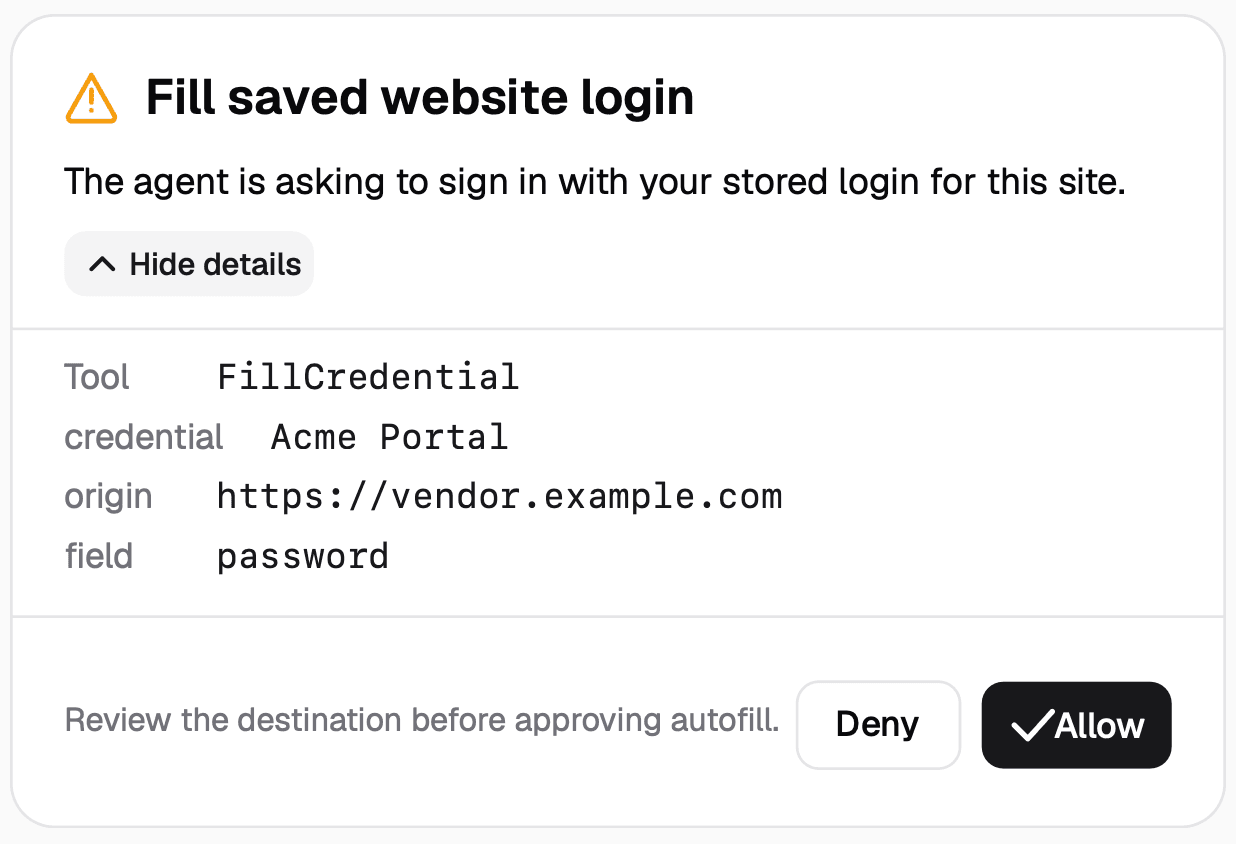
A login page should not end a browser task. Save credentials for approved sites in Settings under Browser Logins, and your agent can fill them when it reaches the right page. Credentials never appear in prompts or conversation transcripts.
Before anything is typed, a timeline approval card shows the destination domain. If it does not match, you see the mismatch before a login is attempted. You can update or remove saved logins whenever you need. The agent gets past the login page without turning your credentials into chat history.
Learn more in Browser.
Additional improvements
- GPT Image 2.5 Flare. Generate quick visual concepts when you want to explore before committing to a direction.
- GPT Image 2.5 Sunburst. Produce high-fidelity visual assets when the job calls for a more finished result.
- Gemini 3.8 Flash. Find this fast model in Latest for responsive, routine agent work.
- GLM 5.3 Flash. Another fast Latest option is available for everyday work that needs a timely answer.
- Ask Hyperagent. Get documentation-grounded product help from the Help menu whenever you need a direct answer.
- Runtime write access enforcement. Email, webhook, and MCP runs now respect the write boundary set for their trigger.