Credits
How credits work, what they pay for, when they expire, and what to do when your balance runs low.
Credits are a USD balance that pays for metered work in Hyperagent. Your plan price is charged up front and becomes credit that agents spend as they run models, generate media, search the web, drive browsers, and take actions through integrations.
Your plan price becomes credit
Pick a monthly plan and you pay its price at the start of each billing period. Every dollar comes back as credit to spend, plus a bonus on top: up to 45 percent extra on bigger plans. On Hyperagent 100, for example, $100 becomes $115 of credit.
Your agents spend that credit as they work. Every run deducts the cost of the models, media, and tools it used, and whatever is left is yours to spend for the rest of the period.
What credits pay for
A run's cost is the sum of the metered work behind it. Each line below is a charge type you will see itemized on the Usage card in Settings → Billing:
Model tokens
Input, output, and cache tokens used by supported models.
Image generation
Images generated during a run.
Video generation
Video seconds generated during a run.
Text-to-speech
Spoken audio generated from text.
Web search
Searches an agent runs to find current information.
Browser sessions
Interactive browser time used to complete a run.
Integration actions
Actions an agent takes through connected services.
Avatar video
Presenter videos created with avatar tools.
What a run costs
No two runs cost the same, because you pay for what the agent actually does rather than a fixed price per message. A quick question that needs one model reply costs little. A deep research task that reads dozens of pages, calls several tools, and generates images costs more.
The Usage card itemizes every charge in a period by provider and model, so you can see exactly what a run spent. Ask an agent to triage an inbox of support requests and the card shows the model tokens for each reply, the web searches behind any escalation research, and the browser sessions used to open linked tickets, each as its own line.
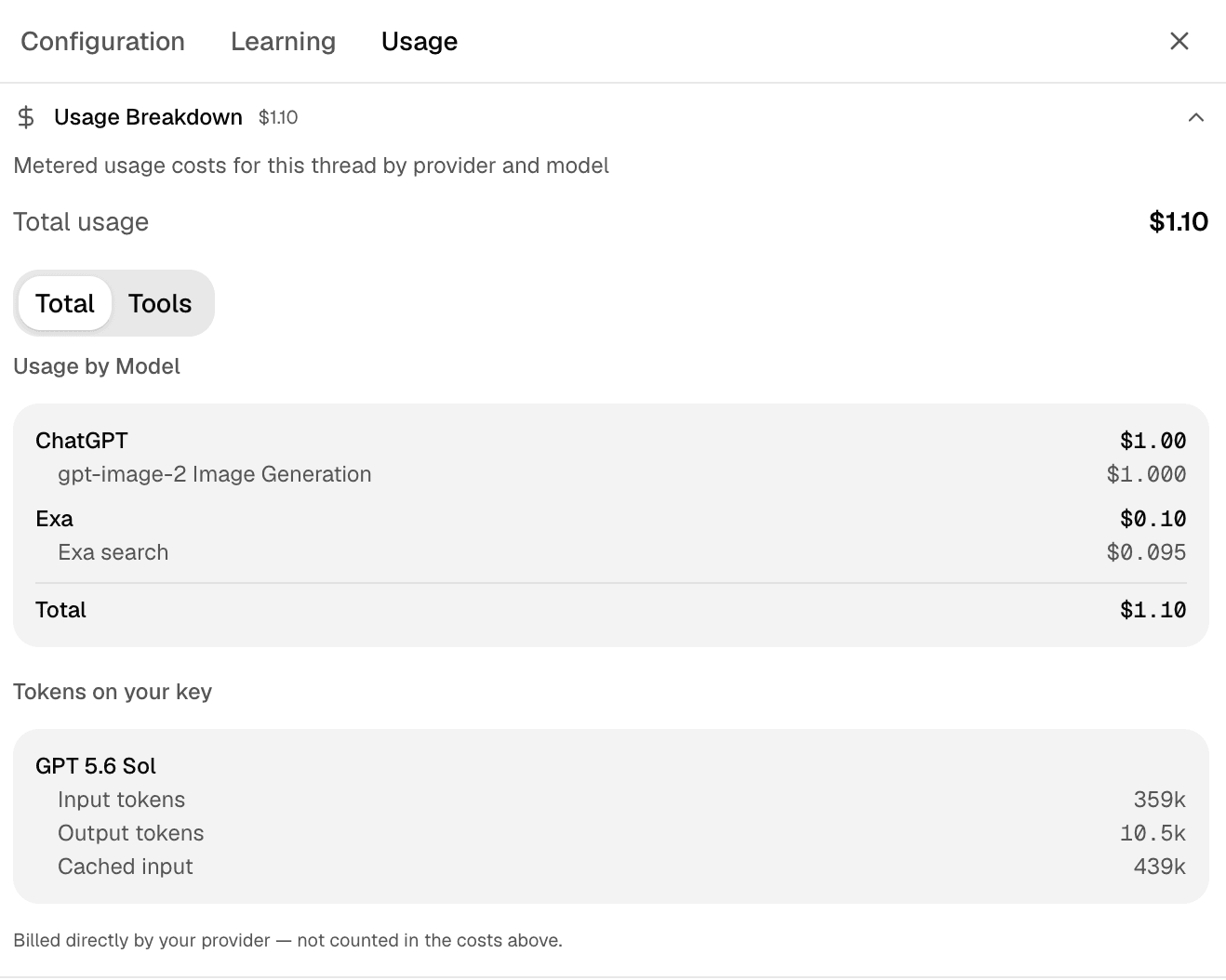
Why costs vary
Three things push a run's cost up or down:
- The model you pick. Faster, smaller models cost less per token than frontier models.
- How much context the run carries. Every message includes the earlier conversation, so longer threads cost more per reply.
- How many tools and media the run uses. Each search, browser session, image, and connected-service action adds its own charge.
To lower spend, pick a lighter model for routine work, start a fresh thread instead of extending a long one, and connect only the tools the task needs. See Control your costs for the full approach.
When credits expire
Each kind of credit follows its own clock.
Expires at the end of the period
The credit from your plan plus its bonus is spent within the billing period it was granted for. Whatever is unused expires when the period ends, and a fresh grant arrives when the next period begins. See Manage your plan for when a period starts and ends.
Lasts 90 days from purchase
Credit you buy as a block or receive through auto-recharge lasts 90 days from the purchase date, so it carries across billing periods until spent.
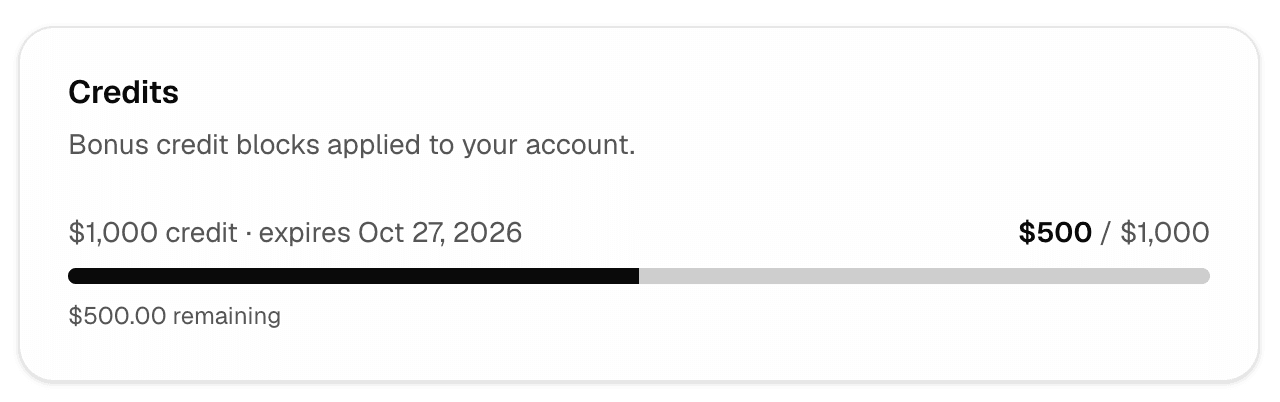
Expire on their listed date
Promotional and referral credits are issued as separate blocks. Each block shows its remaining balance and its own expiry date in Settings → Billing. An unused block is forfeited when that date passes.
When you hold more than one kind of credit, Hyperagent always spends the block with the nearest expiry date first, whether that is a promotional block, a bonus block, or your plan credit. Spending down the soonest-to-expire credit first is what keeps a block from expiring unused while a later one sits idle.
What happens when your balance runs low
By default, your plan price is all you ever pay. When your credit for the period is spent, new runs pause until the next period begins. Nothing extra is billed unless you choose it. There are two ways to add more, and both are opt-in. Both live on the Prepaid credit card in Settings → Billing:
A one-time top-up
Buy credit… opens the purchase dialog. Every dollar buys exactly one dollar of credit, and the block lasts 90 days.
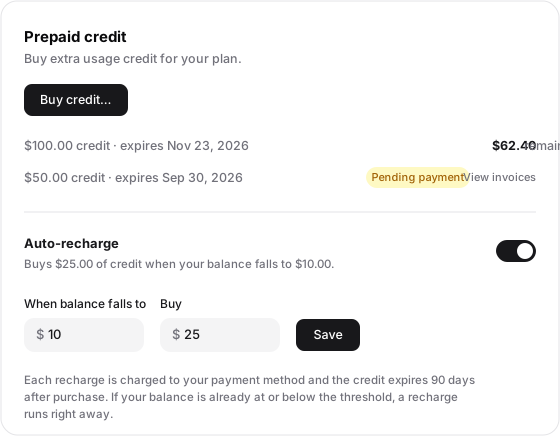
Each block shows its expiry and remaining balance
A block whose payment has not settled shows Pending payment with a link to the invoice, and grants no credit until it clears.
The one setting that charges beyond your plan
Set the threshold and the amount to buy each time. Save replaces the previous settings; the switch turns it off.
Buy a credit block
A credit block is a one-time top-up you buy in Settings → Billing. You choose a whole-dollar amount between $10 and $25,000, and every dollar buys exactly one dollar of credit. Top-ups do not earn the plan bonus.
The charge goes to your saved card right away, and the credit becomes spendable as soon as the payment settles, usually within moments. If the payment fails, the block waits as pending rather than granting credit, and you get a link to the invoice so you can pay it directly.
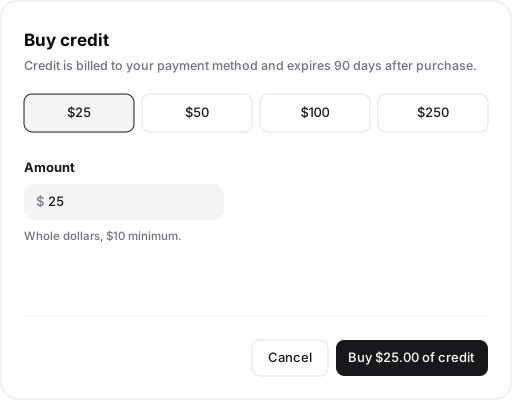
A purchased block lasts 90 days from the day you buy it, so unlike your plan credit it carries across billing periods until it is spent or expires.
Turn on auto-recharge
Auto-recharge keeps your agents running without manual top-ups, and it is the one setting that lets Hyperagent charge your card beyond your plan price, so turn it on deliberately.
You set two numbers in Settings → Billing:
- Threshold: when your balance falls to this amount, a recharge triggers.
- Recharge amount: how much credit is bought each time, charged to your saved card. It must be more than the threshold, so one recharge lifts you clearly out of the trigger zone.
Each recharge buys credit at the same one-to-one rate as a manual block, and each recharged block also lasts 90 days. You have one auto-recharge setting at a time: saving new numbers replaces it, and turning it off removes it. If you turn it on while your balance is already at or below the threshold, the first recharge happens immediately.
Auto-recharge is the right tool for agents that must not stop, like scheduled runs and Live Mode watches. If an agent misbehaves while auto-recharge is on, it can keep buying credit until you intervene, so pair it with a sensible Budget limit per query on expensive agents.
On Shared Billing
Members of a Shared Billing organization cannot buy credit or set up auto-recharge themselves. The organization's Owner manages billing, so ask them to top up or configure auto-recharge. See Shared Billing.
Legacy usage caps and extra billing applied to retired plans
The earlier included-usage, cost-cap, and extra-billing behavior belonged to Pay As You Go and the older subscription plans, which are being retired. If you are moving off one of those plans, see Pricing changes for what changes and when.
Sharing credits through Shared Billing
Credits belong to a billing account. Separate personal accounts do not combine balances, so each person's usage is paid from their own plan and credits.
Shared Billing is the exception. An eligible Owner can move invited members onto one organization balance that covers their usage. See Shared Billing before enabling it.
Check your balance and usage
Open Settings → Billing to see your current balance, account-level usage for the current billing period, your plan and promotional credit blocks, and their expiry dates. Use Command Center to compare total cost across agents. To inspect one agent's usage for the billing period by model, service, thread, or run, open Observability → Usage on that agent's configuration page. For one thread's metered costs and ChatGPT-subscription usage, open the thread's Usage tab. See Usage and invoices.