Manage your plan
How to upgrade, downgrade, or cancel, when each change takes effect, how to manage your card, and what happens to the rest of a paid period.
When a plan change takes effect depends on the direction
Upgrades apply immediately for a prorated charge. Downgrades and cancellations take effect at the end of your current billing period, so you keep what you paid for until then.
You change your plan and manage your payment method from Settings → Billing. Each change takes effect at a different point in your paid period, and card actions follow their own rules.
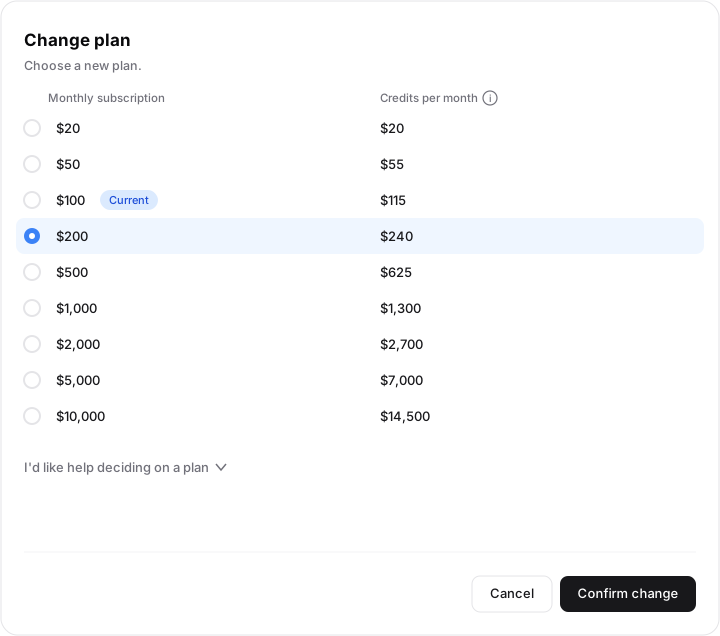
Upgrade
Upgrading to a higher plan takes effect immediately. Hyperagent charges the prorated difference for the rest of the current period, and your new plan's larger credit becomes available right away.
Open Settings → Billing
Go to the Billing section of Settings.
Choose the higher plan
Select the plan you want to move to.
Confirm the change
You keep your existing billing date. The only immediate charge is the prorated difference between your old plan and the new one for the days remaining in the period.
Downgrade
Downgrading to a lower plan is scheduled for the end of your current billing period. You keep your current plan and its full credit until the period ends. Nothing is taken back mid-period. When the period rolls, you move to the lower plan and its smaller credit.
If you change your mind before the period ends, you can move back to the higher plan and the scheduled downgrade does not take effect.
Cancel
Cancelling always takes effect at the end of the current billing period. You keep full access until the period ends, and no further charge is taken after the period closes.
When changes take effect
Whether a change happens now or later comes down to your billing period, the window your current plan is billing for. Your period is anchored to the day you first subscribed, so it renews on that same date each cycle rather than on the first of the calendar month.
That anchor is why a downgrade or cancellation lands on a specific day: it takes effect when the current period ends, whenever that falls for you. An upgrade is the exception. Because you pay the prorated difference for it, an upgrade changes your plan mid-period while the period itself keeps the same anchor date.
The remainder of a paid period is never cut short. Whether you downgrade or cancel, you keep your current plan and credits until the period ends. There is no self-serve refund for unused time; contact Support if you believe you are owed one. If an agent errored or looped and consumed credits unexpectedly, share the thread link and roughly how many credits were used so Support can review it.
Annual plans are no longer offered
Annual plans have been retired. If you are still on one, you keep your current annual terms through the end of your already-paid term, and your credits still refresh each period. At the end of the term the subscription moves to the matching monthly plan. See Pricing changes (August 2026) for the full migration.
This same period is also the window your usage and invoices describe. See Usage and invoices for reading the numbers.
Add or replace a card
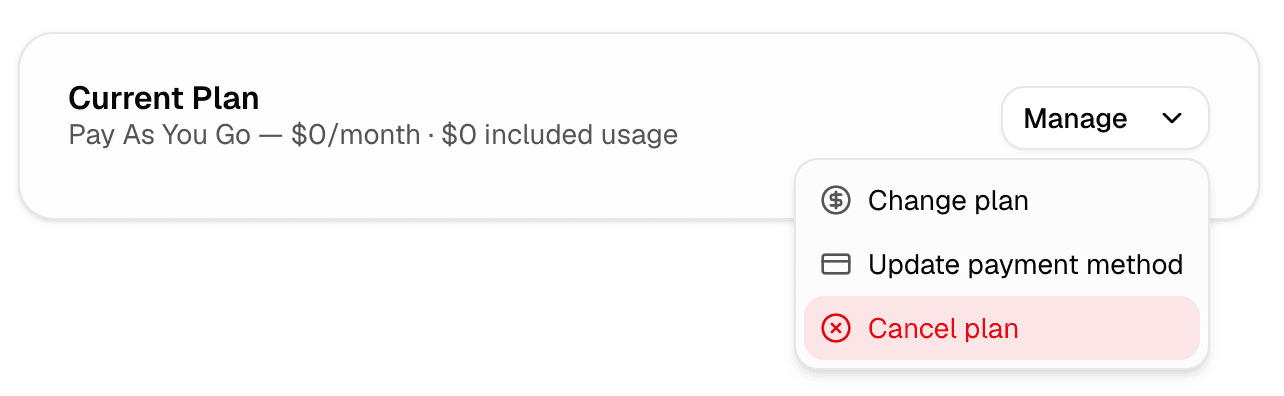
You add a payment method when you subscribe to a paid plan, and Hyperagent saves it for future billing through the secure payment flow. To use a different card later, replace it from Settings → Billing: open your current plan's Manage menu, choose Update payment method, and save the new card. Updating your card does not change your plan or your billing date.
Remove a card
There is no way to remove a card while a subscription is active, and that is intentional: an active paid plan always needs a valid card on file so the next charge can go through. The supported action is to replace the card, not remove it. To stop the card from being charged again, cancel the plan instead.
Use this path for each goal:
- Want to use a different card: replace it from Settings → Billing.
- Want to stop being charged: cancel the plan and keep access until the period ends.
- Want the card deleted because the subscription is already cancelled: the card stops being charged at the end of the paid period; contact Support to remove it from the payment record. If you still have an active subscription, cancel it first.
FAQs
Connect your ChatGPT subscription
Use your ChatGPT subscription to run supported GPT models in Hyperagent. Connect your account and choose what happens when you reach a usage limit.
Billing and credits
How credits, billing periods, plan changes, and shared billing work, and where to find every live number in the product.