Start working with Hyperagent for free
Start working with Hyperagent for free. See what's included, check your usage, and know when your allowance resets.
Research your next customer, compare suppliers, or explore a new market. Hyperagent can search the web, browse websites, and organize the findings. No paid subscription is required.
Your free allowance gets you started
Use supported models and tools to put Hyperagent to work. Daily, weekly, and monthly limits apply, and you can check your usage and reset times in Settings → Billing.
Ready to try it? Start your first thread and tell Hyperagent what you want to get done.
What your allowance covers
Start with the free allowance for everyday work. A paid plan adds more control, tools, and automation options.
| What you can do | Free | Paid |
|---|---|---|
| Low-cost models chosen for your task | Included | Included |
| Web research and browsing | Included | Included |
| Image search | Included | Included |
| Scheduled tasks | Up to once a day per schedule | More frequent schedules |
| Live Mode | One agent, up to once an hour | Multiple agents, more frequent checks |
| Choose a specific model | Not included | Choose from available models |
| Generate images, video, and audio | Not included | Uses paid credit |
| Transcription and live voice | Not included | Uses paid credit |
Hyperagent can choose low-cost models such as Claude Sonnet 5.5, GPT-6 Luna, and DeepSeek V4.1 Flash for your tasks. Paid plans also include a free allowance; model choices and automation settings depend on your plan. Compare paid plans.
How to use your free allowance
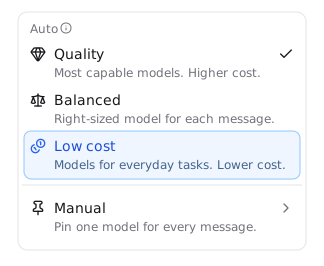
Open the model picker
Open a conversation and select the model picker beside the message box.
Choose Low cost
Under Auto, choose Low cost.
Give Hyperagent a task
Describe what you want done and send your message. Hyperagent chooses a model and uses your free allowance for included work.
Check your model selection
Choosing a specific model does not use the free allowance, and your existing model choice does not change automatically.
Check your usage
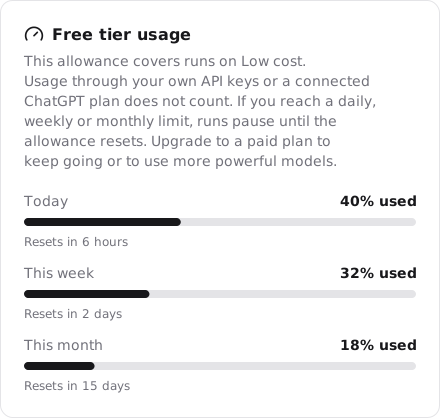
Open Settings → Billing and find Free tier usage. Each meter shows the percentage you've used and its next reset time:
- Today resets every day at midnight UTC.
- This week resets on Monday at midnight UTC.
- This month resets on the first day of the month at midnight UTC.
The same work counts toward all three limits. A daily reset clears today's usage, but your weekly and monthly totals still include earlier work. You can reach one of those limits even when today's meter has room left.
When you reach a limit
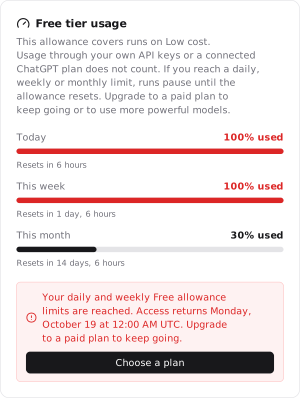
Without a paid plan, work that uses the allowance pauses when you reach a daily, weekly, or monthly limit. The notice tells you when you can continue.
Wait for the reset to keep working for free, or select Choose a plan in the notice to add a paid plan. You can also upgrade from Settings → Billing. See Plans for the options.
Example: two limits reached
If you've reached both the daily and weekly limits, tomorrow's daily reset alone won't restore access. Both limits must reset. Follow the time in the notice. It accounts for all the limits you've reached.
Free allowance on a paid plan
With Auto → Low cost selected:
- If you reach an allowance limit, work on this setting continues using paid credit until the allowance resets.
- If your paid credit runs out, you can still use any free allowance that remains, unless a payment problem or account restriction prevents it.