Autonomy
Understand what an agent can do on its own, what needs your approval, and what its access policy blocks.
An email assistant can prepare replies in Gmail without sending them. Another assistant can send replies, but only after you approve each one. Autonomy lets you decide how much of the job an agent can complete on its own.
Delegate the work without giving up every decision
An access policy sets rules for actions such as saving a draft, sending an email, or updating a record. You decide which actions the agent can complete, which need approval, and which it must not take.
Autonomy describes how much an agent can do without asking you. An access policy records the rules for actions through its integrations.
Scout
- Job
- Prepare email replies for your review.
- Rule
- Only write drafts, never send emails from Gmail.
- Permission
- Save drafts when the policy check allows them.
Beacon
- Job
- Prepare follow-up messages.
- Rule
- Ask before sending Gmail messages.
- Permission
- Ask you to approve each send before it proceeds.
Similar tools, different permissions
Scout prepares email drafts but cannot send them through the named Gmail actions. Beacon prepares follow-up messages and asks before sending. These illustrative agents have similar tools, but different permissions.
What determines whether an agent can act
Three things determine whether an agent can take an action:
- Instructions tell the agent what to do, such as preparing email replies for your review.
- Integration access provides authentication to an external account and the scopes someone authorized the agent to use. To act on that account, the agent must first have an integration set up with the required scopes.
- Access policy checks whether the agent can perform the action under the conditions you have set, including whether it needs your approval.
An access policy turns your boundaries into rules for specific actions. A rule can depend on who receives a message, what it contains, or whether the agent is running unattended. For example, you can let an agent save email drafts while requiring approval before it sends a message to a customer. The policy checks the proposed action against these rules before it proceeds.
Permission levels
Permission levels determine how much control you keep over an action: delegate it to the agent, review it before it happens, or block it. An access policy can assign different levels to different actions within the same integration, so you can allow draft preparation while requiring approval to send.
Allow
The agent can complete the action without asking you when the policy conditions and integration access permit it.
Ask
The action pauses for your approval. The agent can proceed only after you approve it.
Deny
The action is blocked. Approval cannot override an explicit denial.
WithholdsManaged by Hyperagent
Existing or migrated policies may show Withholds. It preserves the write restriction for that type of run. As with Ask, a narrower Allow rule does not release the hold.
Withholds does not request approval by itself on unattended runs. Keep existing write_limited_default values when editing JSON; use the three permissions above for new rules.
How access policies check actions
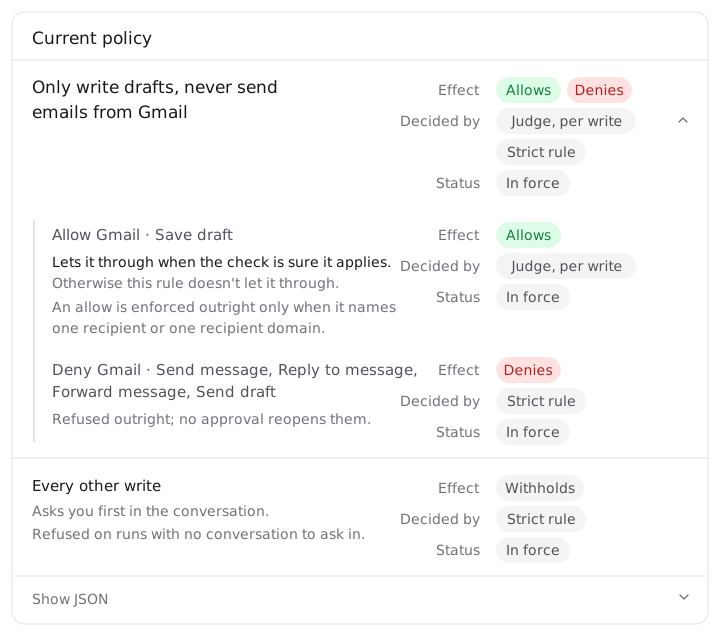
Access policies use two kinds of check: Strict rule for conditions that can be checked directly, and Judge, per write for conditions that require interpreting an action's content. A write is an action that saves, sends, or changes data. A single policy can use both kinds of check.
Hyperagent checks the proposed action before allowing it to proceed. In the policy view, Decided by shows which kind of check applies to each part of a rule.
Strict rule
Hyperagent checks the action against explicit conditions, such as a named action, a supported email recipient, or a run type. A strict denial blocks the action even if you offer to approve it.
Judge, per write
A separate language-model check reviews the proposed action and its inputs against your rule, such as whether a message promises a price. Each action gets its own check. The judgment can be uncertain or wrong.
One policy, both kinds of check
This example policy uses both kinds of check. Save draft uses judgment for each draft. Send message, Reply to message, Forward message, and Send draft use strict denials. “Never send” covers those named native Gmail actions, including sending an existing draft.
How Judge, per write works
Hyperagent runs this check separately from the agent doing the work:
- Review the request: A language model receives the rule's wording and condition, the proposed tool action, and its inputs, such as an email's recipients and body or the fields being changed.
- Check the condition: The model determines whether that specific action meets the rule's condition. For example, does the request fetch existing notes, or change them?
- Apply the permission: Hyperagent uses that result to apply the rule's Allow, Ask, or Deny permission alongside other applicable rules and account restrictions.
For app-based connections, this check also runs for searches and reads. Each request is checked on its own.
What happens when no rule decides an action
Every other write is the default
When no rule decides an integration write, Every other write is the policy's default: Hyperagent asks for approval in a conversation where someone can respond. Without an available approval path, the action is blocked. Set an explicit write permission for unattended work you want the agent to complete on its own.
Existing agents may still use the old Auto or Ask first controls until you migrate their settings.
Start by deciding whether writes may proceed or need approval in conversations, scheduled work, and other run types you use. Then add restrictions for particular apps or actions. An app-specific Allow does not cancel a run-type Ask for the run type.
Before delegating unattended work, check that your rules show In force, then try an action you want to allow and one you want to block.
Current limits
- Bundle installs: A bundle cannot install an agent that carries a policy. Publishing an individual Marketplace listing can work when Hyperagent can convert its policy for installation.
- Team duplication: Policy-governed agent items are skipped; the rest of the team can still duplicate. Other agent-copy workflows depend on whether Hyperagent can carry the rules safely.
- Missing judge verdict: If the checker cannot return a usable answer, Hyperagent holds the action when that answer is needed to decide its permission. An uncertain condition is different: that rule does not apply, and other rules or the default decide.
Set up or migrate an access policy
Control your agent’s actions
Choose write permissions by run type, then add restrictions for specific apps or actions.
Access policy JSON
Look up the policy schema, run filters, and exact native action names.
Migrate an agent
Review an existing agent's saved permissions and turn them into policy rules.