Autowiki
Keep customer history, project decisions and operating rules in pages your agents can use in later work.
A repeat customer question can depend on several earlier conversations. You need the problem, the agreement and any action still outstanding. Autowiki brings eligible knowledge into linked pages that people can inspect and agents can consult in later work.
Dreaming is the background process that maintains those pages. It reads eligible threads, saved memories and documents in the workspace, then creates or updates the wiki. A page can hold a customer's current terms, the decision behind a project change, or the rules for a recurring process.
Keep a reference for the next piece of work
Autowiki preserves useful context beyond the conversation where it arose. Your agent can consult that reference instead of reconstructing the history each time.
Autowiki is in beta. To start a wiki and check its first pages, follow Set up and use Autowiki.
What a wiki page keeps
A page brings related knowledge together, rather than saving each sentence as a separate note. It has a title, summary, linked pages, sources and version history. Pages can describe people, customers, products, projects, systems, processes and policies.
The distinction from other knowledge is the job each kind does:
Memories
Memories keep standing facts, preferences and corrections. They can contribute to a wiki page and remain useful as separate records.
Documents
Documents hold source material or authored work, such as a care guide or proposal. A wiki can cite them without replacing them.
Skills
Skills describe how to do a job. A wiki page can explain a business process, while a skill gives the agent a method to follow.
Threads
Threads keep the conversation and work for a request. Autowiki draws useful knowledge from eligible work into a reference for later requests.
Example: a settled customer complaint
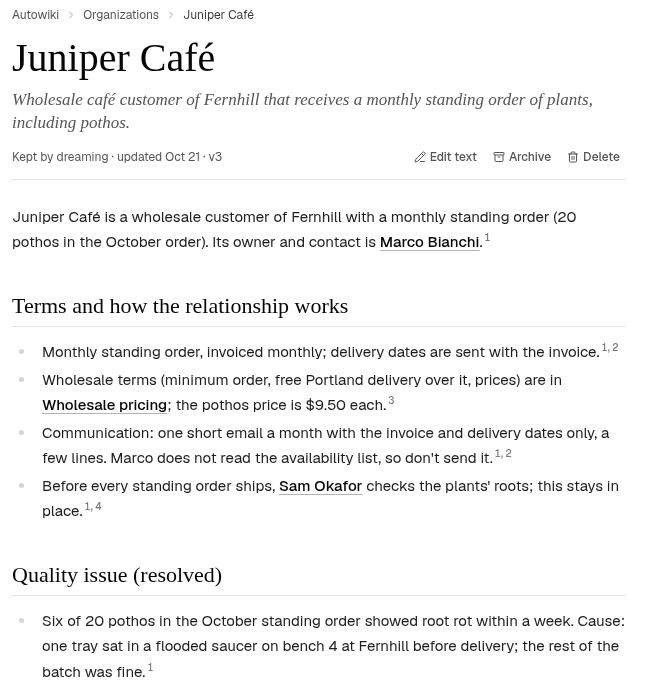
The Juniper Café page brings together its standing order, the agreed remedy for a complaint, the settled status and a root-check procedure for future orders. An agent preparing for the next customer conversation can begin from that history.

Sources
Dreaming works within the selected workspace. It draws from the work and reference material you keep there:
Threads
Eligible threads contribute the conversations, decisions and findings from your work with agents.
Saved memories
Saved memories contribute lasting facts, preferences and corrections within the relevant workspace or agent's knowledge.
Documents
Documents contribute reference material and revisions, such as a policy, project brief or customer guide.
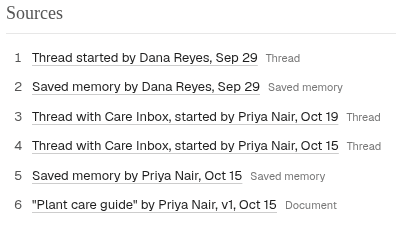
An agent's learning settings and where the material belongs affect what contributes. A customer page can bring an agreed term from a thread together with a saved preference and a reference document.
How pages stay current
The first build starts with saved memories, then processes the recent activity window you choose. Daily dreaming reviews later activity and updates the pages, so the reference develops as the work continues.
Daily dreaming
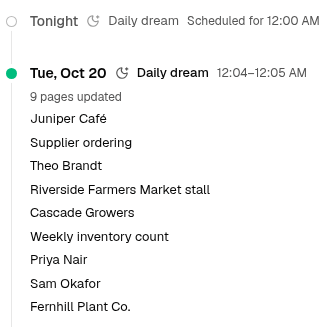
Background maintenance reviews recent activity daily. Owners and Editors can also request an incremental dream to catch up on activity.
Your corrections
Requested corrections save without waiting for the next dream. Owners and Editors can edit a page or ask an agent to update it.
History shows which pages each dream created or updated. If you pause daily dreaming, the pages remain available for you and your agents to use.
Who can use the knowledge
There are two choices to make: where the knowledge belongs, and who should be able to maintain it. Your agents also have their own knowledge settings, so you can give each one the context its work needs.
Your Personal wiki
Personal keeps your wiki separate from the team's. You manage it yourself, and your agents use the pages their knowledge settings allow.
Your team's wiki
Workspace members can read shared pages and browse pages kept for its agents. Use this home for customer history, policies and decisions the team needs together.
What your workspace role lets you do
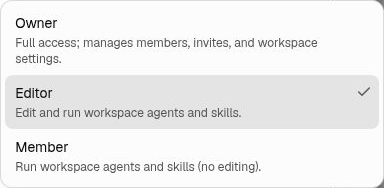
In Personal, you have owner access. In a shared workspace, the same Owner, Editor and Member roles you use elsewhere in Hyperagent apply to Autowiki.
Member
Members read the wiki and use workspace agents. They do not edit its pages or change daily dreaming.
Editor
Editors correct pages and can archive or restore them. They can request a dream while daily dreaming is on.
Owner
Owners maintain pages and manage the workspace's members. They also turn daily dreaming on or off.
The same roles apply when an agent makes a page change for you. Members can use an agent's answer. Owners and Editors can also correct the wiki pages it uses.
Workspace roles
Use this action lookup for shared work. In Personal, you have owner access.
| Action | Owner | Editor | Member |
|---|---|---|---|
| Read pages and history | Yes | Yes | Yes |
| Correct, archive and restore pages | Yes | Yes | No |
| Turn daily dreaming on or off | Yes | No | No |
| Request a dream or stop active work | Yes | Yes | No |
| Permanently delete one page | Yes | No | No |
| Wipe the whole wiki | Yes | Yes | No |
What your agents can use
An agent's knowledge settings are a separate choice from your teammates' roles. An agent can use the pages kept for it and the shared pages its settings allow. Another agent's pages do not automatically become part of its knowledge.
Give agents shared context when several should work from the same customer history or policies. Keep specialist context with the agent when it mainly applies to that role. Check the agent's knowledge settings when you want it to use more shared context.

For setup, page corrections and daily dreaming controls, use Set up and use Autowiki.
Inspect, correct and retire pages
Sources and version history let you examine how a page developed. History distinguishes dream-written updates from your team's edits, so you can see what changed and who changed it.
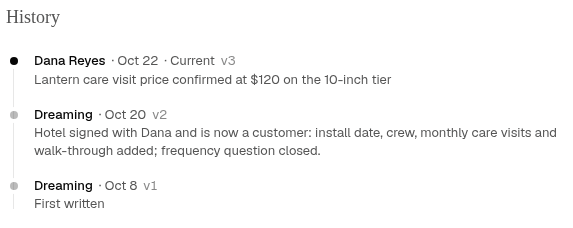
Edit a page when terms change or a summary needs correction. You can also ask an agent to update it on your behalf. Archive a page when it is no longer relevant, then restore it if you need it again. See Set up and use Autowiki for the steps and page-management controls.